Crucial BX500 SATA SSD (240GB-4TB)
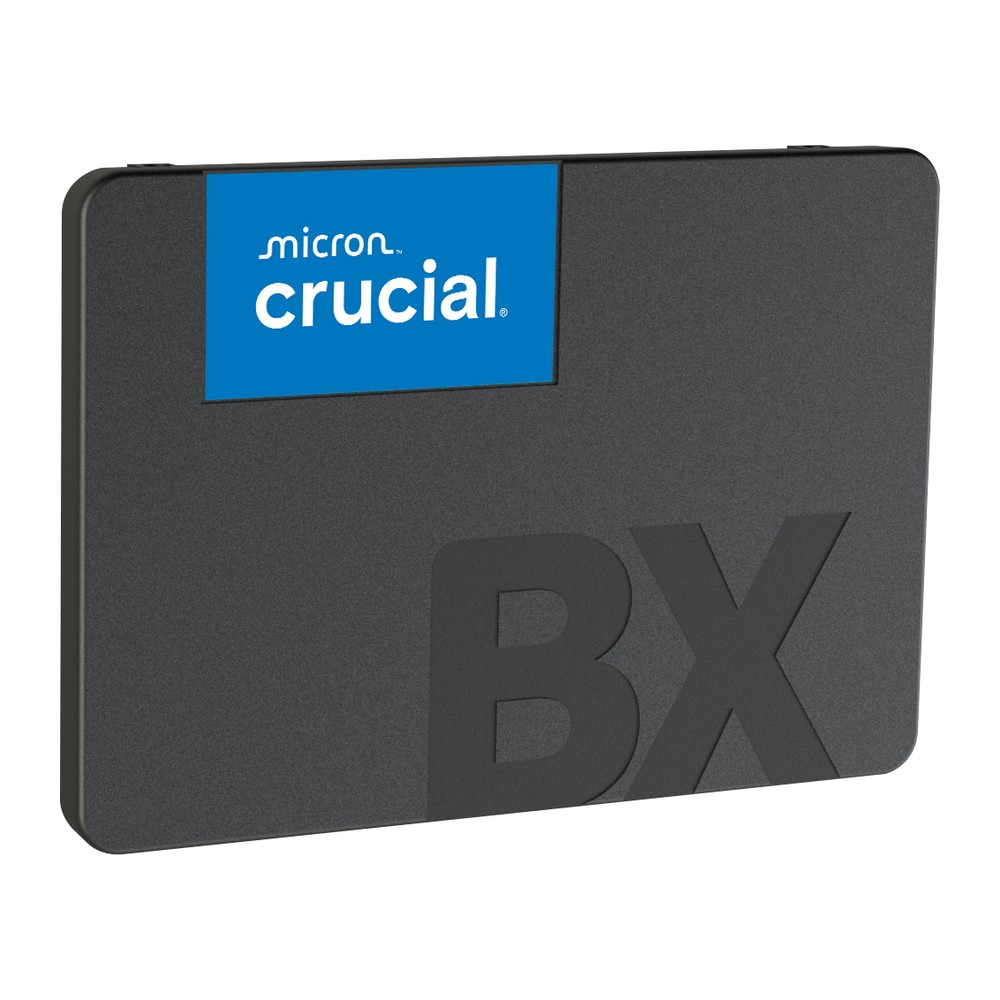
An entry-level 2.5-inch SATA SSD in 240 GB to 4 TB, rated at up to 540/500 MB/s, with up to 1,000 TBW and a three-year limited warranty.
Full Specification Sheet
| Type | Internal SSD, SATA (client) |
|---|---|
| Interface | SATA 6 Gb/s |
| Form Factor | 2.5-inch, 7 mm |
| Capacities | 240 GB, 480 GB, 1 TB, 2 TB, 4 TB |
| Sequential Read / Write | Up to 540 / 500 MB/s (all capacities) |
| Endurance (TBW) | 80 TB (240 GB), 120 TB (480 GB), 360 TB (1 TB), 720 TB (2 TB), 1,000 TB (4 TB) |
| Data Protection | Redundant Array of Independent NAND (RAIN) |
| Dimensions / Weight | 3.95 x 2.75 x 0.275 in (about 100 x 70 x 7 mm), 2.46 oz (about 70 g) |
| Part Numbers | CT240BX500SSD1, CT480BX500SSD1, CT1000BX500SSD1, CT2000BX500SSD1, CT4000BX500SSD1 |
| Warranty | 3-year limited |
The Crucial BX500 is the basic SATA solid-state drive in Crucial's range, positioned as the simplest way to replace a hard disk in an existing laptop or desktop. It comes in the standard 2.5-inch, 7-millimetre format with a SATA 6 Gb/s interface and is rated at up to 540 MB/s for sequential reads and 500 MB/s for sequential writes. The product flyer we rely on lists five capacities from 240 GB to 4 TB. This page summarises that official document. We have not tested the drive, and we publish no prices or benchmark results of our own.
Format and compatibility
The BX500 is a 2.5-inch drive with a height of 7 millimetres. The flyer gives its dimensions in inches, 3.95 by 2.75 by 0.275, which is about 100 by 70 by 7 millimetres, and a weight of 2.46 ounces, roughly 70 grams. It connects with the same SATA data and power plugs as a notebook hard disk, so it drops into nearly any laptop with a 2.5-inch bay and, with a SATA cable and power lead, into any desktop. Crucial describes the installation as plug and play: place the drive in the storage bay, connect the SATA cable from the motherboard and attach power from the power supply unit.
Performance
Every capacity is rated identically, at up to 540 MB/s for sequential reads and 500 MB/s for sequential writes. According to the flyer's footnote, the figures are typical values measured with IOMeter at a queue depth of 32 with the write cache enabled and the drive in a fresh, out-of-the-box state. They are close to the limit of the SATA interface and, for sequential reading, more than three times what a typical 5,400 or 7,200 rpm hard disk achieves. The larger practical gain over a hard disk is in access time: an SSD has no heads to move and reaches any file almost instantly, which shortens start-up, program launches and searches. Our guide SSD vs HDD: do you still need a hard drive? goes into the comparison.
The flyer does not publish random read and write figures in IOPS, and it does not describe how the drive behaves during long sustained writes. Entry-level SSDs commonly rely on a fast write buffer and slow down once it is full, but since Crucial gives no figures for the BX500, we make no specific claim here.
Endurance and warranty
Endurance is stated in total bytes written: 80 TB for the 240 GB model, 120 TB for 480 GB, 360 TB for 1 TB, 720 TB for 2 TB and 1,000 TB for 4 TB. Related to capacity, the ratings are uneven. The 1 TB and 2 TB models are rated for 360 full drive writes, the 240 GB model for about 333, and the 480 GB and 4 TB models for 250. For ordinary home and office use, where a computer may write 10 to 30 GB per day, all of these correspond to many years of service. The limited warranty runs for three years, shorter than the five years common on mid-range and premium drives. Our article TBW endurance ratings explained shows how to translate such figures into daily use.
Data protection features
The flyer highlights Redundant Array of Independent NAND, abbreviated RAIN. This feature stores parity information across the flash components inside the drive, in a way that Crucial compares to how RAID works across several hard disks, so that data can be reconstructed if a part of the flash fails. The document also points out the general durability advantage of solid-state storage: without moving parts, the drive is less likely to be damaged by a drop or by wear of mechanical components.
What is not specified
Several details that are often of interest are absent from the flyer. It does not state the type of NAND flash, the controller, or whether the drive has a DRAM cache. It gives no mean time to failure, no power consumption values, no operating temperature range and no information about hardware encryption. We therefore leave these fields empty instead of assuming values, and buyers for whom such points matter, in particular encryption, should check the current documentation for the exact part number.
How it compares in our database
In our storage section, the BX500 competes most directly with the Kingston A400, another entry-level SATA drive with a three-year warranty; the page BX500 vs A400 sets their specifications next to each other. The Crucial family reaches further up in capacity, to 4 TB. A step above both is the Samsung 870 EVO, which documents TLC flash, a DRAM cache, hardware encryption and a five-year warranty.
Who it suits
The BX500 is intended for people who want to give an ageing computer a new lease of life at low cost, or who need inexpensive solid-state capacity for programs, documents and media. It is a reasonable boot drive for an office or family PC and a simple upgrade for a laptop that still has a hard disk. Users with heavier demands, such as frequent large file transfers, video editing or virtual machines, should look at drives with published random performance, a DRAM cache and a longer warranty.
Choosing a capacity
For a system drive, 480 GB is a practical minimum today, since the operating system, updates and common applications quickly occupy more than 100 GB, and an SSD performs best with some free space. The 1 TB and 2 TB versions have the best endurance ratings relative to their size. The 4 TB model is attractive as a replacement for a large hard disk in a quiet PC or media computer, where its rating of 1,000 TBW is ample for data that is mostly read.
Installation tips
Before swapping a system drive, the existing installation can be copied with cloning software, provided the data in use fits on the new SSD. In a laptop, the drive usually sits behind a bottom cover and is held by a small caddy that must be moved to the new drive. In a desktop case with only 3.5-inch bays, an adapter bracket is needed. Connect the drive to a SATA 6 Gb/s port and make sure the controller is set to AHCI mode.
What the flyer does not say
In addition to the points above, the flyer gives no release date and notes that not all capacities were available at initial launch. Prices vary by country, retailer and capacity and are not listed on this page.