Kingston A400 SATA SSD (240GB-960GB)
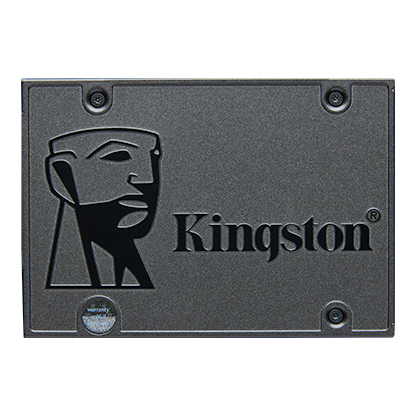
Kingston's entry-level 2.5-inch SATA SSD in 240 GB, 480 GB and 960 GB, rated up to 500 MB/s read and 450 MB/s write, with up to 300 TBW and a three-year warranty.
Full Specification Sheet
| Type | Internal SSD, client (desktop and notebook) |
|---|---|
| Form Factor | 2.5-inch, 7 mm |
| Interface | SATA Rev. 3.0 (6Gb/s), backwards compatible with SATA Rev. 2.0 (3Gb/s) |
| Capacities | 240 GB, 480 GB, 960 GB |
| NAND | 3D NAND |
| Sequential Read / Write (ATTO) | 500 / 350 MB/s (240 GB), 500 / 450 MB/s (480 GB, 960 GB) |
| Endurance (TBW) | 80 TB (240 GB), 160 TB (480 GB), 300 TB (960 GB) |
| Power | 0.195 W idle, 0.279 W average, 0.642 W max read, 1.535 W max write |
| MTBF | 2 million hours |
| Dimensions / Weight | 100.0 x 69.9 x 7.0 mm, 41 g (240-480 GB), 41.9 g (960 GB) |
| Operating Temperature | 0 to 70 C |
| Warranty | 3-year limited |
| Model Numbers | SA400S37/240G, SA400S37/480G, SA400S37/960G |
The Kingston A400 is one of the most widely sold budget SSDs: a 2.5-inch drive on the SATA interface, aimed at people who want to replace the mechanical hard drive in an older desktop or laptop without changing anything else in the machine. Kingston currently lists three capacities, 240 GB, 480 GB and 960 GB, and rates all of them at up to 500 MB/s read, with write speeds of 350 MB/s for the smallest model and 450 MB/s for the two larger ones. This page goes through the figures in Kingston's specification sheet and explains what they mean in practice. It contains no benchmarks of our own and no price, and anything the manufacturer does not publish, such as the controller model, is simply left out.
Interface and form factor
The A400 uses SATA Rev. 3.0 at 6 Gb/s and remains backwards compatible with SATA Rev. 2.0 at 3 Gb/s, so it can be fitted to computers that are ten or more years old, although an older SATA 2 port will cap its throughput at roughly half. The 2.5-inch case is 100.0 by 69.9 by 7.0 millimetres, which matches the standard 7 mm height of laptop drive bays; desktops with only 3.5-inch bays need a simple adapter bracket. The drive weighs about 41 grams, or 41.9 grams for the 960 GB model. Retail listings also show older variants, including a 120 GB capacity and an M.2 2280 SATA version sold as SA400M8, but the current Kingston page covers the 2.5-inch SA400S37 line only. For the difference between SATA and NVMe drives in the M.2 slot, see our M.2 vs SATA SSD guide.
Speed by capacity
Kingston quotes its speeds as baseline performance measured with ATTO, a sequential transfer test. All three capacities reach up to 500 MB/s in reads. Writes are 350 MB/s on the 240 GB drive and 450 MB/s on the 480 GB and 960 GB models. These numbers sit close to the practical ceiling of the SATA 6 Gb/s interface, which after protocol overhead tops out at around 550 to 600 MB/s. The manufacturer claims the A400 is ten times faster than a traditional hard drive, a statement based on its own comparison conditions; the improvement users notice most is not peak throughput but the near-instant access time of flash memory, which shortens boot times and application launches.
Kingston does not publish random 4K IOPS figures for the A400 on the current page, so we cannot compare it on that metric with drives such as the Kingston SSDNow mS200 or with NVMe models.
Endurance
Endurance is expressed as total bytes written (TBW): 80 TB for 240 GB, 160 TB for 480 GB and 300 TB for 960 GB. To put that in daily terms, 160 TB over the three-year warranty period works out to roughly 146 GB written every day, far beyond what a typical home or office PC writes. Kingston rates the mean time between failures at 2 million hours. Both numbers are statistical design values rather than guarantees for an individual drive. Our explainer on SSD endurance and TBW ratings covers how these figures are calculated and why they matter less for light use.
Kingston states clearly that the A400 is designed for desktop and notebook workloads and is not intended for server environments. Running it as a cache drive or in a busy NAS would push it outside its intended use.
Power and temperature
Power draw is low, as expected from a SATA drive without a high-performance controller: 0.195 W at idle, 0.279 W on average, 0.642 W maximum while reading and 1.535 W maximum while writing. That makes the A400 a reasonable option for older laptops where battery life matters. The operating temperature range is 0 to 70 °C, and storage temperature is -40 to 85 °C. Vibration tolerance is 2.17G peak (7 to 800 Hz) while operating and 20G peak (10 to 2,000 Hz) when not operating. Because flash memory has no moving parts, Kingston points out that it is more resistant to shock and vibration than a mechanical drive, which matters in portable computers.
Warranty and support
The A400 carries a limited three-year warranty with free technical support. That is shorter than the five years offered on Kingston's own KC600 and on many mid-range SSDs from other brands, and it reflects the A400's position as an entry-level product. Kingston also provides its SSD Manager software for firmware updates and health monitoring on its other SATA drives; the A400 page lists the software among its resources.
How it fits in our database
Among the drives in our storage section, the A400 is the most basic internal SSD. Compared with a 3.5-inch hard drive such as the Seagate BarraCuda 500GB 7200 RPM, it offers much faster access but less capacity per unit of money. Compared with NVMe drives such as the Samsung 990 EVO, it is far slower in sequential transfers, but it works in machines that have no M.2 slot at all. That is its main reason to exist: it brings SSD responsiveness to systems that can only take a SATA drive.
Choosing a capacity
Since the 480 GB model is faster at writing than the 240 GB version and has double the endurance, it is the more balanced choice for a system drive. The 240 GB model is enough for an operating system and a handful of applications but fills quickly once games, photo libraries or large updates are added. The 960 GB version suits people who want to replace a hard drive completely and keep all their files on solid-state storage. In every case, leaving some free space helps an SSD maintain its write performance over time.
What the page does not say
Kingston does not name the controller or the type of 3D NAND cells used, and it does not state whether the drive has a DRAM cache. Components in budget SSDs can change between production batches without a change of model number, which is common across the industry. The page also gives no random-access figures and no price. Prices vary by country and retailer and are not listed here. Any test results you see elsewhere refer to specific samples and may not reflect every batch.