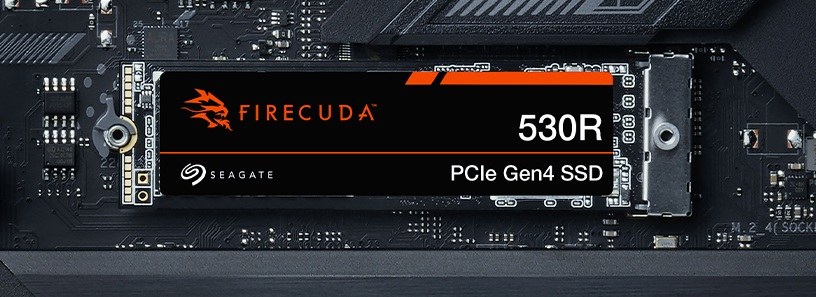
Seagate FireCuda 530R NVMe SSD (1TB-4TB)
A PCIe Gen4 x4 NVMe 1.4 SSD in M.2 2280 with 3D TLC, 1 TB to 4 TB, up to 7,400 MB/s reads and 1.3 million IOPS, up to 5,050 TBW and a five-year warranty with data recovery services.
Full Specification Sheet
| Type | Internal SSD, NVMe (client) |
|---|---|
| Interface | PCIe Gen4 x4, NVMe 1.4 |
| Form Factor | M.2 2280-D2 |
| Capacities | 1 TB, 2 TB, 4 TB |
| NAND | 3D TLC |
| Sequential Read | Up to 7,400 MB/s (all capacities) |
| Sequential Write | Up to 7,000 MB/s (1 TB), 6,900 MB/s (2 TB), 6,800 MB/s (4 TB) |
| Random Read / Write (4KB QD32 T16) | Up to 1,300,000 / 1,300,000 IOPS |
| Endurance (TBW) | 1,100 TB (1 TB), 2,400 TB (2 TB), 5,050 TB (4 TB) |
| Active Power (average) | 8.3 W (1 TB), 8.6 W (2 TB), 8.9 W (4 TB) |
| Idle Power PS3 (average) | 22 mW (1 TB), 28 mW (2 TB), 29 mW (4 TB) |
| Low Power L1.2 | Under 5 mW |
| Operating Temperature | 0 to 70 C (internal) |
| Non-Operating Temperature | -40 to 85 C |
| Shock (non-operating, 0.5 ms) | 1,500 G |
| Dimensions | 80.85 x 22.15 mm; 2.23 mm high (1 TB), 3.58 mm (2 TB and 4 TB) |
| Weight | 7.3 g (1 TB), 8.8 g (2 TB), 9.2 g (4 TB) |
| MTBF | 1,800,000 hours |
| Model Numbers | ZP1000GM30063, ZP2000GM30063, ZP4000GM30063 |
| Warranty | 5-year limited, plus 3 years of Rescue Data Recovery Services (not in all countries) |
The Seagate FireCuda 530R is the company's PCIe Gen4 gaming and creator SSD, described by Seagate as the latest evolution of its best-selling Gen4 drive. It uses 3D TLC flash in the M.2 2280 format and comes in 1 TB, 2 TB and 4 TB versions. The headline figures are up to 7,400 MB/s for sequential reads, up to 1.3 million random IOPS and an endurance rating that reaches 5,050 terabytes written on the largest model. This page summarises the manufacturer's data sheet. We have not tested the drive, and we publish no prices or measurements of our own.
Interface and compatibility
The drive uses four lanes of PCIe Gen4 with the NVMe 1.4 protocol. Seagate lists an M.2 slot with M key and a PCIe Gen4 x4 interface as the system requirement and states backward compatibility with PCIe Gen3, where the older link limits the achievable speed. Supported operating systems are Windows 11, Windows 10 and Linux. Seagate also says the drive supports Microsoft DirectStorage, which lets compatible games stream assets from fast NVMe storage more efficiently, and markets the slim 2280 format for gaming PCs and handheld gaming computers.
Speed by capacity
Sequential reads are rated at up to 7,400 MB/s for every capacity. Sequential writes are slightly higher on the smaller models: up to 7,000 MB/s for 1 TB, 6,900 MB/s for 2 TB and 6,800 MB/s for 4 TB. Random performance is listed at up to 1,300,000 IOPS for both reads and writes across the range, measured with 4 KB blocks at queue depth 32 and 16 threads. Seagate notes that these are fresh-out-of-box results on a newly formatted drive, obtained with a common benchmarking tool on a Windows host with a PCIe Gen4 motherboard, and that firmware, hardware and configuration affect the outcome.
Endurance and warranty
Endurance is the 530R's strongest point on paper. Total bytes written are rated at 1,100 TB for 1 TB, 2,400 TB for 2 TB and 5,050 TB for 4 TB. Mean time between failures is 1.8 million hours. The limited warranty runs for five years, and Seagate adds three years of Rescue Data Recovery Services, an in-house recovery service that is not offered in every country. Our article on how to read TBW ratings puts these numbers in perspective: even the 1 TB model's rating is far beyond what typical home use writes in five years.
Power and heat
Average active power is listed at 8.3 W for 1 TB, 8.6 W for 2 TB and 8.9 W for 4 TB. Idle power in the PS3 state is 22, 28 and 29 milliwatts, and the L1.2 low-power mode draws less than 5 milliwatts on all three. The operating temperature range, as measured internally, is 0 to 70 °C. An active power figure close to 9 W is typical for fast Gen4 drives and means the 530R benefits from airflow or a motherboard M.2 heatsink during long transfers. Our guide to NVMe throttling and heatsinks explains what happens when a drive gets too warm.
Physical details
The form factor is M.2 2280-D2, which indicates components on both sides of the board. The 1 TB model is the thinnest at 2.23 millimetres and weighs 7.3 grams; the 2 TB and 4 TB models are 3.58 millimetres high and weigh 8.8 and 9.2 grams. Length and width are 80.85 and 22.15 millimetres at most. Non-operating shock resistance is 1,500 G for 0.5 milliseconds, and the storage temperature range is -40 to 85 °C. TRIM and S.M.A.R.T. are supported, and the drive is RoHS compliant.
How it compares in our database
In our storage section, the FireCuda 530R competes with other high-end Gen4 drives such as the WD_BLACK SN850X and the Kingston KC3000. Its sequential read rating is marginally above both, and its endurance ratings are notably higher. The page FireCuda 530R vs 990 PRO compares it with Samsung's flagship Gen4 model. The data sheet does not state whether the drive uses a DRAM cache, so that comparison point is missing.
Reading the performance figures
The random figures deserve a short explanation. Seagate measures them at queue depth 32 with 16 threads, which means many requests are waiting at the same time. That is a useful way to show what the controller and flash can handle at full load, but everyday desktop work, such as opening programs or loading a game level, usually involves far fewer simultaneous requests. In those situations, responsiveness depends more on latency than on peak IOPS, and the differences between fast Gen4 drives become small. The sequential numbers are most relevant when copying large files, installing games or exporting video.
Who it suits
The FireCuda 530R is aimed at gamers and creators who want a fast Gen4 drive with a large endurance reserve. The 2 TB model is a good balance for a combined system and game drive; the 4 TB model suits large game libraries, video projects and anyone who writes a lot of data every day. Users of handheld gaming PCs should check which M.2 length their device accepts, because many handhelds use the shorter 2230 format rather than 2280.
Installation tips
Insert the drive into an M.2 slot with M key, press it down and fasten it. If the motherboard has an M.2 heatsink, use it, and remove any protective film from the thermal pad. On boards where an M.2 slot shares lanes with SATA ports or other slots, check the manual to avoid disabling something you need. Seagate's SeaTools software can be used to check the drive's health. When the drive replaces an existing system disk, cloning software can transfer the installation, provided the used space fits on the new drive.
Choosing a capacity
Spread over the five-year warranty, the endurance ratings work out to roughly 600 GB of writes per day for the 1 TB model, about 1.3 TB per day for 2 TB and around 2.8 TB per day for 4 TB. These are generous reserves. For most buyers, capacity should therefore be chosen by the space their games and projects need, with some free space left so that the drive's write caching and background maintenance have room to work.
What the data sheet does not say
The data sheet does not name the controller, does not state whether a DRAM cache is used and does not give the NAND layer count or sustained write speeds after the cache is full. A release date is not listed. Prices vary by region, retailer and capacity and are not shown on this page.