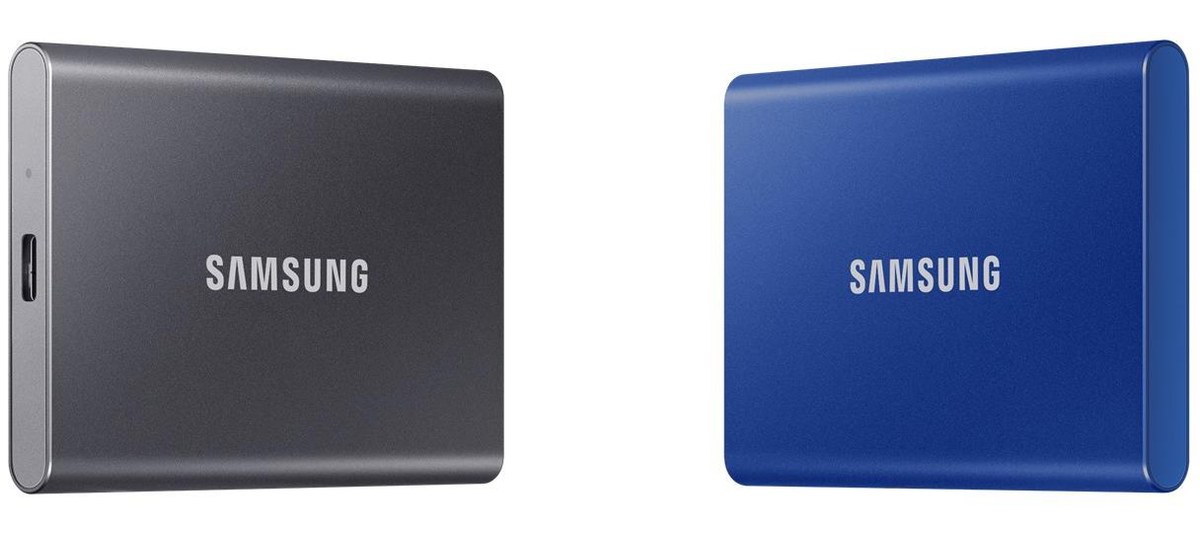
Samsung Portable SSD T7 (1TB-4TB)
A pocket-sized USB 3.2 Gen 2 portable SSD with up to 1,050/1,000 MB/s, 1 TB to 4 TB, an 85 x 57 x 8 mm body of 72 g, AES 256-bit hardware encryption and a three-year warranty.
Full Specification Sheet
| Type | External portable SSD |
|---|---|
| Interface | USB 3.2 Gen 2 (10 Gbps), USB Type-C |
| Capacities | 1 TB, 2 TB, 4 TB |
| Sequential Read / Write | Up to 1,050 / 1,000 MB/s |
| Dimensions | 85 x 57 x 8 mm |
| Weight | 72 g (may vary by capacity) |
| Drop Resistance | Up to 2 m |
| Encryption | AES 256-bit hardware encryption |
| Software | Samsung Magician |
| Operating Temperature | 0 to 60 C (case) |
| Non-Operating Temperature | -40 to 85 C |
| Humidity | 5% to 95%, non-condensing |
| Shock (non-operating) | 1,500 G, 0.5 ms, 3 axis |
| Vibration (non-operating) | 20 G, 20 to 2,000 Hz |
| In the Box | USB Type-C to A cable, USB Type-C to C cable |
| Model Codes | MU-PC1T0, MU-PC2T0, MU-PC4T0 |
| Warranty | Three-year limited |
The Samsung Portable SSD T7 is a compact external drive that connects over USB-C and is rated at up to 1,050 MB/s for reading and 1,000 MB/s for writing. Samsung's 2024 data sheet lists three capacities, 1 TB, 2 TB and 4 TB, a body of 85 by 57 by 8 millimetres and a weight of 72 grams. It is aimed at people who want to carry large files between computers, back up a laptop or extend the storage of a console or tablet without the bulk of a hard drive. This page summarises the manufacturer's specification. We have not tested the drive, and we give no prices or measurements of our own.
Interface and speed
The T7 uses USB 3.2 Gen 2, which carries 10 gigabits per second. Samsung states sequential speeds of up to 1,050 MB/s read and up to 1,000 MB/s write, measured with the supplied cable under its internal test standard. The company notes that performance depends on the host, the cable and the system environment. To reach the rated figures, the computer's port must also support USB 3.2 Gen 2; on an older 5 Gbps USB port, the drive still works but the link caps the speed at a lower level.
For comparison, a portable hard drive is typically limited by its spinning platters to a fraction of these figures, and it is more vulnerable to knocks during operation. Our guide to portable versus internal storage explains when an external SSD makes sense and when an internal drive is the better investment. If you need even more speed, our article on USB4 and Thunderbolt NVMe enclosures covers the faster external options.
Size and build
At 85 by 57 by 8 millimetres, the T7 is roughly the size of a credit card and only a little thicker than a smartphone. The listed weight is 72 grams, and Samsung adds that the exact weight can vary with capacity. The data sheet rates the drive for drops of up to two metres, based on a free fall onto a metal plate under controlled conditions. Samsung is clear that drop damage is not covered by the warranty and that results can differ in real environments, so the rating is best read as extra margin rather than a promise.
Security and software
The drive includes AES 256-bit hardware encryption. Password protection and drive management are handled through Samsung Magician, which the data sheet lists as compatible with Windows 10 and later, macOS High Sierra 10.13.6 and later, and Android 5.1 and later. Hardware encryption means the data on the flash is encrypted by the drive itself, so enabling a password does not cost noticeable transfer speed. If you lose the password, however, the data cannot be recovered, so keep it in a safe place.
Environmental ratings
The operating temperature range is 0 to 60 °C, measured at the hottest point of the case, and Samsung recommends sufficient airflow under heavier workloads. When switched off, the drive tolerates -40 to 85 °C and humidity between 5 and 95 percent without condensation. Non-operating shock resistance is 1,500 G for 0.5 milliseconds in three axes, and non-operating vibration tolerance is 20 G from 20 to 2,000 Hz. The drive carries a long list of certifications, including CE, FCC, UL, UKCA and BIS, and complies with RoHS 2.
What is in the box
Samsung supplies two cables: USB Type-C to Type-A and USB Type-C to Type-C. That covers both older computers with rectangular ports and newer laptops, tablets and phones with USB-C. A quick user manual and warranty statement are also included. The model names are MU-PC1T0, MU-PC2T0 and MU-PC4T0 for the three capacities, each sold under several model codes.
Warranty
The T7 comes with a three-year limited warranty. Samsung refers buyers to its online warranty documents for the detailed terms. Unlike internal SSD data sheets, this one does not give an endurance rating in terabytes written, which is common for portable drives intended mainly for transfers and backups rather than constant heavy writing.
How it compares in our database
In our storage section, the most direct contrast is with portable hard drives such as the WD My Passport and the Seagate Expansion Portable. Both offer USB storage in a similar pocket format, but they rely on mechanical disks. The page T7 vs My Passport lays out the specifications side by side. The T7's advantages are speed, lower weight and better resistance to knocks; a hard drive's advantage is usually lower cost per terabyte at the largest capacities.
What the rated speed means in practice
The rated figures are easiest to understand as transfer times. At the full 1,000 MB/s write rating, copying 100 GB of video would take a little under two minutes in ideal conditions, and filling the entire 1 TB model would take roughly 17 minutes. Real transfers of many small files, such as photo libraries with thousands of images, run noticeably slower because each file adds overhead. On a 5 Gbps USB port the same jobs take considerably longer, which is why the host port matters as much as the drive itself.
Who it suits
The T7 suits photographers and video makers who copy files from a laptop to a backup drive, students and office workers who move projects between machines, and console players who want to keep games on external storage where the console allows it. The 1 TB model is enough for document and photo backups; the 2 TB and 4 TB versions make more sense for video work or large game libraries.
Practical tips
Use the supplied cable or a known good USB-C cable, because a cheap cable rated only for charging or for USB 2.0 will slow the drive dramatically. Plug the drive into a port that supports 10 Gbps if you want full speed; on many desktops, the rear ports are faster than the front ones. Format the drive with a file system that all your devices understand when you share it between Windows and macOS. Finally, an external SSD is a convenient copy, not a complete backup strategy: keep important data in at least two places.
What the data sheet does not say
The data sheet does not name the controller or the type of flash memory inside the T7, and it gives no endurance rating, no random-access figures and no sustained write speed for very large transfers. A release date is not listed. Prices vary by country, retailer and capacity and are not shown on this page.