Western Digital WD My Passport Portable Hard Drive (USB 3.0, 1-6 TB family)
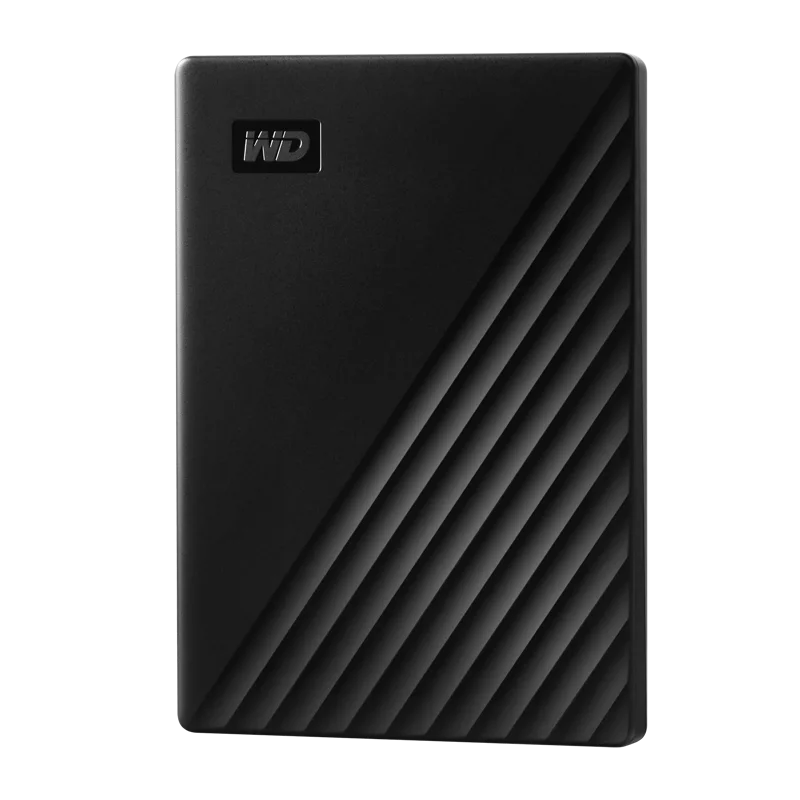
A slim portable USB 3.0 hard drive family from 1 TB to 6 TB with a Micro-B connector, backup software with ransomware defense, 256-bit AES hardware encryption and a three-year warranty.
Full Specification Sheet
| Type | External portable HDD |
|---|---|
| Capacities | 1, 2, 4, 5 and 6 TB |
| Connector | Micro-B |
| Interface | USB 3.2 Gen 1 (USB 3.0), backward compatible with USB 2.0 |
| Transfer Rate | Up to 5 Gb/s |
| Security | Password protection plus 256-bit AES hardware encryption (included software, Windows only) |
| Backup Software | Acronis True Image for Western Digital (includes ransomware defense) |
| Dimensions (L x W x H) | 4.22 x 2.95 x 0.53 inches (1-2 TB), 0.75 inches high (4-5 TB), 0.81 inches high (6 TB) |
| Weight | 0.31 lb (1-2 TB), 0.46 lb / about 210 g (4-6 TB) |
| Operating Temperature | 5 C to 35 C |
| Non-Operating Temperature | -20 C to 65 C |
| Enclosure | More than 50% post-consumer recycled plastic |
| Model Numbers | WDBYVG0010B (1 TB), WDBYVG0020B (2 TB), WDBPKJ0040B (4 TB), WDBPKJ0050B (5 TB), WDBR9S0060B (6 TB), with colour-code suffixes BK, BL, RD, WT |
| Warranty | 3-year limited |
The WD My Passport is Western Digital's mainstream portable hard drive: a pocket-sized USB 3.0 drive for carrying photos, videos, music and documents. The manufacturer's page opens with the line that every journey needs a passport, and describes the drive as trusted portable storage that gives you the confidence and freedom to drive forward in life, with a new, stylish design that fits in the palm of your hand. It is a family page, in the same way as the WD Blue entry we publish alongside it: the page lists several capacities from 1 TB to 6 TB and several colours, each with its own model number. The page gives no single price and no launch date for the family, so this entry gives neither. What follows summarises the published specification, notes where the page is inconsistent and adds a few labelled calculations. We have not tested any of these drives.
Capacities and model numbers
The page lists five capacities. At 1 TB the model numbers start with WDBYVG0010B, at 2 TB WDBYVG0020B, at 4 TB WDBPKJ0040B, at 5 TB WDBPKJ0050B and at 6 TB WDBR9S0060B, each followed by a two-letter colour code and a regional suffix. The colour codes seen are BK, BL, RD and WT, and the 6 TB black model is labelled Black on the page, so we read the codes as black, blue, red and white, an inference from that one label and not an explicit key on the page. Not every capacity is listed in every colour, and the regional suffix can differ, for example JESN on one 2 TB black model against WESN on the others. The page offers up to 6 TB of capacity, which is described as plenty of space to carry photos, videos, music and important documents wherever you go.
Interface and speed
The drive uses a Micro-B connector and lists USB 3.2 Gen 1, USB 3.0 and USB 2.0 as its interfaces, with a transfer rate of up to 5 Gb/s. USB 3.2 Gen 1 and USB 3.0 are two names for the same 5 Gb/s signalling, and the drive also works, more slowly, on a USB 2.0 port. As arithmetic, 5 Gb/s is 625 MB/s of raw signalling before protocol overhead, and a portable hard drive is limited by its own spinning platters long before it reaches that figure, so the interface is not the bottleneck. The page does not state a recording technology, cache size or spindle speed for the My Passport, and it does not give a sustained transfer rate, so we make no claim about them. For readers weighing a portable disk against an SSD, our guide on portable versus internal storage sets out the trade-offs in size, speed and price.
Software, backup and security
Western Digital pairs the drive with included software that it says makes it simple to schedule backups of your files with Acronis True Image for Western Digital, and to help protect important applications and your computer system against data loss caused by ransomware attacks. For privacy, the page offers password protection and built-in 256-bit AES hardware encryption, and it notes that the password protection is for Windows only. In practice that means a drive can be locked so that a lost or stolen unit does not expose your files, although you must remember the password, because recovering data from a locked drive without it is not something the page offers. The page's tech-spec rows add a short feature list: a slim durable design to help take your important files with you, device-management software with defense against ransomware, and password protection plus 256-bit AES hardware encryption. If this drive is part of a backup plan, our overview of how many drives a home NAS needs explains why one copy is rarely enough.
Size, weight and environment
The 1 and 2 TB models are listed at 4.22 by 2.95 by 0.53 inches (about 107 by 75 by 13.5 mm in our conversion) and 0.31 lb (about 140 g). The 4 and 5 TB models are listed at 0.75 inches high and 0.46 lb, with one weight given as 210 g, and the 6 TB models at 0.81 inches high and 0.46 lb. One 6 TB row prints its dimensions as 0.81 by 0.75 by 0.81 inches, which cannot be right for a drive of this footprint and is clearly a typing error on the page, so we ignore it. Operating temperature is 5 C to 35 C, narrower than the 0 C to 60 C range of an internal drive, and non-operating temperature is -20 C to 65 C. Certifications listed are FCC-ICES, CE, BSMI, RCM, VCCI, EAC and UKCA. The page also states that the enclosure is made with more than 50 percent post-consumer recycled plastic and the packaging with over 50 percent post-consumer recycled pulp that is fully recyclable.
Warranty
Western Digital says it builds the drives with tried-and-true components and gives a three-year limited warranty for peace of mind. As with any hard drive, the warranty covers the hardware and not the data on it, which is why the backup advice above matters. If a drive that is meant to carry irreplaceable files will travel in a bag, a sleeve and a habit of copying the files somewhere else are worth more than any spec.
Where it sits in our database
The nearest relative in our database is the Expansion Portable 4TB, which lists an external portable HDD with 4 TB, USB 3.0 and a 2.5-inch form factor. Against it, the My Passport family covers a wider range of capacities, adds the 256-bit AES encryption and backup software the page describes, and states a three-year warranty and detailed dimensions. The two drives share the same basic idea of a portable hard drive in a slim enclosure. We do not have a measured speed for either. You can read the pair side by side in our comparison of the My Passport and the Expansion Portable, and the whole storage category is open for wider browsing.
What the page does not say
The page does not state a sustained speed, a cache size, a spindle speed, a recording technology or a price. It also does not map each model number to its colour in text. Use this entry to check the facts that decide fit: the Micro-B cable, USB 3.0 compatibility, the capacity you need, the temperature limits and the three-year warranty. Then compare it with an external SSD (our SSD versus HDD guide helps) if speed matters more to you than cost per terabyte, and with a second copy of your data if the files matter more than the drive.