Building a Home NAS: How Many Drives Do You Actually Need?
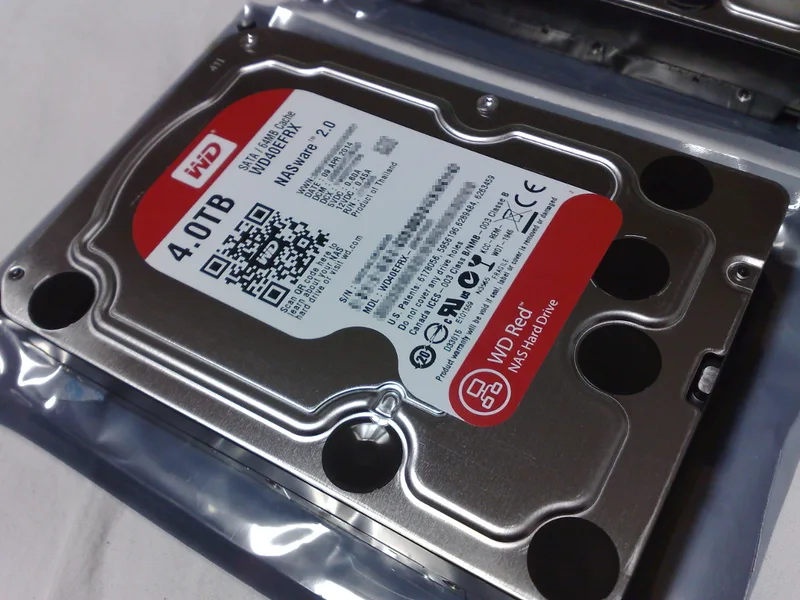
A home NAS (network-attached storage) build starts with a question that trips up almost every first-time builder: how many drives do you actually need, and how much of that capacity is really usable once redundancy is factored in? Drives purpose-built for this job, like the Western Digital Red 4TB NAS Hard Drive, are engineered specifically for the always-on, multi-drive vibration and workload profile a NAS creates — but the drive count and layout decision matters as much as which drive you buy.
The simplest possible NAS is a single drive with no redundancy at all, and it is worth stating plainly why this is rarely the right answer for anything you actually care about keeping: a single-drive NAS is not a backup system, it is just storage, and a single drive failure means total data loss with nothing to recover from. If the data on the NAS only ever exists there and nowhere else, a single drive is one mechanical failure away from being gone permanently — fine for genuinely disposable, easily re-downloaded content, a poor choice for photos, documents, or anything irreplaceable.
Two drives in a mirrored configuration (RAID 1) is the realistic minimum for anyone storing data they cannot easily replace. In a mirror, both drives hold an identical copy of everything, meaning usable capacity is exactly one drive's worth regardless of how many drives you add to the mirror — two 4TB NAS drives in RAID 1 give you 4TB of usable, protected space, not 8TB. That "wasted" capacity is the entire point: it is what allows the NAS to keep running and serving data uninterrupted if one drive fails, giving you a window to replace it without losing anything.
Four or more drives opens up more capacity-efficient redundancy options, most commonly RAID 5 or RAID 6, which use parity data spread across all drives instead of a full duplicate copy. RAID 5 tolerates a single drive failure while losing only one drive's worth of capacity to parity, regardless of how many drives are in the array — four 4TB drives in RAID 5 yield 12TB usable rather than the 8TB a mirrored approach across the same drives would give. RAID 6 goes a step further, tolerating two simultaneous drive failures at the cost of two drives' worth of parity capacity, which matters specifically during a rebuild window after a failure, when the remaining drives are under unusually heavy read load and a second failure during that vulnerable window is the scenario RAID 6 is specifically designed to survive.
RAID, in any configuration, is explicitly not a backup by itself, and this distinction trips up even experienced builders. RAID protects against a drive failing — it does nothing to protect against accidental deletion, ransomware, a fire, flood, or theft that takes the entire NAS at once. A genuinely complete data protection strategy follows the well-known 3-2-1 approach: three copies of important data, on two different types of media, with one copy stored somewhere physically separate from the others — meaning even a well-configured redundant NAS should still have its most important data backed up somewhere else entirely, not treated as the single source of truth.
Drive selection matters specifically for NAS use in a way it does not for a single desktop drive. NAS-rated drives like the Red 4TB are built and firmware-tuned for 24/7 operation, vibration tolerance when mounted alongside several other spinning drives in the same enclosure, and specific error-recovery timing behavior that plays correctly with RAID controllers — a desktop-grade drive dropped into a multi-bay NAS can sometimes get incorrectly flagged as failed by a RAID controller during a routine, longer error-recovery cycle that a NAS-tuned drive is specifically configured to complete faster.
Capacity planning is worth doing honestly before buying rather than after running out of space. Media libraries, backups of multiple devices, and any kind of video or photo archive grow faster than most people initially estimate, and the awkward, expensive scenario to avoid is discovering an array is nearly full and needing to either add more drives to an already-populated enclosure or replace existing drives with larger ones — the latter being a genuinely time-consuming, failure-risk-bearing process on a live array. Buying with real headroom for at least a few years of expected growth, even if it means a slightly larger upfront purchase, is generally the more sensible long-term approach.
Common questions worth addressing directly: is two drives really enough, or should a first-time builder start with four? For most home users, two drives in RAID 1 is a completely sensible, lower-cost starting point that can be expanded to a larger array later if the NAS grows into a genuinely heavy-use system. Do you need enterprise drives instead of NAS-rated drives like the Red 4TB? For a home or small-office NAS running a handful of bays, NAS-rated drives are the correctly targeted product tier — enterprise drives add cost and features aimed at data-center-scale deployments that a home NAS rarely needs.
Rebuild time is worth understanding before a drive ever fails, since it directly shapes how vulnerable an array is during recovery. Replacing a failed drive in a RAID 5 or RAID 6 array triggers a rebuild process that reads every remaining drive in the array in full to reconstruct the missing data, and with today's multi-terabyte drives that process can take many hours, sometimes over a day on a heavily loaded array. During that window, the array runs in a degraded state with reduced or, in RAID 5's case, zero further fault tolerance until the rebuild finishes — which is precisely the scenario RAID 6's extra parity drive is designed to protect against, and part of why larger arrays increasingly favor RAID 6 over RAID 5 as drive capacities keep growing faster than drive speeds.
NAS enclosure choice matters alongside drive selection, since the enclosure's own hardware — its CPU, RAM, and network interface — determines how much of the drives' raw performance is actually usable across the network. A NAS with a weak processor or a single 1-gigabit network port will bottleneck well before a modern NAS-rated drive's own sequential speed becomes the limiting factor, meaning the practical, felt performance of a home NAS is often gated by the enclosure itself rather than the drives inside it — worth researching specifically for anyone planning to use the NAS for demanding tasks like multi-user video editing or serving several 4K video streams simultaneously.
The bottom line: a single drive is storage, not protection — budget for at least a two-drive mirrored array for anything you cannot afford to lose (see our Red 4TB NAS review for how one such drive performs), and consider a four-drive parity-based array once capacity needs grow past what mirroring comfortably provides. Either way, treat RAID as protection against drive failure specifically, not as a substitute for a real backup stored somewhere else entirely — our SSD vs. HDD guide covers where spinning storage still fits in 2026.