WD Red 4TB NAS HDD Review: Why Purpose-Built Storage Actually Matters
8.4/10
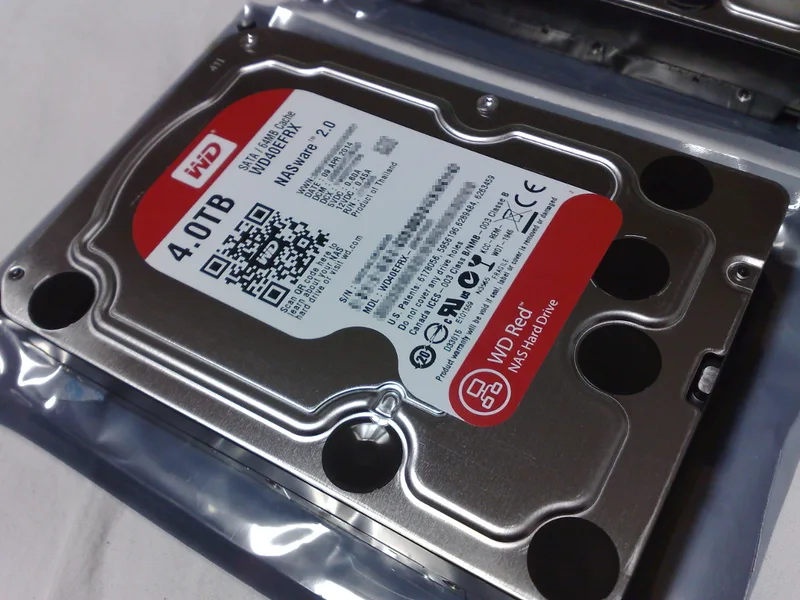
The Western Digital Red 4TB NAS Hard Drive occupies a category that gets far less attention than flagship NVMe SSDs and GPUs, but for anyone building a home NAS, media server, or bulk backup array, drives in this class matter more to long-term reliability than almost anything else in the build. Understanding what actually separates a NAS-rated drive from a standard desktop hard drive is worth the few minutes it takes, because the difference isn't marketing — it's real engineering targeted at a specific failure mode.
The core distinction between the two drive categories is vibration tolerance and firmware behavior in multi-drive enclosures. NAS drives like this WD Red are built and firmware-tuned to handle the resonance created by multiple spinning drives packed close together in a NAS chassis, something standard desktop drives were never engineered to tolerate over years of continuous operation. A desktop drive dropped into a four or eight-bay NAS will often run hotter, louder, and with a measurably higher long-term failure rate than a purpose-built NAS drive in the identical enclosure.
At 4TB and a 7200 RPM-class spin speed in WD's current Red lineup, this drive balances capacity, sustained transfer speed, and power draw reasonably well for a general-purpose home or small-office NAS array. It's not positioned as the highest-capacity option WD offers, but for anyone building a RAID array with several bays, spreading capacity across multiple mid-sized drives rather than one or two very large ones has real resilience benefits — a rebuild after a single drive failure completes faster and puts less sustained stress on the remaining drives.
Firmware-level features aimed at NAS use include vibration compensation sensors that actively adjust head positioning in response to detected chassis vibration, which is the specific engineering answer to the multi-drive resonance problem mentioned above. This isn't a checkbox spec — it's the actual mechanism behind the improved reliability NAS-rated drives claim over standard desktop drives in enclosures with three or more bays.
For anyone weighing a NAS build against cloud storage or an external drive setup, it's worth being honest about what a NAS drive like this actually buys you: local control, no ongoing subscription cost, and full-speed local network transfer rates that cloud storage simply cannot match for large media libraries. The tradeoff is upfront hardware cost and the responsibility of maintaining your own redundancy through RAID rather than relying on a provider's infrastructure.
Common questions about NAS drives come up often. Can a standard desktop drive be used in a NAS instead to save money? Technically yes for a single or two-bay enclosure with light use, but the vibration and reliability gap widens meaningfully in larger arrays, making purpose-built NAS-rated drives the clearly more sensible choice as bay count and drive density increase. Does RAID make backups unnecessary? No — RAID protects against drive failure, not against accidental deletion, ransomware, or a house fire, so a genuine backup strategy still absolutely needs an offsite or cloud component regardless of how robust the local RAID array itself is.
Noise and vibration in the actual living or office space matter more with NAS drives than many buyers expect going in, since these drives run continuously rather than spinning up occasionally like a desktop secondary drive. A NAS enclosure placed in a bedroom, living room, or a quiet home office benefits noticeably from drives with genuinely good idle acoustics, and it's worth checking published noise figures rather than assuming all drives in this capacity class behave identically at idle and under sustained load.
Warranty terms for NAS-rated drives typically run noticeably longer than for consumer desktop drives, often somewhere between three and five years depending on the specific model and region, which reflects manufacturer confidence in the drive's engineering for continuous-duty use. For a component meant to run 24/7 for years inside a RAID array, this warranty length is a genuinely meaningful purchasing signal, not just a marketing number.
The bottom line: for anyone actually building a multi-bay NAS rather than just adding a single external drive, purpose-built NAS storage like this WD Red 4TB is the technically correct choice, not just the more expensive one. The vibration tolerance and firmware tuning solve a real problem that desktop drives were never designed to handle, and in a always-on, multi-drive enclosure running for years at a time, that engineering difference compounds into a measurably lower real-world failure rate.
Thermal behavior inside a densely packed NAS enclosure is another factor that separates purpose-built drives from repurposed desktop ones. NAS-rated drives are typically validated by the manufacturer across a wider sustained operating temperature range than consumer desktop drives, since NAS chassis airflow is often noticeably more constrained than a full-size desktop tower equipped with dedicated case fans. Anyone building a NAS in a compact or fanless enclosure should pay particular attention to a drive's rated maximum operating temperature rather than assuming all 3.5-inch drives handle sustained heat identically.
RAID compatibility and configuration options deserve a specific mention for anyone new to NAS builds. This drive works across the common RAID levels — RAID 1 mirroring for straightforward redundancy, RAID 5 or 6 for a better balance of capacity and fault tolerance across larger arrays, and RAID 10 for setups prioritizing both speed and redundancy simultaneously. The right RAID level depends heavily on bay count and how much usable capacity you're willing to sacrifice for redundancy, and it's genuinely worth researching this specific choice for your particular NAS enclosure's software before finalizing a drive order.
For buyers scaling a NAS array over time rather than filling every bay on day one, sourcing drives from the same model line but ideally not the exact same manufacturing batch reduces the small but real risk of correlated failures, where drives manufactured in the exact same production batch and installed simultaneously tend to statistically fail within a similar timeframe under identical usage conditions. Staggering purchases slightly, when practical, is a simple, low-cost way to meaningfully reduce this risk over the full lifespan of a long-running array.
Considering solid-state instead? See our Samsung 990 Pro 4TB review, browse the full storage comparison hub, or read our home NAS drive guide for how many drives you actually need.