M.2 vs. SATA SSD: Which Storage Interface Does Your Build Actually Need?
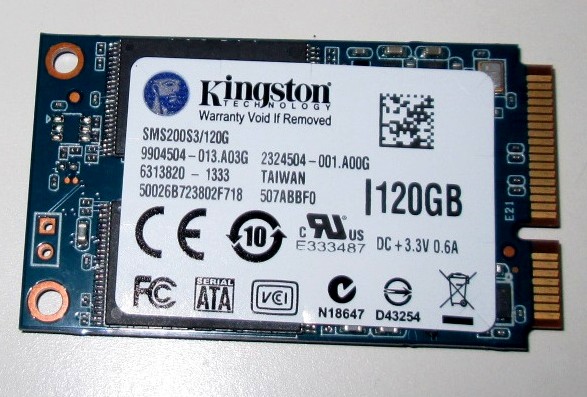
M.2 and SATA are two different things that get conflated constantly, and clearing up that confusion is the single most useful thing a buyer can do before choosing a storage drive. M.2 is a physical connector form factor, not a performance tier by itself — it describes the small, slim slot a drive plugs directly into on the motherboard. SATA is a communication protocol and interface standard, separate from the physical connector question. Confusingly, some M.2 drives actually use the SATA protocol internally rather than the much faster NVMe protocol, which means the M.2 form factor alone does not tell you which performance category a specific drive belongs to.
The practical categories that actually matter for a buying decision are: 2.5-inch SATA SSDs (the traditional laptop-style drive connected via a SATA data cable), M.2 SATA SSDs (the same SATA protocol and speed ceiling, just in the smaller M.2 stick form factor with no cable needed), and M.2 NVMe SSDs (a completely different, far faster protocol that communicates directly over the PCIe bus rather than through the SATA controller). The jump from either SATA option to NVMe is where the real, dramatic performance difference actually lives.
SATA III, regardless of physical form factor, is capped at a theoretical 6Gbps, which works out to roughly 550–560MB/s in real-world sequential read and write speeds once protocol overhead is accounted for — every SATA SSD on the market, no matter how new or expensive, runs into this identical ceiling, because the limitation is the interface itself, not the drive's internal components. NVMe over PCIe removes that ceiling entirely: a PCIe Gen3 NVMe drive comfortably reaches 3,000–3,500MB/s, a Gen4 drive commonly reaches 5,000–7,000MB/s, and Gen5 drives push past 10,000MB/s on the fastest current models — five to twenty times the hard ceiling that every SATA drive shares, regardless of price or brand. Our Samsung 990 Pro 4TB review covers a modern NVMe drive at the faster end of that range in real-world detail.
Given that gap, the obvious question is why SATA SSDs still exist as a current product category at all rather than having been fully replaced by NVMe. The answer comes down to compatibility and cost rather than any advantage in raw speed. Older laptops and desktops, particularly anything built before roughly 2015–2016, frequently have no M.2 NVMe slot at all, only a 2.5-inch SATA bay or, at best, an M.2 slot wired only for the SATA protocol rather than PCIe — for those systems, a SATA SSD is not a compromise choice, it is the only SSD upgrade path physically available, and still an enormous upgrade over the mechanical hard drive it typically replaces. Our Kingston SSDNow mS200 review covers exactly this use case: reviving an aging ultrabook that has no faster option available to it.
Cost per gigabyte is the second reason SATA persists, though the gap has narrowed significantly in recent years as NVMe pricing has fallen. At the very lowest capacities and price points, a basic SATA drive can still undercut an equivalent NVMe drive slightly, which matters for cost-sensitive builds where the drive is purely a secondary bulk-storage volume rather than the primary boot and application drive, where speed differences are felt far less in daily use than they are on a system's main OS drive.
For anyone building or upgrading a current-generation system with a genuine choice available, NVMe is the correct default for the primary drive in almost every case, not just for enthusiasts. The real-world difference is not subtle — boot times, application load times, and especially large file transfers and game level-load times are all noticeably faster on NVMe, and the price premium over SATA at common consumer capacities like 1TB or 2TB has shrunk to the point where choosing SATA specifically to save money on a primary drive rarely makes sense anymore. SATA remains the right, deliberate choice specifically for older hardware with no NVMe slot, or as a low-cost secondary bulk drive on a system where the primary NVMe drive already handles anything speed-sensitive.
Before buying, it is worth double-checking a specific motherboard or laptop's actual M.2 slot wiring rather than assuming every M.2 slot supports NVMe — budget motherboards and older laptops sometimes include an M.2 slot wired only for SATA, which will happily accept and run an NVMe drive physically but silently cap it at SATA speeds, wasting the premium paid for a faster drive. The manufacturer's specification page for the exact board or laptop model is the reliable way to confirm this before purchasing, since the M.2 slot's physical appearance alone does not reveal which protocol it actually supports. Our storage comparison hub has drive-by-drive breakdowns across both categories to help match a specific drive to a specific system's actual capabilities.
It is also worth addressing a common misconception directly: for the overwhelming majority of everyday tasks — web browsing, office applications, general file management — the difference between SATA and NVMe is barely perceptible, because those workloads rarely push enough sustained sequential or random throughput to hit either interface's ceiling. Where the gap becomes obvious is specifically in large, sustained transfers: copying a large game install, extracting a big archive, or working with large video files. Buyers upgrading a mostly-idle office machine should not feel pressured into paying an NVMe premium purely out of habit, while buyers who regularly move large files or load large game worlds will feel the difference immediately and consistently.
Physical installation differs meaningfully between the two as well, which matters for anyone assembling a build themselves. A 2.5-inch SATA drive needs both a SATA data cable and a SATA power cable routed from the power supply, plus a drive bay or mounting bracket, all of which add a small amount of cable clutter and a few extra minutes of assembly time. An M.2 drive, whether SATA or NVMe protocol, needs neither cable — it screws directly onto the motherboard and draws power straight from the M.2 slot itself, which is part of why M.2 has become the default form factor on modern motherboards even independent of the SATA-versus-NVMe protocol question. This also means a small M.2 NVMe drive can sit closer to the CPU and other heat-generating components, which is why many current motherboards and higher-performance drives include a small heatsink specifically for the M.2 slot to manage the additional heat that comes with sustained high-speed transfers.