Kingston SSDNow mS200 120GB Review: Reviving an Aging Ultrabook
7.2/10
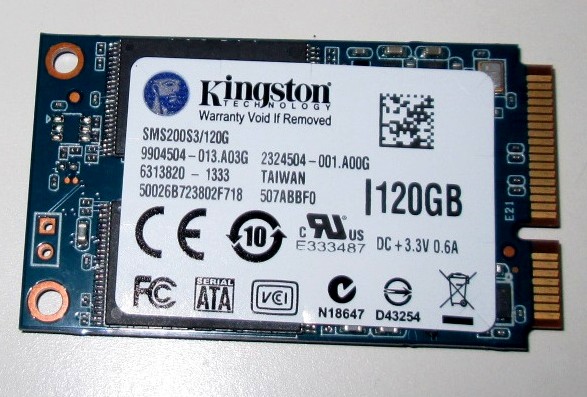
The Kingston SSDNow mS200 120GB occupies a narrow but genuinely useful niche: it's an mSATA solid-state drive, a form factor that has largely faded from the mainstream but still matters enormously to anyone with an older ultrabook, small-form-factor PC, or embedded system that specifically requires it. At around $65 for 120GB, it isn't competing on price-per-gigabyte with modern M.2 NVMe drives — it's competing on being one of the only realistic upgrade paths for a specific class of aging hardware.
Why mSATA still matters in 2026
mSATA (mini-SATA) predates the now-ubiquitous M.2 connector, and was the compact SSD form factor of choice in ultrabooks, small-form-factor desktops, and early convertible laptops roughly between 2011 and 2015. Physically, mSATA cards are similar in size to a Mini PCIe card but electrically speak SATA rather than PCIe, which is a critical distinction: an M.2 SATA drive and an mSATA drive are electrically compatible in terms of protocol, but the physical connector is entirely different and not interchangeable without an adapter. For a laptop or small-form-factor system that shipped with a dedicated mSATA slot, there is often no way to install a modern M.2 drive without a mechanical adapter of some kind, if the chassis has room for one at all — which makes a genuine mSATA drive like this one the simplest, most reliable upgrade path.
What replacing a spinning drive with this SSD actually changes
For the systems this drive targets — typically machines originally specced with either a small first-generation SSD or, in some cases, a 2.5-inch mechanical drive paired with an mSATA cache slot — moving to a proper 120GB mSATA SSD as the primary boot drive is one of the single most impactful upgrades available for an aging ultrabook. Boot times, application launch times, and general system responsiveness improve dramatically when the bottleneck shifts from a mechanical drive's seek times to an SSD's near-instant random access, even on a SATA-interface drive that is, by current standards, far from the fastest storage available. For a machine whose CPU is the real limiting factor for modern workloads anyway, an SSD upgrade like this one often makes the difference between "feels obsolete" and "still perfectly usable for browsing, documents, and light work."
Being realistic about the capacity
120GB is a tight capacity by any current standard, and it's worth being upfront about that rather than glossing over it. This drive makes the most sense as an OS-and-applications boot drive, paired with cloud storage or a secondary drive for bulk files, rather than as the only storage in a system used for large media libraries or extensive local file storage. For the ultrabooks and small-form-factor systems this drive actually fits, that's usually an accurate description of how they were used in the first place — these were never the machines people stored terabytes of local media on.
Performance expectations, honestly stated
As an mSATA drive, this is bound by the SATA III interface's roughly 550 MB/s theoretical ceiling, same as any 2.5-inch SATA SSD — it will not approach NVMe speeds, because the physical connector it uses was never designed to carry PCIe lanes. For the systems it's actually going into, this is close to a non-issue: a laptop originally designed around SATA-speed storage isn't leaving PCIe-generation performance on the table by using a SATA-speed replacement, since the rest of the system (chipset, CPU-era, RAM speed) was never going to unlock NVMe-tier gains anyway. The real-world jump from a mechanical drive or a small legacy SSD to this drive is where nearly all of the perceptible improvement lives, and that jump is substantial regardless of the SATA ceiling.
Who should buy this
The buyer profile here is narrow and specific: someone with an aging ultrabook, small-form-factor PC, or similar device with a genuine mSATA slot, looking to extend its useful life without replacing the whole machine. It is not a drive to seek out for a new build — no current motherboard ships with mSATA slots, and M.2 has fully superseded it for new hardware. But for keeping a several-generations-old machine snappy and useful a while longer, rather than sending working hardware to a landfill because storage-format obsolescence made a straightforward upgrade seem impossible, a drive like this genuinely earns its keep.
Migration process and what to expect
Upgrading an ultrabook's storage from a mechanical or first-generation SSD drive to this one is usually a straightforward clone-and-swap process: connect the new mSATA drive via a USB-to-mSATA enclosure (inexpensive and widely available), clone the existing drive's contents using cloning software — Kingston, like most SSD makers, offers free cloning software for exactly this purpose — then physically swap the drive inside the machine. The main practical hurdle isn't the drive itself but physical access: some ultrabooks have easily removable bottom panels, while others require more involved disassembly, so checking a model-specific teardown guide before starting is worth the ten minutes it takes.
Because the target capacity (120GB) is often smaller than what a several-year-old drive may have grown to contain over time, some cleanup — clearing out old downloads, uninstalling unused applications, moving large files to cloud or external storage — is frequently a necessary step before cloning, rather than an optional nicety. Planning for that in advance makes the whole upgrade smoother than discovering a capacity mismatch mid-clone.
Reliability expectations for this drive class
Kingston's SSDNow line has a long track record as a mainstream, dependable SSD family rather than a performance-flagship one, and that reliability-over-speed positioning is exactly right for this drive's actual use case — a boot drive in a machine being kept in service specifically because it still does its job well. Standard SSD wear-leveling and TRIM support keep write endurance a non-issue for typical OS-and-applications usage patterns; at 120GB and used the way this drive is intended to be used, running out of write endurance before the drive becomes obsolete for other reasons is exceptionally unlikely.
Verdict
The Kingston SSDNow mS200 120GB isn't trying to be a modern flagship storage product, and evaluating it as one would miss the point entirely. As a targeted, reliable upgrade for the specific legacy hardware that actually needs mSATA, it does its one job well, and remains one of the more sensible ways to keep an otherwise-capable older machine in active use.
Related reading: SK hynix BC501 256GB review, more storage reviews.