SK hynix BC501 256GB Review: Budget NVMe Done Right
8.1/10
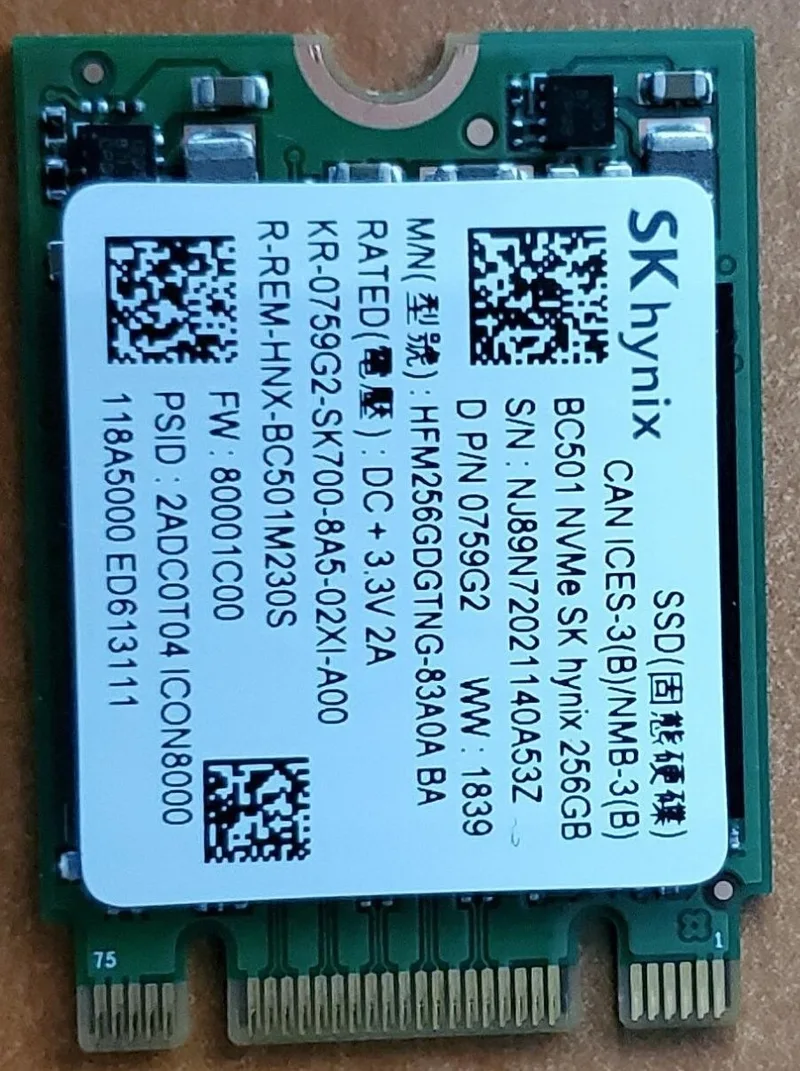
SK hynix doesn't get the same consumer-brand recognition as Samsung or Western Digital in the storage space, despite being one of the largest NAND flash and DRAM manufacturers in the world — a lot of SK hynix's silicon ends up inside other companies' branded drives, memory kits, and even smartphones, without the SK hynix name ever appearing on the retail box. The BC501 256GB is one of the relatively few drives SK hynix sells directly under its own name to end users, and at around $45 for a 256GB PCIe 3.0 NVMe M.2 drive, it's a genuinely solid entry point into NVMe-speed storage for anyone upgrading a budget or older build.
What PCIe 3.0 NVMe actually means at this price point
The BC501 uses a PCIe 3.0 x4 NVMe interface in the M.2 2280 form factor — the same physical size as most M.2 drives, fitting essentially any modern motherboard's M.2 slot. PCIe 3.0 NVMe tops out around 3,500 MB/s sequential read speeds in ideal conditions, which is dramatically faster than any SATA SSD (roughly 550 MB/s ceiling) despite the identical physical connector some SATA-interface M.2 drives also use — the interface, not the connector shape, is what determines the speed ceiling. For anyone moving off SATA storage, that jump is immediately noticeable in boot times, application launches, and file transfers; for anyone already on NVMe and considering PCIe 4.0 or 5.0 instead, the BC501's PCIe 3.0 ceiling is the tradeoff being made for its low price.
Being clear-eyed about the 256GB capacity
256GB is a modest capacity by current standards, and this drive makes the most sense as an OS-and-core-applications boot drive rather than a do-everything primary storage solution. For a budget build, a common and sensible pairing is exactly what this drive enables: a fast, affordable 256GB NVMe boot drive handling Windows and frequently-used applications, paired with a larger, cheaper secondary drive — an HDD like this site's own Barracuda 500GB, or a larger SATA SSD — for games, media, and bulk files. That two-drive approach gets NVMe-speed responsiveness where it matters most (system and application load times) without paying NVMe prices for capacity mostly used to store large, rarely-load-time-sensitive files.
Who this drive is actually for
The BC501 is squarely aimed at budget builders and upgraders who want a genuine NVMe speed boost without a genuine NVMe price tag. Upgrading an older SATA-SSD or HDD-based system to an NVMe boot drive is one of the highest-impact, lowest-cost upgrades available for an aging PC, and a 256GB drive at this price point is often the cheapest realistic entry into that upgrade. It is not the drive for anyone whose workload genuinely needs the capacity or sustained-write performance of a larger, higher-tier NVMe drive — video editors working with large raw footage libraries, for instance, will outgrow both the capacity and the sustained-write ceiling of a budget drive like this one quickly.
Sustained write performance and thermal behavior
Budget NVMe drives, including entry-level models across the industry, typically use a DRAM-less or reduced-DRAM controller design and a smaller SLC write cache than premium drives, which means sustained large sequential writes — copying a huge file, for example — can slow down noticeably once the cache is exhausted, dropping toward the drive's slower native TLC write speed. For typical desktop use — OS operations, application loading, moderate file transfers — this rarely becomes noticeable, since most real-world write operations don't sustain long enough to exhaust the cache. It becomes relevant specifically for large, sustained write operations, which is one more reason this drive suits boot-and-applications duty better than bulk media-editing storage.
Compatibility and installation
M.2 2280 NVMe drives like the BC501 install directly into any motherboard's M.2 slot rated for NVMe (most boards from the last several years support this, but it's always worth double-checking a specific motherboard's M.2 slot specifications, since a small number of budget boards restrict certain M.2 slots to SATA-only signaling). Installation itself is about as simple as PC hardware gets — a single small screw holds the drive flat against the motherboard, no cables or brackets required, and most motherboards natively support NVMe boot without any special driver installation on a fresh Windows install. For anyone who has previously dealt with SATA cable routing, an NVMe drive like this one is a genuinely easier build experience, not just a faster one.
Owners of older motherboards should also confirm their board's BIOS supports NVMe boot specifically (rather than just physically fitting the M.2 connector) — this became standard well before this drive's release, but very early M.2-equipped boards occasionally need a BIOS update to boot from NVMe rather than just using it as secondary storage — a five-minute check against the motherboard maker's compatibility list before buying avoids any surprises.
Endurance and everyday reliability
SK hynix, as one of the world's largest NAND manufacturers, controls its own flash memory supply chain rather than sourcing third-party NAND the way some budget SSD brands do — which generally translates into more consistent quality control across production runs. For typical desktop use patterns, TLC NAND endurance at this capacity comfortably outlasts the practical lifespan most people keep a boot drive in service, making write endurance a rarely-relevant concern outside of unusually write-intensive workloads like constant large video file processing or database server duty, neither of which is the realistic use case for a 256GB budget boot drive in a home or office desktop build.
Value verdict
At roughly $45 for 256GB of genuine PCIe 3.0 NVMe storage, the SK hynix BC501 delivers real, noticeable speed gains over SATA storage at a price that makes NVMe accessible to budget builds rather than reserved for premium ones. Its capacity and sustained-write ceiling are real constraints worth planning around, but for its intended role as a fast, affordable boot drive in a budget or upgraded system, it's a straightforwardly good value — and a rare chance to buy storage silicon directly from one of the industry's largest manufacturers rather than a rebrand of it.
Related reading: Seagate Barracuda 500GB review, Samsung 990 PRO 4TB review, more storage reviews.