Seagate Barracuda 500GB Review: Simple Bulk Storage for a Budget Build
7.4/10
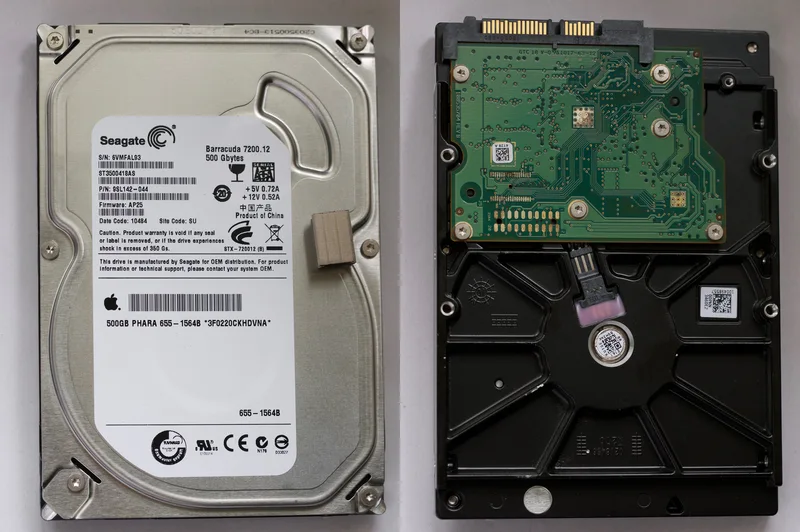
Seagate's Barracuda line is one of the longest-running and best-known product names in consumer hard drive history, and the Barracuda 500GB 7200RPM internal drive represents exactly what that name has always stood for: a straightforward, no-frills 3.5-inch desktop hard drive, priced at around $35, aimed squarely at bulk internal storage rather than anything performance-critical.
What 500GB at 7200RPM gets you today
This is a SATA 6Gb/s, 3.5-inch, 7200 RPM mechanical hard drive — the same fundamental drive category that has served as desktop bulk storage for over two decades, refined but not reinvented. The 7200 RPM spindle speed sits above the 5400 RPM tier common in budget external and laptop drives, giving it meaningfully better sequential throughput and slightly better random-access latency, while still falling well short of any SSD's random access performance, since mechanical seek times are a fundamentally different category of speed than flash memory's near-instant addressing.
At 500GB, this drive is small by current bulk-storage standards — multi-terabyte drives are now the norm for dedicated storage builds — but the capacity tier matters less than the role. For a secondary internal drive in a build where the primary boot drive is an SSD (as it should be in any build built or upgraded in recent years), 500GB of spinning storage is a genuinely useful amount of space for games, documents, and media that don't need SSD-speed loading, at a price where "just add a second drive" is an easy decision rather than a significant budget line item.
The role this drive actually fills in a modern build
Nobody building a new PC today should be putting their operating system on a mechanical drive — that ship has sailed, and SSD boot drives are both affordable and dramatically better for everyday responsiveness. Where a drive like the Barracuda 500GB earns its place is as inexpensive secondary storage: a landing zone for downloads, a location for less-frequently-played game installs, or bulk document and media storage that doesn't justify SSD pricing. Pairing an NVMe or SATA SSD boot drive with a cheap mechanical secondary drive remains one of the most cost-effective ways to get both fast everyday performance and generous total storage capacity in a single budget build.
Reliability considerations for internal desktop use
Unlike portable external drives, an internal 3.5-inch desktop drive like this one lives inside a case with consistent power and, generally, better cooling and vibration isolation than a drive that gets carried around — conditions that are meaningfully kinder to mechanical drive longevity. Seagate's Barracuda line is positioned as consumer desktop storage rather than enterprise or NAS-grade storage, which means it's rated for standard desktop duty cycles (regular but not constant 24/7 operation) rather than the always-on workloads NAS-specific drives are built and rated for. For its intended role as a secondary desktop drive powered on alongside the rest of the system during normal use, that's exactly the right rating.
What this drive is not the right choice for
Running a NAS or a server with sustained 24/7 uptime calls for drives specifically rated and warrantied for that duty cycle — using consumer desktop drives in that role, while technically possible, runs outside their intended design envelope and warranty terms. Similarly, anyone whose workload is genuinely storage-performance sensitive — video editing off the drive directly, database work, anything latency-sensitive — should be looking at SSD storage regardless of capacity needs, since no amount of RPM closes the fundamental gap between mechanical and flash storage for those workloads.
Noise and vibration in a modern build
Mechanical drives are the one component in a modern PC that reliably produces audible seek noise and low-frequency vibration under load, in a market where SSDs, modern fans, and well-designed coolers have made silent or near-silent builds increasingly achievable. A single 7200RPM drive like this one is not loud by mechanical-drive standards, but in an otherwise very quiet SSD-and-fan-only build, it will be the most audible component, particularly during sustained sequential access like large file copies. For most builds this is a minor, easily-ignored characteristic rather than a real drawback; for anyone building specifically toward a silent or near-silent PC, it's worth factoring in, and a soft-mount drive bay or vibration-dampening drive tray (common in many current cases) meaningfully reduces the vibration transfer into the case panels.
Installation and setup
As a standard 3.5-inch SATA drive, installation is about as simple as internal PC storage gets: mount it in any 3.5-inch drive bay, connect a SATA data cable to the motherboard and a SATA power cable from the PSU, and it's ready to be initialized and formatted in the OS. No special drivers or configuration are needed on any current version of Windows, macOS-adjacent Hackintosh builds aside, or Linux. For anyone assembling a first PC, this is one of the least error-prone components to install correctly, and it's a forgiving place to learn basic PC assembly before tackling components with more failure modes.
Warranty and long-term ownership
Seagate's Barracuda line typically carries a standard consumer warranty in the one-to-two-year range depending on region and retailer, shorter than the extended warranties Seagate offers on its higher-tier, NAS-rated, and enterprise drives — a reflection of the same desktop-duty-cycle positioning discussed above rather than a quality difference in the drive itself. For a component this inexpensive, budgeting for eventual replacement as part of normal PC maintenance, rather than expecting decade-long service life, is the realistic way to plan around any mechanical drive, regardless of brand.
Value verdict
At around $35, the Seagate Barracuda 500GB is inexpensive, straightforward bulk internal storage that does exactly what a budget secondary drive needs to do, without pretense or unnecessary features. It's not the drive for anyone chasing capacity-per-dollar at the multi-terabyte tier, and it's certainly not a boot drive candidate in any build put together with modern performance expectations in mind. But as cheap, reliable overflow storage sitting alongside an SSD boot drive, it remains a sensible, low-risk way to add real capacity to a budget build without inflating the total cost of the storage line item.
Related reading: SK hynix BC501 256GB review, Seagate Expansion Portable 4TB review, more storage reviews.