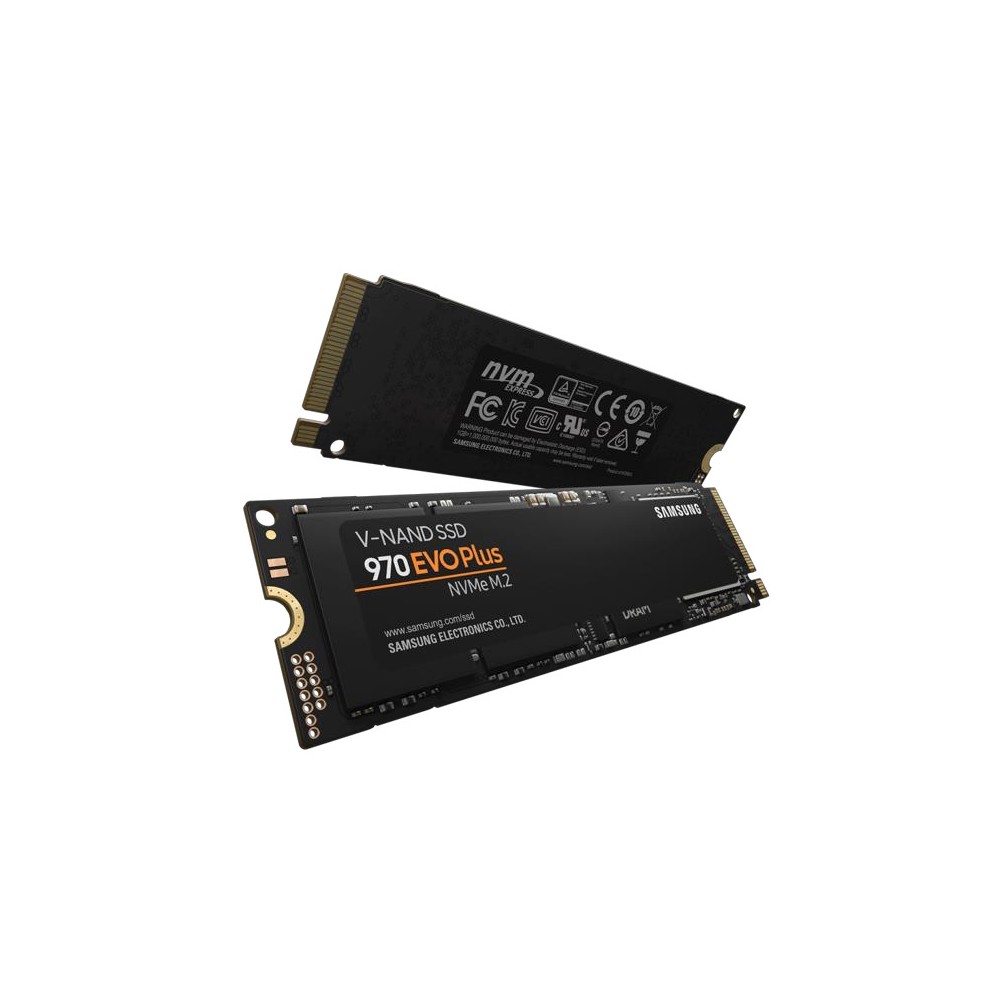
Samsung 970 EVO Plus NVMe SSD (250GB-2TB)
A PCIe 3.0 x4 NVMe SSD in M.2 2280 with TLC V-NAND and DRAM cache, 250 GB to 2 TB, rated up to 3,500/3,300 MB/s and up to 1,200 TBW.
Full Specification Sheet
| Type | Internal SSD, NVMe (client) |
|---|---|
| Interface | PCIe 3.0 x4, NVMe 1.3 |
| Form Factor | M.2 2280 (max. 80.15 x 22.15 x 2.38 mm) |
| Capacities | 250 GB, 500 GB, 1 TB, 2 TB |
| Controller | Samsung in-house controller |
| NAND | Samsung V-NAND 3-bit MLC (TLC) |
| DRAM Cache | 512 MB (250/500 GB), 1 GB (1 TB), 2 GB (2 TB) LPDDR4 |
| Sequential Read | Up to 3,500 MB/s |
| Sequential Write | Up to 2,300 MB/s (250 GB), 3,200 MB/s (500 GB), 3,300 MB/s (1 TB and 2 TB) |
| Random Read 4K (QD32) | Up to 250,000 (250 GB), 480,000 (500 GB), 600,000 (1 TB), 620,000 (2 TB) IOPS |
| Random Write 4K (QD32) | Up to 550,000-560,000 IOPS |
| Endurance (TBW) | 150 TB (250 GB), 300 TB (500 GB), 600 TB (1 TB), 1,200 TB (2 TB) |
| Encryption | AES 256-bit, TCG Opal 2.0, IEEE 1667 |
| Operating Temperature | 0 to 70 C |
| MTBF | 1,500,000 hours |
| Warranty | 5-year limited (or TBW, whichever comes first) |
The Samsung 970 EVO Plus is one of the best-known NVMe drives of the PCIe 3.0 generation. It is an M.2 2280 card that combines Samsung's own controller with 3-bit V-NAND and a dedicated DRAM cache, and it is rated at up to 3,500 MB/s for sequential reads, which is close to the limit of what four PCIe 3.0 lanes can carry. The data sheet covers four capacities from 250 GB to 2 TB. This page summarises that document. We have not tested the drive ourselves, and no prices or measurements of our own are included.
Interface and compatibility
The drive uses PCIe Gen 3.0 with four lanes and the NVMe 1.3 protocol. The card measures at most 80.15 by 22.15 by 2.38 millimetres, the M.2 2280 format that Samsung describes in the data sheet as the most popular size. It works in any M.2 slot that supports NVMe, including the newer PCIe 4.0 and 5.0 slots, where it runs at its own Gen3 speed. This makes it a sensible match for the large number of desktops and laptops built between roughly 2017 and 2020, whose M.2 slots offer PCIe 3.0 and would not allow a faster Gen4 drive to show its advantage. Before buying, check that the slot is not limited to SATA-only M.2 cards; our NVMe SSD buying guide covers the points to verify.
Speed by capacity
Sequential read performance is given as up to 3,500 MB/s. Sequential write depends on the capacity: up to 2,300 MB/s for the 250 GB model, 3,200 MB/s for 500 GB and 3,300 MB/s for the 1 TB and 2 TB models. As with most SSDs, the smallest capacity is clearly the slowest at writing, because it has fewer flash chips to spread the work across.
Random performance at a queue depth of 32 rises with capacity as well. Random reads are rated at up to 250,000 IOPS for 250 GB, 480,000 IOPS for 500 GB, 600,000 IOPS for 1 TB and 620,000 IOPS for 2 TB, and random writes at up to 550,000 to 560,000 IOPS. At a queue depth of 1 with a single thread, the data sheet lists between 17,000 and 19,000 IOPS for reads and 60,000 to 62,000 IOPS for writes. The write figures were measured with the Intelligent TurboWrite buffer active; Samsung notes that this buffer operates only within a specific data transfer size, so very long writes will be slower once it is used up.
Controller, NAND and cache
Samsung builds the controller, the flash and the DRAM itself. The memory is V-NAND 3-bit MLC, generally referred to as TLC. The LPDDR4 DRAM cache is 512 MB for the 250 GB and 500 GB models, 1 GB for the 1 TB model and 2 GB for the 2 TB model. A dedicated DRAM cache distinguishes the 970 EVO Plus from the many value NVMe drives that do without one, and it helps keep performance consistent in demanding mixed workloads.
Endurance and warranty
Total bytes written are 150 TB for 250 GB, 300 TB for 500 GB, 600 TB for 1 TB and 1,200 TB for 2 TB, the equivalent of 600 full drive writes. The limited warranty covers five years or the TBW figure, whichever is reached first. Mean time between failures is given as 1.5 million hours. These ratings are comfortable for gaming, office work, software development and regular content creation.
Power and temperature
Idle power with active state power management is listed as 30 milliwatts, and the L1.2 low-power state as 5 milliwatts, which benefits notebook battery life. Average active power is in the range of 5 to 6 watts according to the data sheet. The operating temperature range is 0 to 70 °C, measured by the drive's own S.M.A.R.T. sensor, and Samsung recommends proper airflow. In a desktop, a motherboard M.2 heat spreader is helpful during long transfers; in a laptop, the drive relies on the chassis for cooling.
Security and features
The drive supports AES 256-bit full-disk encryption with TCG Opal 2.0 and IEEE 1667 Encrypted Drive, together with TRIM, garbage collection and S.M.A.R.T. Non-operating shock tolerance is 1,500 G for 0.5 milliseconds.
How it compares in our database
In our storage section, the 970 EVO Plus marks the top of the PCIe 3.0 class. Its successor in spirit is the Samsung 990 EVO, a newer mainstream drive from the same manufacturer, and the comparison 970 EVO Plus vs 990 EVO shows how the two generations differ on paper. Among current value drives, the Kingston NV3 offers higher sequential figures over PCIe 4.0 but publishes less detail about its flash and cache.
Who it suits
The 970 EVO Plus is a strong choice for upgrading a PCIe 3.0 system, where it uses the interface to the full and brings a DRAM cache, TLC flash and a five-year warranty. It also remains a solid general-purpose drive in newer systems when the workload does not need Gen4 transfer rates, which is true for most everyday tasks and many games. Users who move very large files between fast drives every day and have a Gen4 or Gen5 slot will gain from a faster model.
Installation tips
An M.2 drive is inserted into the slot at an angle, pressed flat and secured with a screw or latch. Many motherboards share PCIe lanes or SATA ports with their M.2 slots, so installing a drive can disable another connector; our article on PCIe lane sharing explains how to read the manual on this point. After installation, updating the drive firmware with the manufacturer's tool is a good habit.
What the data sheet does not say
The data sheet does not name the controller model or state the size of the TurboWrite buffer per capacity. The low-queue-depth figures are printed as ranges that we could not assign to individual capacities with certainty, which is why we quote them as ranges. No release date is given in the document. Prices vary by country, retailer and capacity and are not listed here.