PCIe Lane Sharing Explained: What Happens When You Run a GPU and Multiple NVMe SSDs
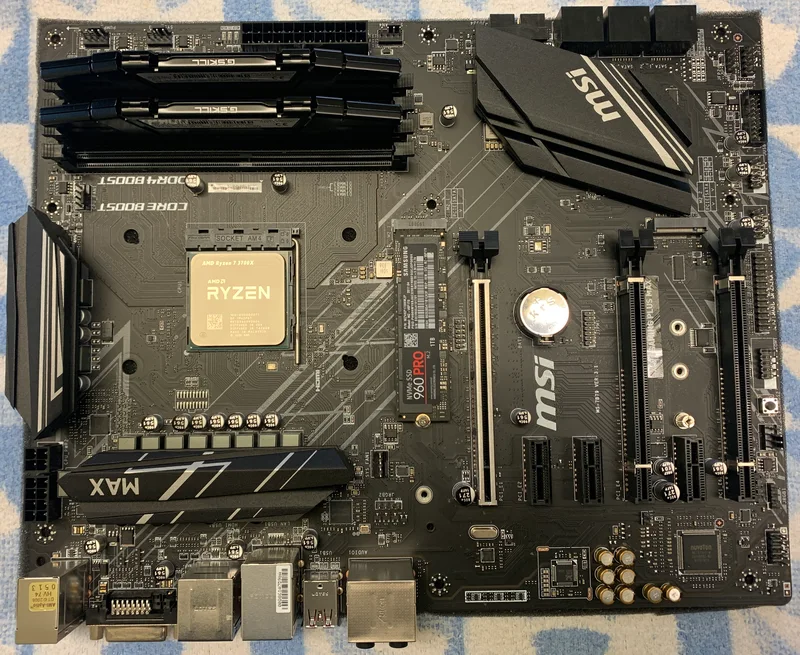
Buy a fast graphics card, add a couple of NVMe SSDs for storage, and on paper everything should just work at full speed. In practice, plenty of builders discover - usually after the fact - that their motherboard quietly reduced their GPU to x8 mode, or that their second and third M.2 slots share bandwidth with their SATA ports, once enough devices are installed at once. This isn't a defect. It's a direct consequence of how PCIe lanes are allocated on consumer platforms, and understanding it before you buy prevents an expensive surprise. This guide explains where PCIe lanes actually come from, why they get shared, and how to plan a GPU-plus-multi-NVMe build that doesn't quietly throttle itself.
Where PCIe Lanes Actually Come From
Every consumer CPU ships with a fixed, limited number of PCIe lanes wired directly to it - typically 16 to 24 lanes on mainstream desktop platforms, a number that has barely grown across generations because die space and pin count are expensive. Those CPU-direct lanes are reserved almost entirely for the primary graphics slot, which is why a single GPU in the top slot on nearly any modern motherboard runs at a full x16 link. Everything else on the board - additional M.2 slots, SATA controllers, extra PCIe x1/x4 slots, USB controllers, and networking chips - draws its lanes from the motherboard's chipset instead, which connects back to the CPU over a single shared uplink (commonly a DMI or Infinity Fabric-style link running at roughly x4 PCIe-equivalent bandwidth). That uplink is the real bottleneck: it's shared by every non-GPU device on the board, all funneling through one connection back to the processor.
Why a Second GPU or M.2 Slot "Steals" Lanes
Some motherboards wire a secondary M.2 slot or second PCIe x16 slot directly to the CPU rather than the chipset, specifically because that's the only place with enough dedicated bandwidth for a full-speed NVMe drive or a second GPU. But since the CPU only has a fixed lane budget, giving lanes to that second slot means taking them from somewhere else - almost always the primary GPU slot. This is why you'll see spec sheets note that a board's top PCIe slot runs at "x16 or x8/x8" depending on whether a second slot is populated, and why some motherboards explicitly document that installing an M.2 drive in slot 2 disables a SATA port or drops the primary GPU slot to x8. A board like the X470 Gaming Plus MAX, built on the AMD X470 chipset with two PCIe 3.0 x16 slots and two M.2 slots, is a realistic example of this trade-off in action on a mainstream AM4 build - checking exactly which M.2 slot draws from the CPU versus the chipset (usually documented in the manual's block diagram) tells you which combinations are truly lane-independent.
PCIe Generation Matters as Much as Lane Count
Lane count alone doesn't tell the whole story - PCIe generation multiplies it. A PCIe 3.0 x4 NVMe SSD needs roughly 4 GB/s of bandwidth, well within a x4 link's ceiling. A PCIe 4.0 x4 drive like the 990 PRO 4TB, rated at up to 7,450 MB/s sequential read, needs a full PCIe 4.0 x4 link to hit its rated speed - plug it into a PCIe 3.0-only slot (common on older or budget chipsets) and it's capped at roughly half that bandwidth regardless of the drive's own capability. This matters directly for lane-sharing scenarios: a chipset uplink running at PCIe 3.0 speeds can support far fewer full-speed NVMe drives simultaneously than the same lane count running at PCIe 4.0 or 5.0, since each generation roughly doubles the bandwidth available per lane. When planning a multi-NVMe build, check both the lane count and the PCIe generation of every M.2 slot individually - motherboard manuals frequently mix generations across slots on the same board.
Does This Actually Hurt Real-World Gaming Performance?
Here's the reassuring part: dropping a GPU from x16 to x8 on a recent PCIe 4.0 or newer platform produces a negligible real-world frame rate difference in the vast majority of games - often within margin of error, because a modern GPU doesn't come close to saturating even an x8 PCIe 4.0 link under normal gaming workloads. The picture changes on older PCIe 3.0 platforms, where dropping to x8 can cost a measurable few percent on a high-end card, and it changes further for workloads that constantly stream large assets across the bus (certain professional GPU-compute and rendering tasks) rather than typical gaming. In other words: for most gamers, an x8 GPU link from populating extra M.2 slots is not something to lose sleep over on a modern build, but it is worth checking your specific board's block diagram if you're running a genuinely bandwidth-hungry workload rather than gaming alone.
How to Plan a Lane-Aware Build
Before buying a motherboard for a GPU-plus-multiple-NVMe build, pull up its official block diagram (usually in the manual's specification section, not the marketing page) and trace exactly which PCIe lanes come from the CPU versus the chipset, and which M.2/SATA/PCIe slots share a lane group. Populate CPU-direct M.2 slots with your fastest, most latency-sensitive drive (typically your boot/OS drive), and reserve chipset-fed slots for secondary bulk storage where a small bandwidth ceiling barely matters. If you're planning a NAS-adjacent bulk storage setup rather than a single hot NVMe drive, our RAID levels for NAS guide covers how multiple drives interact for redundancy rather than raw throughput, which is a different planning problem than lane allocation. And if PCIe generation itself - not just lane count - is the deciding factor in your storage upgrade, our PCIe Gen4 vs. Gen5 NVMe guide goes deeper on that specific trade-off.
The Bottom Line
PCIe lane sharing isn't a flaw to work around so much as a budget to plan for. Consumer CPUs simply don't have enough native lanes to give every slot full, independent, CPU-direct bandwidth, so motherboard designers make deliberate trade-offs between GPU lane width and M.2/SATA lane availability. Read the block diagram before you buy, prioritize your fastest drive for a CPU-direct slot, and don't assume a "GPU dropped to x8" warning in your BIOS is a problem - for the overwhelming majority of modern gaming builds, it measurably isn't. For a deeper look at how much VRAM and card class you should be pairing with your storage plans, see our X470 Gaming Plus MAX review, which documents this board's exact lane layout in practice.