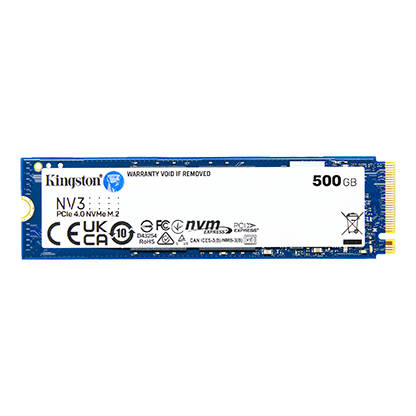
Kingston NV3 PCIe 4.0 NVMe SSD (500GB-4TB)
A PCIe 4.0 x4 NVMe SSD in M.2 2280 (500 GB to 4 TB) and M.2 2230 (500 GB to 2 TB), rated up to 6,000/5,000 MB/s and up to 1,280 TBW.
Full Specification Sheet
| Type | Internal SSD, NVMe (client) |
|---|---|
| Interface | PCIe 4.0 x4, NVMe |
| Form Factors | M.2 2280 (single-sided), M.2 2230 |
| Capacities | M.2 2280: 500 GB, 1 TB, 2 TB, 4 TB; M.2 2230: 500 GB, 1 TB, 2 TB |
| NAND | 3D NAND |
| Sequential Read / Write | 5,000 / 3,000 MB/s (500 GB), 6,000 / 4,000 MB/s (1 TB), 6,000 / 5,000 MB/s (2 TB and 4 TB) |
| Endurance (TBW) | 160 TB (500 GB), 320 TB (1 TB), 640 TB (2 TB), 1,280 TB (4 TB) |
| Dimensions / Weight | 2280: 22 x 80 x 2.3 mm, 7 g; 2230: 22 x 30 x 2.3 mm, 2.6 g (500 GB) or 2.8 g (1-2 TB) |
| Operating Temperature | 0 to 70 C |
| MTBF | 2,000,000 hours |
| Warranty | 5-year limited |
The Kingston NV3 is the third generation of Kingston's value NVMe line, following the NV1 and NV2. It moves fully to PCIe 4.0 x4 with a Gen 4x4 NVMe controller and is rated at up to 6,000 MB/s read and 5,000 MB/s write on the larger capacities. Two sizes are offered: the common M.2 2280 stick for desktops and most laptops, in 500 GB, 1 TB, 2 TB and 4 TB, and the short M.2 2230 card used in handheld gaming PCs and compact notebooks, in 500 GB, 1 TB and 2 TB. Kingston says the drives were designed for lower power consumption and reduced heat. This page summarises the manufacturer's specification; we have not tested the NV3, and no prices or benchmark numbers of our own appear here.
Interface, sizes and compatibility
Both versions use PCIe 4.0 with four lanes and the NVMe protocol. The 2280 model is 22 by 80 millimetres and 2.3 millimetres thick, weighs 7 grams, and is single-sided, which means all components sit on one face of the board. Single-sided drives fit more easily into thin laptops, where there is often no room for chips on the underside. The 2230 model is just 22 by 30 millimetres and weighs 2.6 grams in the 500 GB version and 2.8 grams in the 1 TB and 2 TB versions. Kingston mentions handheld gaming consoles as a target for the small format. A PCIe 4.0 drive also works in PCIe 3.0 slots at reduced speed and in PCIe 5.0 slots at its own Gen4 speed; our Gen4 vs Gen5 upgrade guide explains when the newer standard is worth paying for.
Speed by capacity
Sequential speeds depend strongly on capacity. The 500 GB model is rated at up to 5,000 MB/s read and 3,000 MB/s write. The 1 TB model reaches 6,000 MB/s read and 4,000 MB/s write. The 2 TB and 4 TB models are rated at 6,000 MB/s read and 5,000 MB/s write. The 2230 versions follow the same figures for the capacities they share. This pattern is common in SSDs: larger drives contain more NAND chips that can be accessed in parallel, which raises write throughput. Buyers who care about write speed should therefore avoid the smallest capacity.
Kingston does not list random 4K IOPS on the product page. Without those figures we cannot compare the NV3 on small-file performance with drives that publish them, such as the WD Blue SN5000, which states IOPS for every capacity. On sequential numbers, the comparison NV3 vs WD Blue SN5000 puts the two PCIe 4.0 value drives side by side.
Endurance and warranty
Total bytes written are 160 TB for 500 GB, 320 TB for 1 TB, 640 TB for 2 TB and 1,280 TB for 4 TB, the same for both form factors where the capacity exists. Those values correspond to roughly 0.32 drive writes per day over five years, a typical rating for consumer drives and more than adequate for gaming, office work and media storage. Kingston rates mean time between failures at 2,000,000 hours and gives a limited five-year warranty with free technical support.
NAND and what is not specified
The specification lists the memory simply as 3D NAND, without stating whether it is TLC or QLC, and it does not name the controller model or say whether the drive uses a DRAM cache. These are the details that most influence how an SSD behaves under long sustained writes and when nearly full. Value drives often use DRAM-less designs that borrow a small amount of system memory through the NVMe Host Memory Buffer feature, but since Kingston does not state the configuration, we do not assume it. As with other budget SSDs, components may vary between production batches.
Power and heat
Kingston positions the NV3 as a low-power drive that produces less heat, though the product page does not publish wattage figures. Operating temperature is 0 to 70 °C and storage temperature -40 to 85 °C. Non-operating vibration tolerance is 20G (10 to 1,000 Hz). No heatsink is included, which suits laptops and handhelds; in a desktop, the motherboard's M.2 cover can help with cooling during long transfers.
How it fits in our database
In our storage section the NV3 sits between the SATA drives, which top out around 550 MB/s, and the high-end PCIe 4.0 and 5.0 models. Its peak read speed is close to that of mid-range PCIe 4.0 drives, while the lack of published random performance and NAND details is what separates it from more fully documented products. For a broader overview of how to choose, our NVMe SSD buying guide walks through capacity, endurance and form factor.
Who it suits
The NV3 is aimed at people upgrading a desktop or laptop on a budget, adding a second drive for a game library, or replacing the small stock SSD in a handheld gaming PC with the 2230 version. The 4 TB 2280 model is one of the more affordable ways to get a large amount of NVMe storage in a single slot. Those who regularly copy very large files, edit video, or keep the drive close to full may prefer a model with documented TLC NAND and DRAM cache.
Installation tips
Installing an M.2 drive takes a few minutes: the card goes into the slot at an angle, is pressed down and fixed with a small screw or a tool-less latch. Before buying, check that the slot supports NVMe and not only SATA, and whether it accepts 2280 or only 2230 cards. Many motherboards share PCIe lanes between M.2 slots and other ports, so filling one slot can disable a SATA port or reduce the lanes of another slot; the motherboard manual lists these rules.
What the page does not say
Besides the NAND type, the controller and the cache, the page gives no power consumption values, no random IOPS and no release date. Prices vary by country, retailer and capacity, and are not listed here. Any third-party test results refer to specific samples and may not apply to every production batch.