ASUS ROG STRIX Z790-E GAMING WIFI
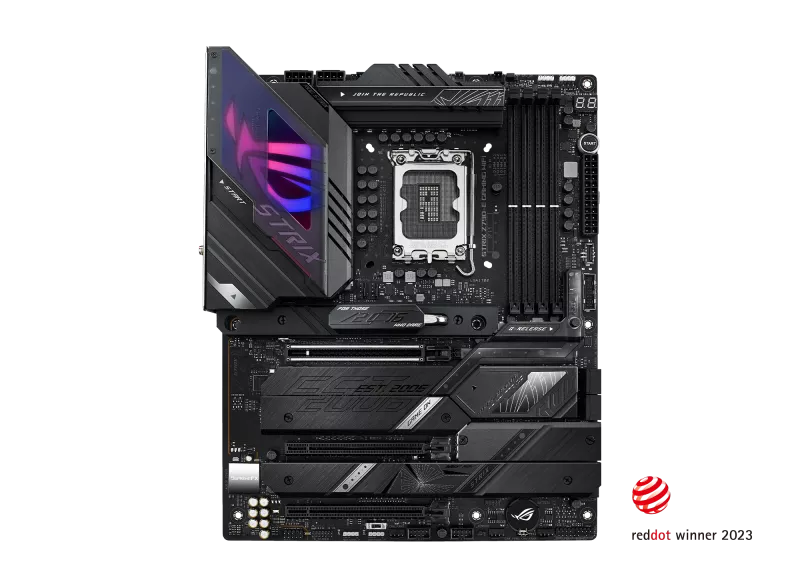
An ATX LGA1700 board on the Intel Z790 chipset with DDR5 up to 7800+ (OC), a PCIe 5.0 x16 slot and PCIe 5.0 M.2 slot, five M.2 slots, Wi-Fi 6E and 2.5 Gb Ethernet.
Full Specification Sheet
| Socket | Intel LGA1700 |
|---|---|
| Chipset | Intel Z790 |
| CPU Support | Intel Core 14th and 13th Gen, 12th Gen, Pentium Gold and Celeron |
| Memory | 4 x DIMM, up to 192 GB, DDR5 up to 7800+ (OC), XMP |
| Expansion | 1 x PCIe 5.0 x16 (CPU), 2 x PCIe 4.0 x16 (x4 mode, chipset) |
| Storage | 5 x M.2 (M.2_1 PCIe 5.0 x4) and 4 x SATA 6Gb/s |
| Networking | Intel 2.5Gb Ethernet, Wi-Fi 6E, Bluetooth 5.3 |
| USB (rear) | 12 ports incl. 1 x USB 3.2 Gen 2x2 Type-C, 7 x USB 3.2 Gen 2, 4 x USB 3.2 Gen 1 |
| Audio | ROG SupremeFX ALC4080, 7.1 channel |
| Form Factor | ATX (30.5 x 24.4 cm) |
The ASUS ROG STRIX Z790-E GAMING WIFI is an ATX motherboard for the Intel LGA1700 socket, built around the Z790 chipset. It sits in the enthusiast tier of the ROG Strix range and is aimed at gaming and high-performance builds that use a 12th, 13th or 14th generation Intel Core processor. The board pairs DDR5 memory with a PCIe 5.0 graphics slot, a PCIe 5.0 M.2 slot, four further M.2 slots, Wi-Fi 6E, 2.5 Gb Ethernet and a large complement of USB ports. This page collects the specification that ASUS publishes on its technical-specification page, explains what the entries mean for a builder and leaves out anything the manufacturer does not state, including the price, which is not given.
Processor and chipset support
The socket is Intel LGA1700, and ASUS lists support for Intel Core 14th and 13th generation processors as well as 12th generation, Pentium Gold and Celeron processors, with the usual note that the ASUS website carries the definitive CPU support list. The board supports Intel Turbo Boost Technology 2.0 and, depending on the processor type, Turbo Boost Max Technology 3.0. The chipset is the Intel Z790, the top tier of the platform, which is the one that allows multiplier overclocking on the K-series processors. If you want to see how this generation fits in the market, our guide to the AM4, AM5 and LGA1700 platforms and our explanation of motherboard chipset tiers put the board into context. Typical partners on this site are the Intel Core i9-14900K and the Intel Core i7-13700K.
Memory
There are four DIMM slots supporting up to 192 GB of non-ECC, unbuffered DDR5 in a dual-channel architecture. ASUS lists rated speeds from 4800 up to 7800+ MT/s, with speeds of 5800 and above marked as overclocking (OC) speeds, and 5600 and below as standard. The board supports Intel Extreme Memory Profile (XMP) and ASUS's OptiMem II routing. A footnote explains that the supported memory types, data rates and module counts vary depending on the processor and memory configuration, and that DDR5 non-ECC memory includes on-die ECC. In practice, filling all four slots usually reduces the maximum stable speed compared with two modules, so check the memory support list before choosing a kit.
Expansion slots and PCIe lane layout
The processor provides one PCIe 5.0 x16 slot, intended for the graphics card. The Z790 chipset provides two more PCIe 4.0 x16-length slots that operate in x4 mode. ASUS notes that when the first M.2 slot is occupied by an SSD, the PCIe 5.0 x16 slot will run at x8 only. That is an important trade-off: it means that a PCIe 5.0 M.2 drive in the first slot and a graphics card share the processor lanes. For the wider background, including how bifurcation tables work, see our explanation of PCIe lane sharing. The board also includes an Alternative PCIe Mode Switch among its internal connectors.
Storage
ASUS lists a total of five M.2 slots and four SATA 6 Gb/s ports. M.2_1 is a Key M slot supporting 2242, 2260, 2280 and 22110 sizes with PCIe 5.0 x4; M.2_2 supports PCIe 4.0 x4 from the processor; M.2_3 and M.2_4 supply PCIe 4.0 x4 through the chipset; and M.2_5 supports PCIe 4.0 x4 as well as SATA modes. Intel Rapid Storage Technology supports RAID 0, 1, 5 and 10 for both PCIe and SATA drives. Included accessories cover installation: an M.2 Q-Latch package, a backplate Q-Latch, a thermal pad for M.2 and rubber packages, and the board's design lists an M.2 heatsink and a heatsink backplate as part of its thermal solution.
Networking, USB and audio
Networking comprises an Intel 2.5 Gb Ethernet controller with ASUS LANGuard, and 2x2 Wi-Fi 6E supporting the 2.4, 5 and 6 GHz bands together with Bluetooth 5.3; ASUS notes that 6 GHz availability varies by country. The rear panel provides twelve USB ports in total: one USB 3.2 Gen 2x2 Type-C, seven USB 3.2 Gen 2 (six Type-A and one Type-C) and four USB 3.2 Gen 1 Type-A. Internally, a front USB 3.2 Gen 2x2 connector supports Type-C with up to 30 W of power delivery fast charge, and headers support further USB 3.2 Gen 1 and USB 2.0 ports, for nine front ports in all. Audio uses the ROG SupremeFX 7.1 codec ALC4080 with a Savitech SV3H712 amplifier, gold-plated jacks, an optical S/PDIF output and shielding. ASUS lists 120 dB signal-to-noise ratio for stereo playback and 113 dB for recording, with playback up to 32-bit and 384 kHz.
Display outputs
Video outputs for processors with integrated graphics are one DisplayPort and one HDMI port. ASUS states that the DisplayPort supports up to 8K at 60 Hz according to DisplayPort 1.4 and that HDMI supports 4K at 60 Hz according to HDMI 2.1, with actual graphics capability varying between processor types. Most buyers will use a dedicated graphics card, but the outputs are handy for troubleshooting or a build without a discrete GPU.
Power, cooling and design features
The board draws power through a 24-pin main connector and two 8-pin +12 V connectors, and the design uses ASUS's Extreme Engine Digi+ with 5K black metallic capacitors. Cooling connectors include a CPU fan header, a CPU optional header, an AIO pump header and five chassis fan headers, with a thermal sensor header as well. The ASUS thermal solution lists a VRM heatsink design and M.2 heatsinks, and the box includes a DDR5 fan holder and a VRM fan holder. Design conveniences include the Q-LED diagnostic lights for CPU, DRAM, VGA and boot device, Q-Release for the graphics slot, Q-DIMM, BIOS FlashBack with its own LED, Clear CMOS, a pre-mounted I/O shield, SafeSlot and SafeDIMM reinforcement, and a start button. Reading up on chipset tiers and voltage regulation is worthwhile before you choose between board tiers.
Software, BIOS and accessories
Software includes Armoury Crate, Aura Sync and Aura Creator, AI Suite 3 with AI Overclocking, Fan Xpert 4 with AI Cooling II, GameFirst VI, Sonic Studio III, Sonic Radar III, DTS Sound Unbound, a 60-day AIDA64 Extreme trial and Norton 360 for Gamers. The 256 Mb flash ROM UEFI BIOS offers an AI Overclocking guide, EZ Flash 3, CrashFree BIOS 3, FlexKey and MemTest86. The accessories list adds two SATA cables, moving Wi-Fi antennas, cable ties, a ROG key chain, stickers and a thank-you card. The board supports Windows 11 and 64-bit Windows 10, and its ATX form factor measures 12 by 9.6 inches, or 30.5 by 24.4 centimetres.
Positioning
On paper the Z790-E is a fully featured board for a high-end Intel gaming PC on the previous socket generation, and it is the board to look at if you already own or plan to buy a 13th or 14th generation Core processor and want DDR5, PCIe 5.0 storage and plenty of M.2 and USB. If you are considering a newer platform, compare it with the ROG Strix Z790-E versus Z890-E comparison, and browse the whole motherboard category. None of the statements above is a test result; all values are the manufacturer's.
Product image: ASUS product image.