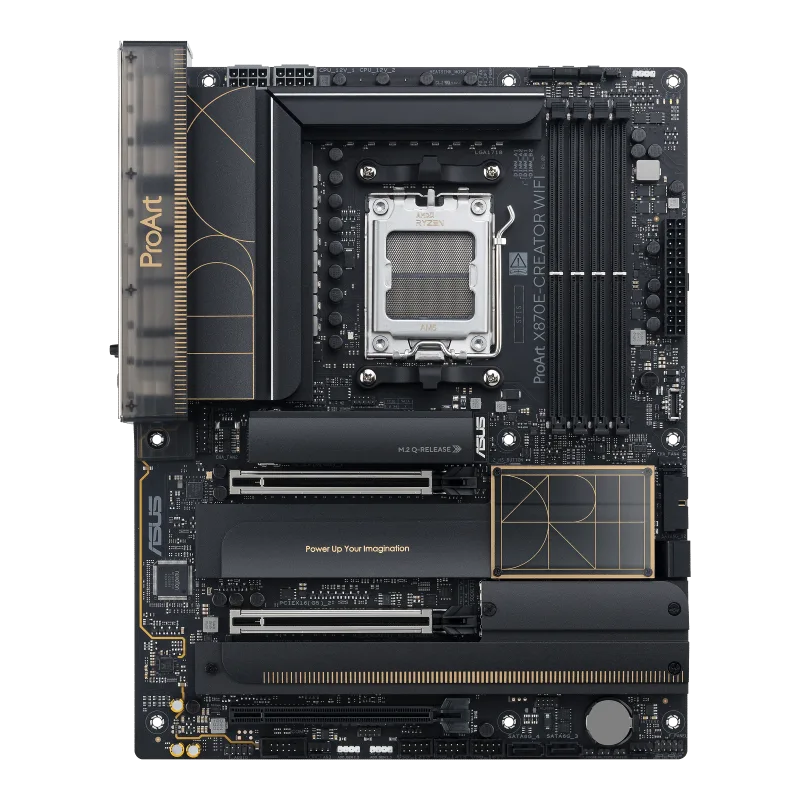
ASUS ProArt X870E-CREATOR WIFI
An ATX AM5 board on the AMD X870E chipset with dual PCIe 5.0 x16 slots, four M.2 slots, 10 Gb and 2.5 Gb Ethernet, Wi-Fi 7 and two USB4 (40 Gbps) ports.
Full Specification Sheet
| Socket | AMD Socket AM5 |
|---|---|
| Chipset | AMD X870E |
| CPU Support | AMD Ryzen 9000, 8000 and 7000 Series desktop processors |
| Memory | 4 x DIMM, up to 256 GB, DDR5 up to 8000+ MT/s (OC) with Ryzen 9000/8000/7000, ECC and non-ECC UDIMM, AMD EXPO and AEMP |
| Expansion | 2 x PCIe 5.0 x16 (x16, x8/x8 or x8/x4/x4 with Ryzen 9000/7000), 1 x PCIe 4.0 x16 (x4, chipset) |
| Storage | 4 x M.2 (two PCIe 5.0 x4 with Ryzen 9000/7000, two PCIe 4.0 x4 from the chipset) and 4 x SATA 6Gb/s |
| Networking | Marvell AQtion 10Gb Ethernet, Intel 2.5Gb Ethernet, Wi-Fi 7 (802.11be) 2x2, Bluetooth 5.4 |
| Rear USB | 2 x USB4 40Gbps Type-C, 1 x USB 20Gbps Type-C, 7 x USB 10Gbps Type-A, 1 x USB 2.0 |
| Video Output | HDMI and two USB4 Type-C display outputs |
| Audio | Realtek ALC1220P 7.1 |
| Form Factor | ATX, 30.5 x 24.4 cm |
| Warranty Note | Not stated on the tech-spec page |
The ASUS ProArt X870E-CREATOR WIFI is an ATX motherboard for the AMD AM5 socket, built on the top-tier X870E chipset. It comes from ASUS's ProArt family, the line the company aims at content creators, and the tech-spec page reflects that: a 10 Gb Ethernet port, a second full PCIe 5.0 x16 slot, four M.2 slots, two USB4 ports and a software list that includes ProArt Creator Hub. This page walks through the specification ASUS publishes, explains what each entry means for someone planning a build, and leaves out anything the manufacturer page does not state, including a price and a launch date. There are no benchmarks and no tests here. Every figure is an ASUS specification unless it is marked as simple arithmetic, and many entries are written per processor family, so they repay a close read.
Processor and chipset support
The socket is AMD AM5, and ASUS lists support for AMD Ryzen 9000, 8000 and 7000 Series desktop processors, with a pointer to its download center for the authoritative CPU support list. The chipset is the AMD X870E. Which features a given processor unlocks depends on the processor family, because the CPU itself supplies the fastest PCIe lanes, and the expansion and storage sections below are split accordingly. For background on where X870E sits among the other chipset classes, see our guide to motherboard chipset tiers.
Memory
There are four DIMM slots with a maximum capacity of 256 GB of DDR5. ASUS states support for speeds of up to 8000+ MT/s with overclocking (OC) on Ryzen 9000, Ryzen 8000 and Ryzen 7000 processors, and it lists both ECC and non-ECC unbuffered modules in a dual-channel architecture. The memory profile technologies named are AMD EXPO and the ASUS Enhanced Memory Profile (AEMP). Three footnotes matter. First, ASUS says adjustments will be made based on the specifications of mass-produced memory products on the market, which is a polite way of saying the top speeds depend on the kit. Second, the supported memory types, speeds and module counts vary with the CPU and memory configuration, and ASUS points buyers to its memory support list. Third, non-ECC unbuffered DDR5 supports on-die ECC, a feature of the memory chips themselves and not the same as full ECC across the module bus. The page gives no timing or latency figures, so none are quoted here. If you want to understand what the megatransfer number does and does not tell you, our guide to RAM speed versus latency covers it.
Expansion slots and how the lanes are shared
This is the part of the specification where the ProArt separates itself from mainstream AM5 boards. With Ryzen 9000 and 7000 processors, ASUS lists two PCIe 5.0 x16 slots with Q-Release Slim, supporting x16, x8/x8 or x8/x4/x4 modes; a footnote refers to a PCIe bifurcation table on the ASUS support site. With Ryzen 8700, 8600 and 8400 processors there is one PCIe 4.0 x16 slot that supports only the first slot at a total bandwidth of x8, and the second slot is disabled. With Ryzen 8500 and 8300 processors the single PCIe 4.0 slot is limited to a total of x4. The X870E chipset adds one more PCIe 4.0 x16 slot that runs in x4 mode. Two sharing rules are stated explicitly: when both PCIe 5.0 slots are used they run at x8 each, and the second one shares bandwidth with the M.2_2 slot, so enabling M.2_2 drops the first slot to x8 and the second to x4. The practical reading is that a two-card or card-plus-capture-device layout is possible, but the fastest configurations trade lanes against each other, which is why our explainer on PCIe lane sharing between GPUs and NVMe drives is worth reading before you plan the layout.
Storage
ASUS counts four M.2 slots and four SATA 6Gb/s ports. With Ryzen 9000 and 7000 processors, M.2_1 and M.2_2 are Key M slots that accept 2242, 2260 and 2280 drives and support PCIe 5.0 x4, with the sharing note above for M.2_2. With Ryzen 8000 processors, M.2_1 runs at PCIe 4.0 x4 and M.2_2 is not supported. The two chipset-fed slots are M.2_3 (2242, 2260, 2280) and M.2_4 (2242 to 22110), both PCIe 4.0 x4. RAID support is listed as processor dependent through AMD RAIDXpert2: PCIe RAID 0/1/10 on Ryzen 7000, RAID 0/1 on Ryzen 8000 and RAID 0/1/5/10 on Ryzen 9000, plus SATA RAID 0/1/10 across the chipset families. The board ships with an M.2 backplate heatsink, M.2 heatsinks, a thermal pad for a 22110 drive and the Q-Latch, Q-Release and Q-Slide M.2 mounting features. For choosing drives to fill those slots, see our Gen4 versus Gen5 NVMe upgrade guide.
Networking
Wired networking is unusually generous: ASUS lists one Marvell AQtion 10Gb Ethernet port and one Intel 2.5Gb Ethernet port, and the ASUS LANGuard protection feature. As simple arithmetic from the stated line rate, 10 gigabits per second is 1.25 gigabytes per second at the theoretical maximum, four times the 2.5 Gb port, which matters only if the rest of your network, such as a switch and a NAS, can also run at that speed. Wireless is Wi-Fi 7 (802.11be) in a 2x2 configuration across the 2.4, 5 and 6 GHz bands with 320 MHz channel width, plus Bluetooth 5.4. ASUS notes that the actual module can be Qualcomm QCNCM865 or MediaTek MT7927, that the label on the product shows which, and that Wi-Fi 7 needs Windows 11 24H2 or later for full function; on Windows 10 no driver is available. The 6 GHz band and channel width are also subject to regional regulation.
USB and video output
The rear panel totals eleven USB ports: two USB4 (40 Gbps) Type-C, one USB 20 Gbps Type-C, seven USB 10 Gbps Type-A and one USB 2.0 Type-A. Internally there is a front-panel USB 20 Gbps connector that supports USB Type-C with up to 30 W power delivery and Quick Charge 4+, one USB 5 Gbps header for two more ports and three USB 2.0 headers for six more, for nine front-panel ports in total. Video output is one HDMI port, which ASUS says supports 4K at 60 Hz as specified in HDMI 2.1, and the two USB4 Type-C ports, which support display output up to 8K at 60 Hz as specified in DisplayPort 1.4. The DisplayPort on the back panel is listed as input only, a detail that catches people who assume every DisplayPort connector is an output. Graphics specifications also depend on the processor, as ASUS itself notes. For the differences between the port standards, see our comparison of USB4 and Thunderbolt for external NVMe.
Audio, power and cooling hardware
Audio is a Realtek ALC1220P codec for 7.1 sound with impedance sense on the front and rear headphone outputs, an internal amplifier, 120 dB SNR stereo playback, 113 dB SNR recording and playback up to 32-bit/192 kHz, though ASUS notes that 32-bit/192 kHz is not supported for 7.1 surround because of HDA bandwidth. Power is delivered through a 24-pin connector and two 8-pin 12 V CPU connectors, and the protection list, ASUS 5X PROTECTION III, names a digital DIGI+ VRM, enhanced DRAM overcurrent protection, ESD guards, LANGuard, overvoltage protection, SafeSlot and a stainless-steel back I/O. ASUS does not publish the number of VRM phases or the amperage of the power stages on this page, so this page does not either. Fan connectivity is one CPU header, one CPU OPT header, one AIO pump header and five chassis headers, plus three addressable Gen 2 RGB headers, a thermal sensor header, a chassis intrusion header and a COM port header.
Firmware, software and what is in the box
The UEFI BIOS sits on a 256 Mb flash ROM, and the back panel carries both a BIOS FlashBack button and a Clear CMOS button, so firmware can be updated or recovered without a working CPU, a feature explained in our guide to BIOS FlashBack. Software listed by ASUS includes Armoury Crate, Aura Creator, Fan Xpert 4 with AI Cooling II, ASUS DriverHub, ProArt Creator Hub and a free trial of Adobe Creative Cloud, plus business-oriented items such as ASUS Control Center Express with an activation key card and IT management support. In the box are a DisplayPort cable, four SATA cables, the thermal pad for M.2 22110, the WiFi Q-Antenna, Q-Connector, the M.2 Q-Latch and Q-Slide packages, rubber packages and a ProArt gift item. The form factor is ATX at 12 x 9.6 inches (30.5 x 24.4 cm). To put this board next to a gaming-focused X870E alternative from our database, open the side-by-side comparison with the ROG STRIX X870E-E GAMING WIFI or browse the whole motherboard category.
What the page does not say
ASUS's tech-spec page contains no price, no launch date, no VRM phase count, no warranty term and no measured results, and this page therefore does not offer any. Before buying, check the ASUS CPU support list for your exact processor, confirm the memory kit against the memory support list, and read the lane-sharing notes so that the slot and M.2 layout you plan is actually available.