ASUS ROG Strix X870E-E Gaming WiFi
An ATX AM5 flagship-tier board with five M.2 slots, Wi-Fi 7, dual USB4 ports and 18 power stages.
Full Specification Sheet
| Chipset | AMD X870E |
|---|---|
| Socket | AM5 (Ryzen 9000 / 8000 / 7000) |
| Memory | 4x DIMM DDR5, up to 256 GB, 8000+ MT/s (OC) with Ryzen 9000 |
| Form Factor | ATX (30.5 x 24.4 cm) |
| Expansion | PCIe 5.0 x16 (CPU) + PCIe 4.0 x16 (x4 mode, chipset) |
| Storage | 5x M.2 (3x PCIe 5.0 x4, 2x PCIe 4.0 x4) + 4x SATA 6Gb/s |
| Networking | Realtek 5Gb Ethernet, Wi-Fi 7 (2x2, 320 MHz), Bluetooth 5.4 |
| Rear USB | 13 ports incl. 2x USB4 (40Gbps) |
| Audio | ROG SupremeFX ALC4080, 7.1 |
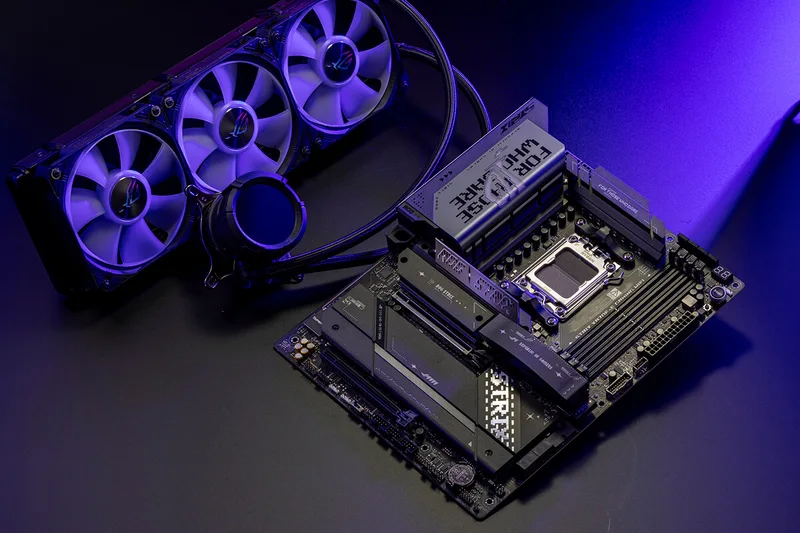
The ASUS ROG Strix X870E-E Gaming WiFi is an ATX motherboard for the AMD AM5 platform, built around the top-tier X870E chipset. ASUS positions it in the Republic of Gamers Strix line as a feature-rich board for enthusiast builds, and its product page highlights 18 power stages, DDR5 memory, extensive PCIe 5.0 connectivity and five M.2 SSD slots. This page goes through the published specification, explains how the storage and expansion lanes are shared, and notes the compatibility details that matter when you choose a processor.
Socket, chipset and processor support
The board uses socket AM5 and supports AMD Ryzen 9000, 8000 and 7000 series desktop processors, with ASUS pointing buyers to its CPU support list for the exact models and BIOS versions required. The distinction between those families matters more than usual on this board, because several expansion features depend on which processor is installed. With Ryzen 9000 and 7000 processors, the primary graphics slot runs at PCIe 5.0 x16 and three M.2 slots run at PCIe 5.0 x4. With a Ryzen 8000 series processor the graphics slot is limited to PCIe 4.0 at x8 or x4 and two of the M.2 slots are not supported. If you are choosing a processor for this board, a chip such as the Ryzen 7 9800X3D gets the full lane configuration.
Memory
There are four DIMM slots supporting dual-channel DDR5 up to 256 GB in total. ASUS lists rated overclocked speeds of 8000+ MT/s with Ryzen 9000 and Ryzen 7000 processors and 8400+ MT/s with Ryzen 8000 processors, and the board supports both ECC and non-ECC unbuffered modules, with on-die ECC on non-ECC DDR5. It supports AMD EXPO memory profiles as well as ASUS's own AEMP profiles, and the company advertises NitroPath DRAM technology, a shortened signal path in the memory slots meant to help high-speed operation. As ASUS notes, supported speeds and module counts depend on the processor and memory configuration, and populating all four slots generally lowers the speed you can reach compared with two modules. The basics of memory profiles are covered in our article on XMP and EXPO.
Storage and how lanes are shared
The board supports five M.2 slots and four SATA 6 Gb/s ports. With Ryzen 9000 or 7000 processors, M.2_1, M.2_2 and M.2_3 all run at PCIe 5.0 x4; M.2_3 also accepts 22110-length drives. M.2_4 and M.2_5 are chipset-attached and run at PCIe 4.0 x4. AMD RAIDXpert2 supports RAID 0, 1, 5 and 10 on both PCIe and SATA drives, with RAID 5 available only with Ryzen 9000 series processors. The important caveat is lane sharing: M.2_2 and M.2_3 share bandwidth with the main PCIe 5.0 x16 slot. When either of those M.2 slots is occupied, the graphics slot drops to x8, and when both are occupied it also runs at x8. A modern graphics card usually loses little at x8, but the arrangement is worth knowing before you fill every slot. Our guide to PCIe lane sharing between a GPU and multiple NVMe drives explains the trade-off in detail.
Networking and connectivity
Wired networking is a Realtek 5 Gb Ethernet port, and wireless is 2x2 Wi-Fi 7 (802.11be) across 2.4, 5 and 6 GHz with 320 MHz channel support and a stated transfer rate of up to 6.5 Gbps, plus Bluetooth 5.4. ASUS notes that full Wi-Fi 7 functions require Windows 11 version 24H2 or later, that older Windows 11 versions support only Wi-Fi 6E, and that no Windows 10 driver is available. Regulations on the 6 GHz band also vary by country. Our explainer on Wi-Fi 6E versus Wi-Fi 7 describes what the new standard adds in practice.
The rear panel has 13 USB ports in total: two USB4 Type-C ports at 40 Gbps that also serve as display outputs, one USB 20 Gbps Type-C port with up to 30 W power delivery, and ten 10 Gbps ports made up of nine Type-A and one Type-C. There is one HDMI output, a Wi-Fi antenna connector, the Ethernet port, gold-plated audio jacks and an optical S/PDIF output, plus BIOS FlashBack and Clear CMOS buttons. Internally the board offers a front-panel USB 20 Gbps Type-C connector, two USB 5 Gbps headers and three USB 2.0 headers.
Power delivery, cooling and audio
ASUS states 18 power stages for the CPU, alongside 5K black metallic capacitors, and power connects through two 8-pin EPS connectors and a 24-pin main connector. VRM heatsinks, M.2 heatsinks and an M.2 backplate handle thermals. Cooling headers are generous: a CPU fan header, a CPU optional header, an AIO pump header and five chassis fan headers, together with three addressable Gen 2 RGB headers. Audio comes from the ROG SupremeFX ALC4080 codec with a Savitech amplifier, a stated 120 dB signal-to-noise ratio on stereo playback and 110 dB on recording, and support for 32-bit, 384 kHz playback on the front panel.
Convenience features
The Q-Design set is a large part of the ROG Strix appeal: a tool-free M.2 Q-Latch, Q-Release and Q-Slide, PCIe slot Q-Release Slim with SafeSlot reinforcement, Q-LED diagnostic lights for the CPU, memory, graphics and boot device, a Q-Code display and a pre-mounted I/O shield. BIOS FlashBack lets you update firmware without a processor installed, which matters when a new Ryzen generation needs a newer BIOS than the one the board shipped with. Our BIOS FlashBack explainer describes how it works. Software includes Armoury Crate, Fan Xpert 4 with AI Cooling II and ASUS's driver hub, along with trial versions of some third-party programs.
Build planning notes
A few practical points follow from the specification. The board is a full ATX size, 30.5 by 24.4 cm, so the case must support ATX boards. Processor power comes through two 8-pin EPS connectors, so the power supply needs to provide both, which most modern units do. The M.2 slots are covered by heatsinks and a backplate, and the tool-free Q-Latch and Q-Release mechanisms are designed to let you fit or remove drives without a screwdriver. If you plan to install a graphics card together with two PCIe 5.0 SSDs, remember that the graphics slot will then run at x8, and that only the drives in the chipset-connected slots avoid that trade-off. Finally, because ASUS says the full Wi-Fi 7 functions depend on the Windows version, install the current chipset, Wi-Fi and BIOS updates from the manufacturer's download page before judging the board's behaviour.
Where it fits
This is a high-end AM5 board, so it makes sense for a build that will use several fast SSDs, Wi-Fi 7 and USB4 devices, and a Ryzen 9000 processor. For a comparison with ASUS's Intel counterpart, see the X870E-E versus Z890-E comparison, or browse all motherboards. All specifications on this page come from ASUS's official product page; availability, bundled items and pricing vary by region.
Product image: ASUS product image.