Intel Core i7-13700K
A sixteen-core hybrid LGA1700 processor that keeps integrated graphics and can pair with either DDR5 or DDR4.
Full Specification Sheet
| Cores / Threads | 16 (8P+8E) / 24 |
|---|---|
| Base / Boost Clock | P-cores 3.4 GHz / up to 5.4 GHz; E-cores 2.5 GHz / up to 4.2 GHz |
| Cache | 30 MB Intel Smart Cache (L3) |
| TDP (Base / Max Turbo) | 125 W / 253 W |
| Socket | LGA1700 |
| Process | Intel 7 |
| Memory | DDR5-5600 or DDR4-3200 (2 DIMMs, dual-channel) |
| PCIe | 16x PCIe 5.0 + 4x PCIe 4.0 lanes |
| Integrated Graphics | Intel UHD Graphics 770 |
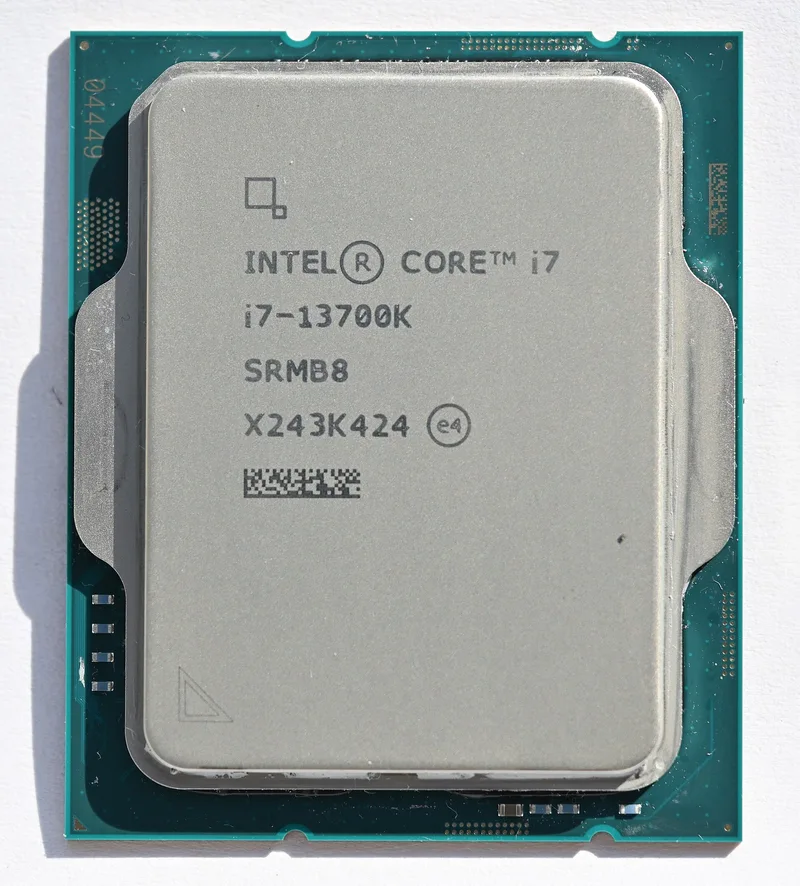
The Intel Core i7-13700K is a 13th-generation desktop processor from the Raptor Lake family, released on 20 October 2022 at a recommended customer price of $409. It combines eight performance cores with eight efficiency cores for sixteen cores in total and 24 threads, since only the performance cores support Hyper-Threading. The K suffix marks an unlocked multiplier for overclocking, and the processor installs in the LGA1700 socket that Intel introduced with the previous generation. For readers comparing this class of chip with others, the essential story is a hybrid design that mixes two kinds of core to serve both light and heavy workloads.
Hybrid design in plain terms
Raptor Lake pairs Raptor Cove performance cores, which are the large, high-clock cores that handle demanding single-threaded and gaming work, with Gracemont efficiency cores, which are smaller and more power-efficient and are arranged in clusters of four. The 13700K carries two such clusters for eight efficiency cores. Its performance cores have a base clock of 3.4 GHz and a maximum turbo of up to 5.4 GHz, while the efficiency cores run at a 2.5 GHz base and up to 4.2 GHz turbo. In practice a scheduling feature in the operating system decides which threads run on which type of core, which is why using an up-to-date version of Windows is recommended for hybrid processors.
The design has consequences for how you read a spec sheet. A core count of sixteen sounds like a direct match for a sixteen-core competitor, but eight of those cores are efficiency cores designed to add throughput in heavily parallel jobs rather than to match the speed of the performance cores. This is a useful trade for tasks such as compiling, rendering and encoding, which spread across every available core, and it also lets background tasks run without disturbing a game running on the performance cores. It is less relevant for lightly threaded software, where the performance cores and their maximum turbo frequency decide the outcome.
Cache, memory and I/O
The processor includes 30 MB of shared L3 cache, and each performance core has up to 2 MB of L2 cache while each efficiency cluster shares up to 4 MB. Memory support is one of the more distinctive features of this generation: the processor can work with either DDR5 or DDR4, depending on the motherboard you choose. The base ratings are DDR4-3200 and DDR5-4800, and on processors at this tier and above, Intel lists DDR5 speeds up to 5600 MT/s when two modules are installed, dropping to 4400 MT/s when four modules are used. Capacity can reach 128 GB, with larger DDR5 capacities becoming possible after a BIOS update. Because DDR4 and DDR5 modules are physically different, the motherboard decides which type you use; you cannot mix them, and you cannot move memory between the two board types. Our DDR5 versus DDR4 buying guide explains how to choose between them.
Connectivity from the processor includes 16 PCIe 5.0 lanes, 4 PCIe 4.0 lanes and 8 DMI lanes, for a total of 28 PCI Express lanes. In everyday terms the sixteen PCIe 5.0 lanes are intended for the graphics card, and the four PCIe 4.0 lanes suit a fast NVMe drive connected directly to the processor. The chipset on the motherboard adds further lanes for additional drives, USB ports and networking.
The processor also includes Intel UHD Graphics 770 with 32 execution units. Unlike the F-suffix variants that have the graphics disabled, this model can drive a monitor without a discrete card, handle video decoding and provide a fallback if a graphics card fails. That is a real practical advantage for troubleshooting and for building a system in stages.
Power and cooling
Intel lists a base power of 125 W and a maximum turbo power of 253 W. The base value is the sustained rating at the base frequency, while the turbo figure describes what the processor may draw when it boosts. In a real system the motherboard's power limit settings determine how long the processor stays near the higher figure, and many motherboards default to relaxed limits that let it draw more power for longer than the minimum specification. If you want predictable thermals and noise, set the power limits deliberately in the BIOS. No cooler is included with K-series processors, so budget for a capable tower cooler or a 240 mm or larger liquid cooler, and check that the power supply has adequate capacity; our guide to PSU wattage shows how to add up the components.
Platform notes
LGA1700 motherboards use the chipset to decide features such as the number of PCIe lanes and USB ports, and only some chipsets allow memory and multiplier overclocking. Since this processor is unlocked, pairing it with a chipset that supports overclocking makes sense if you want to use that capability; otherwise a more affordable board is fine. The processor also uses the same socket as the previous generation, so a compatible motherboard may need a BIOS update to recognise it. Our platform guide covering AM4, AM5 and LGA1700 explains where this socket sits in Intel's roadmap and what that means for future upgrades.
Who it is for
The 13700K suits users who want strong gaming performance and dependable multi-threaded output without going to the flagship. Streamers benefit from the efficiency cores absorbing background work, editors benefit from the additional threads, and anyone who wants integrated graphics as a safety net will appreciate the UHD 770. It is a sensible choice if you already own DDR4 and want to reuse it on a DDR4 motherboard, though a DDR5 board offers more room for future upgrades. If you want to see how it relates to Intel's top model, open the Core i9-14900K page and the Core i9-14900K review, or compare it against an AMD alternative on the Core i7-13700K against Ryzen 9 7900X page. Browsing the processors catalogue also lets you check other candidates at similar power levels.
Verdict
The Core i7-13700K is a well-rounded hybrid processor: sixteen cores, 24 threads, boost clocks up to 5.4 GHz, integrated graphics, and the flexibility to run DDR4 or DDR5 depending on the board. Its main demands are a good cooler, a capable power supply and a thoughtful choice of BIOS power settings. Treat the specification list as the starting point, decide whether the hybrid layout and the platform's memory options suit your workload, and this processor should reward you with strong all-round performance for gaming and productivity.
Photo: 4300streetcar / Wikimedia Commons, CC BY 4.0.