Intel Core i9-14900K Review: The Last Great LGA1700 Flagship
8.7/10
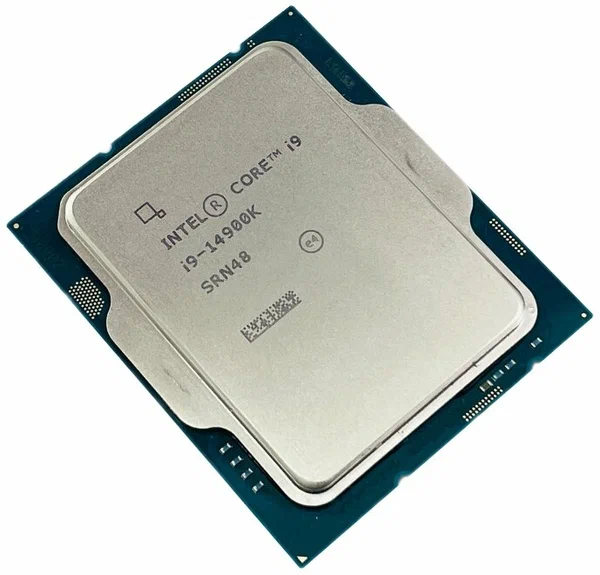
The Core i9-14900K sits at the top of Intel's 14th-generation desktop lineup, and on paper it looks like a modest refresh of the 13900K rather than a clean-sheet redesign. In practice, that is exactly the point: Intel spent its fourteenth generation squeezing more headroom out of a socket, a process node, and a hybrid core layout it already understood extremely well, and the result is a chip that pushes single-thread clocks further than almost anything else on the LGA1700 platform.
The headline number is the 24-core, 32-thread layout split between 8 Performance-cores and 16 Efficient-cores. That asymmetry confuses people who grew up on symmetric multi-core CPUs, but the logic is simple: the P-cores handle latency-sensitive work like games and foreground applications, while the E-cores soak up background tasks — encoding, compiling, streaming overlays — without stealing cycles from the cores your frame rate actually depends on. Base clock sits at 3.2GHz, but the part that matters for gaming is the boost ceiling: up to 6.0GHz on a favored P-core, which is still, at the time of writing, among the highest out-of-the-box clocks available on any consumer desktop chip.
36MB of Intel Smart Cache is shared across the die, which matters more than the raw number suggests — cache misses are one of the biggest hidden costs in modern CPU workloads, and a deep shared cache reduces how often the chip has to reach out to system memory. Combined with support for high-speed DDR5, a well-tuned 14900K system can hide a surprising amount of memory latency that would otherwise bottleneck a chip with these clock speeds.
The socket is LGA1700, the same footprint that has been in service since Alder Lake. That is good news for anyone already sitting on a Z690 or Z790 motherboard — a BIOS update is usually all that stands between an existing build and this chip — but it is also the ceiling: this is the last major flagship this socket is expected to receive before Intel moves on to its next platform. Buying in now means buying the peak of a mature, well-supported ecosystem rather than the start of a new one.
Power is the honest asterisk on this review. Base TDP is rated at 125W, but under an all-core boost load the package can draw up to 253W, and that number is not exaggerated marketing — it is what a serious cooling loop needs to plan for. A 240mm or larger all-in-one liquid cooler is the realistic minimum for sustained heavy workloads; air cooling works for gaming-only usage where the chip rarely holds an all-core boost for long, but anyone doing regular rendering or compiling should budget for liquid cooling and a case with real airflow.
Integrated graphics come by way of Intel UHD Graphics 770, which is not a card you would choose to game on but is genuinely useful as a fallback: it means a dead or DOA discrete GPU does not turn a build into a brick, and it is enough for desktop work, video output during a GPU swap, or a basic media server that never touches games.
Where does the 14900K make the most sense? It is the CPU of choice for buyers chasing the single highest gaming frame rate a desktop platform can produce today, particularly at 1080p and 1440p where the CPU, not the GPU, is more often the limiting factor. It is also a strong choice for mixed creator workloads — someone who games in the evening and renders or compiles during the day benefits directly from the P-core/E-core split in a way a pure gaming chip cannot match.
Against its most direct rival, the platform decision matters as much as the silicon: buyers already on LGA1700 lose nothing by staying, while buyers building completely fresh should weigh DDR5 platform cost and the appeal of AM5's longer stated upgrade runway before committing either direction.
Real-world thermal behavior deserves a closer look than the TDP number alone provides. Under a sustained all-core workload — video encoding, compiling a large project, or extended benchmarking — the 14900K will hold its highest boost clocks only as long as thermal headroom allows, then step down clock speed to stay within its temperature limits. This is normal, expected behavior for any modern high-performance chip, but it means the cooler you pair it with directly determines how much of the chip's rated performance you actually get to keep during long sessions rather than just short bursts. A well-mounted 280mm or 360mm AIO, paired with a case that has genuine intake and exhaust airflow rather than a sealed, style-focused enclosure, is the difference between a 14900K that holds close to its boost ceiling for minutes at a time and one that throttles within seconds of a heavy load starting.
Memory compatibility is worth planning around before finalizing a build, not after. LGA1700 boards support DDR5, but not every DDR5 kit is validated at every speed on every board — checking a specific motherboard's memory support list before buying a high-speed kit avoids the common frustration of a system that boots but refuses to run memory at its rated XMP profile without manual tuning. This is a small extra step that saves real troubleshooting time down the line.
A few common questions come up repeatedly around this chip. Does it need a Z-series motherboard? Only if you intend to overclock manually or run memory well above stock XMP profiles — B-series boards work fine for a stock or lightly-tuned build and cost meaningfully less. Is the integrated graphics good enough to skip a GPU entirely? For office work and browsing, yes; for any gaming beyond the lightest indie titles, no, a discrete GPU is still necessary. Will it bottleneck a high-end GPU? At 1080p and 1440p with a top-tier graphics card, this remains one of the least likely CPUs on the market to be the limiting factor, which is precisely why it remains a popular pairing for high-refresh-rate competitive gaming rigs.
The bottom line, restated plainly: if your motherboard is already LGA1700 and you want the highest single-thread and gaming performance available on that platform without a full rebuild, the 14900K remains an excellent, low-friction upgrade. If you are starting from zero, it is still an excellent chip, but the platform-longevity conversation with AM5 is worth having honestly before you commit either way.
For a direct look at how this chip's closest rival stacks up, see our Ryzen 9 7950X review, or browse the full CPU comparison hub. Buyers still undecided between the two platforms should also read our Intel vs. AMD flagship buying guide.