Crucial T705 PCIe 5.0 NVMe SSD (1TB-4TB)
A flagship PCIe 5.0 NVMe SSD with 232-layer TLC NAND in 1 TB to 4 TB, with or without heatsink, rated up to 14,500/12,700 MB/s and up to 2,400 TBW.
Full Specification Sheet
| Type | Internal SSD, NVMe (client) |
|---|---|
| Interface | PCIe 5.0, NVMe (backward compatible with PCIe 3.0 and 4.0) |
| Form Factor | M.2 2280, with or without heatsink |
| Capacities | 1 TB, 2 TB, 4 TB |
| NAND | Micron 232-layer TLC NAND |
| Sequential Read | Up to 13,600 MB/s (1 TB), 14,500 MB/s (2 TB), 14,100 MB/s (4 TB) |
| Sequential Write | Up to 10,200 MB/s (1 TB), 12,700 MB/s (2 TB), 12,600 MB/s (4 TB) |
| Random Read | Up to 1,400K (1 TB), 1,550K (2 TB), 1,500K (4 TB) IOPS |
| Random Write | Up to 1,750K (1 TB), 1,800K (2 TB and 4 TB) IOPS |
| Endurance (TBW) | 600 TB (1 TB), 1,200 TB (2 TB), 2,400 TB (4 TB) |
| Encryption | TCG Opal 2.01 |
| Thickness / Weight | About 3.8 mm and 0.35 oz without heatsink; about 21 mm and 1.94 oz with heatsink |
| Features | Microsoft DirectStorage enabled; aluminium and copper heatsink on heatsink versions |
| Warranty | 5-year limited (or TBW, whichever comes first) |
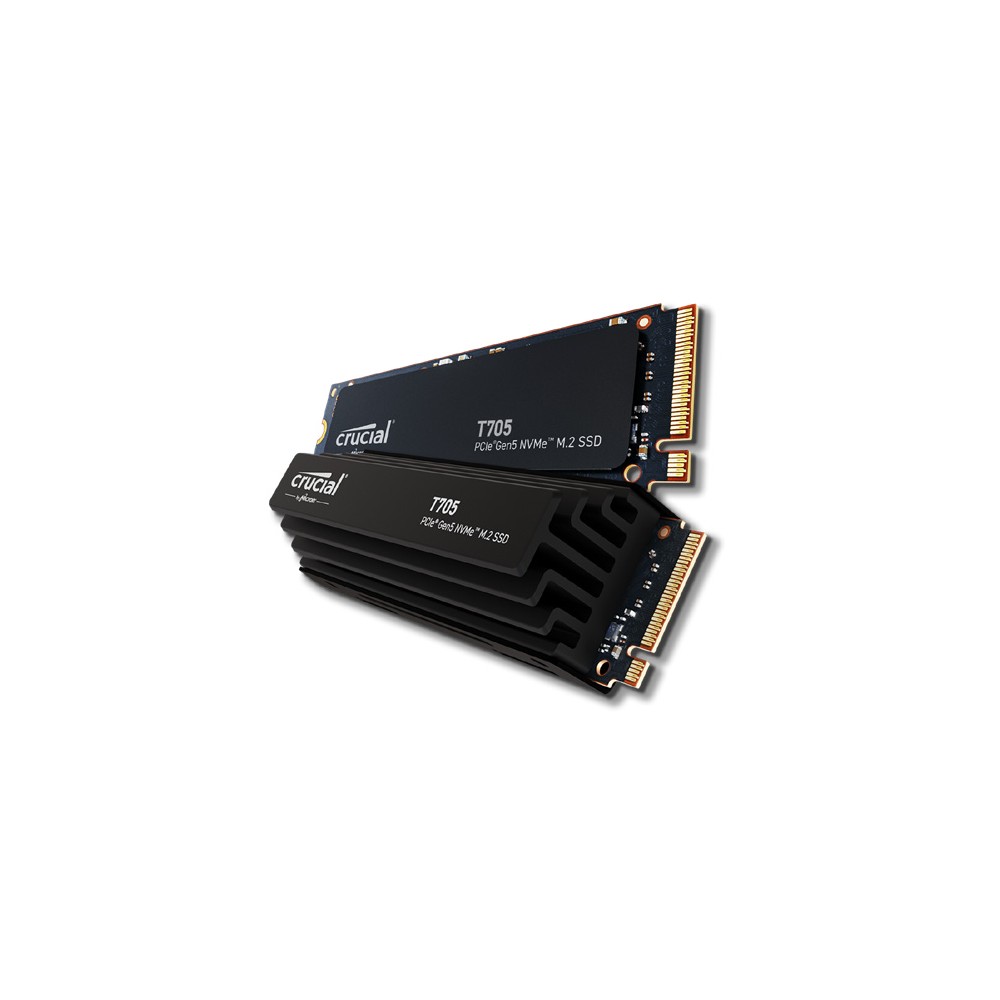
The Crucial T705 is Crucial's fastest consumer SSD and one of the quickest PCIe 5.0 drives on paper. It is an M.2 2280 NVMe drive built with Micron's 232-layer TLC NAND and rated at up to 14,500 MB/s for sequential reads and 12,700 MB/s for sequential writes, roughly double the figures of the best PCIe 4.0 drives. Crucial sells it in 1 TB, 2 TB and 4 TB, each with or without a large passive heatsink. This page summarises the official product flyer. We have not tested the drive, and we publish no prices or measurements of our own.
Interface and requirements
To reach its rated performance, the T705 needs an M.2 slot with PCIe 5.0 and four lanes, which is found on recent high-end desktop platforms. The flyer states that the drive is backward compatible with Gen3 and Gen4 motherboards, where it will work at the speed of the slot, though buying a Gen5 drive for such a system makes sense only with a later upgrade in mind. Our Gen4 vs Gen5 upgrade guide discusses which workloads benefit from the newer interface.
Speed by capacity
The flyer gives figures for each capacity, identical for the heatsink and non-heatsink versions. The 1 TB model is rated at up to 13,600 MB/s for reads and 10,200 MB/s for writes. The 2 TB model is the fastest, with 14,500 and 12,700 MB/s, and the 4 TB model follows with 14,100 and 12,600 MB/s. Random performance is given as up to 1,400,000 IOPS for reads and 1,750,000 for writes on 1 TB, 1,550,000 and 1,800,000 on 2 TB, and 1,500,000 and 1,800,000 on 4 TB.
According to the footnote, these are typical results measured with CrystalDiskMark at a queue depth of 512 with the write cache enabled, Windows 11 core isolation disabled and a fresh drive. Such conditions show the maximum the hardware can deliver. In everyday work, with low queue depths and mixed file sizes, the difference between a Gen5 and a Gen4 drive is much smaller than the sequential figures suggest; it is greatest when very large files are copied between equally fast drives.
Heatsink and cooling
Cooling is a central topic for this drive. The heatsink version carries a premium aluminium and copper heatsink that, according to Crucial, dissipates heat without noisy fans or liquid cooling and allows the drive to run at maximum workload without thermal throttling under typical conditions of airflow and ambient temperature. With the heatsink, the drive is about 0.83 inches, or 21 millimetres, tall and weighs 1.94 ounces, so the space above the M.2 slot must be checked, especially near a large graphics card or CPU cooler.
The version without a heatsink is about 0.15 inches, or 3.8 millimetres, thick and weighs 0.35 ounces. The flyer states clearly that it must be installed with a motherboard heatsink or an alternative cooler to achieve optimal performance. It adds that the copper-clad label on the drive must not be removed when fitting such a heatsink, both for performance and to keep the warranty. Our guide to thermal throttling and heatsinks explains why fast drives slow down when they overheat.
NAND, endurance and warranty
Crucial names Micron 232-layer TLC NAND as the memory. The controller and DRAM cache are not specified in the flyer. Total bytes written are 600 TB for 1 TB, 1,200 TB for 2 TB and 2,400 TB for 4 TB, equal to 600 full drive writes. The limited warranty runs for five years from purchase or until the published TBW value, as measured in the drive's SMART data, is reached.
Gaming features and encryption
The T705 supports Microsoft DirectStorage with GPU decompression, which lets compatible games stream assets from the drive more efficiently. Crucial cites its own tests in which games loaded faster than from Gen4 drives; the size of the gain depends on the title and the system. TCG Opal 2.01 is listed, so hardware encryption can be managed with compatible software.
How it compares in our database
In our storage section, the T705's main rival is the Samsung 9100 PRO, another PCIe 5.0 flagship, which is rated slightly higher for sequential transfers and is offered up to 8 TB, while endurance per capacity is the same. The page T705 vs 9100 PRO shows both data sets. One generation down, the Crucial T500 offers about half the sequential speed on PCIe 4.0, needs less cooling and comes in a 500 GB version.
Who it suits
The T705 is a drive for enthusiasts and professionals with a PCIe 5.0 platform who regularly handle very large files: high-resolution video projects, large data sets, complex 3D scenes or extensive game libraries that are moved between fast drives. It also appeals to builders who want the fastest storage available for a new high-end system. For general use, office work and most gaming, a good PCIe 4.0 drive provides a very similar experience with lower heat output.
Choosing a version
Choose the heatsink version if the motherboard has no cooler for the Gen5 slot and there is enough clearance. Choose the bare version if the board supplies its own substantial M.2 heatsink, which most PCIe 5.0 motherboards do. Among the capacities, the 2 TB model has the highest ratings; the 1 TB model writes noticeably more slowly at 10,200 MB/s.
Installation tips
Use the motherboard's PCIe 5.0 M.2 slot, usually the one closest to the processor. Check the manual, because on some boards using this slot reduces the lanes available to the graphics card. Make sure the heatsink makes even contact through its thermal pad, leave the copper label on the drive in place and ensure there is airflow across the area. Update the firmware before first use, and check the drive temperature in the manufacturer's utility during the first large transfer.
What the flyer does not say
The flyer gives no power consumption figures, no operating temperature range and no mean time to failure, does not name the controller and states no release date. Prices vary by country, retailer and capacity and are not listed on this page.