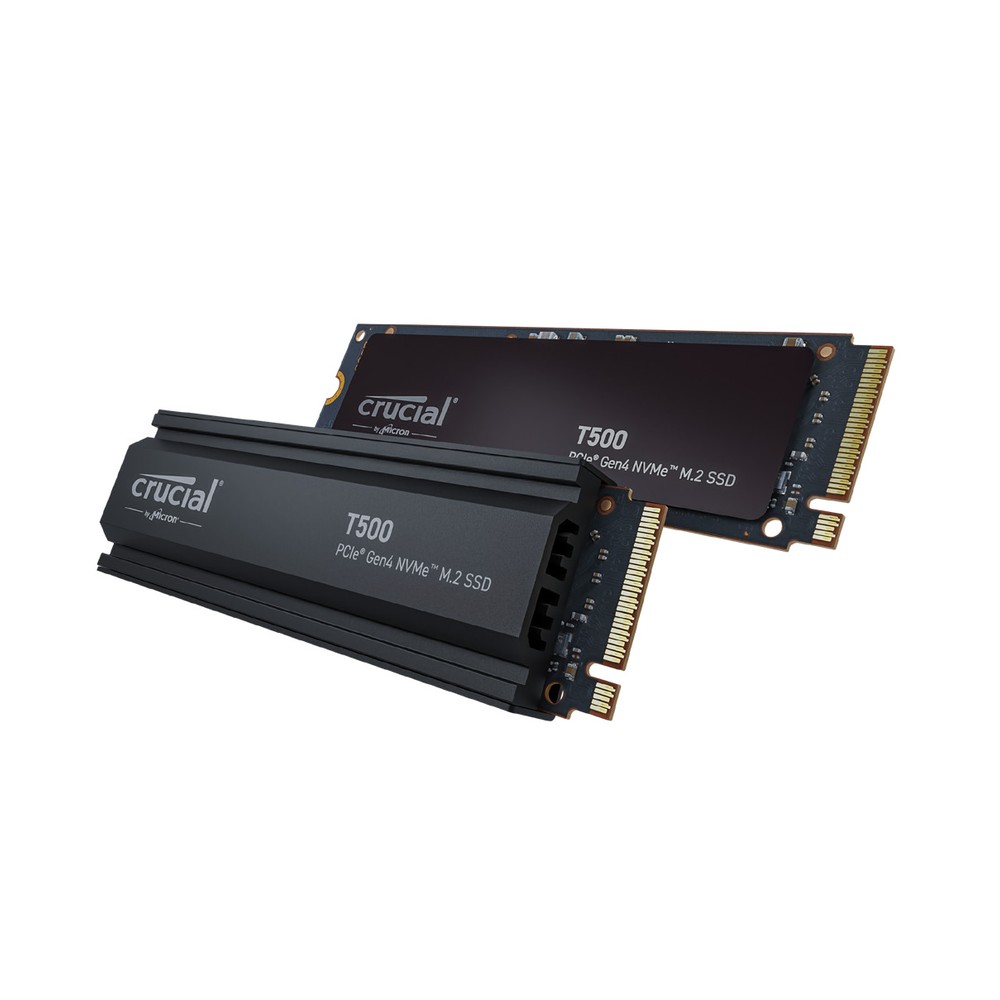
Crucial T500 PCIe 4.0 NVMe SSD (500GB-4TB)
A high-end PCIe 4.0 NVMe SSD with TLC NAND in 500 GB to 4 TB, with or without heatsink, rated up to 7,400/7,000 MB/s and up to 2,400 TBW.
Full Specification Sheet
| Type | Internal SSD, NVMe (client) |
|---|---|
| Interface | PCIe 4.0, NVMe |
| Form Factor | M.2 2280, with or without heatsink |
| Capacities | 500 GB, 1 TB, 2 TB, 4 TB (heatsink versions: 1 TB, 2 TB, 4 TB) |
| NAND | TLC NAND |
| Sequential Read | Up to 7,200 MB/s (500 GB), 7,300 MB/s (1 TB), 7,400 MB/s (2 TB), 7,000 MB/s (4 TB) |
| Sequential Write | Up to 5,700 MB/s (500 GB), 6,800 MB/s (1 TB), 7,000 MB/s (2 TB), 6,900 MB/s (4 TB) |
| Random Read | Up to 800K (500 GB), 1,150K (1 TB), 1,180K (2 TB), 1,050K (4 TB) IOPS |
| Random Write | Up to 1,390K (500 GB), 1,440K (1 TB and 2 TB), 1,350K (4 TB) IOPS |
| Endurance (TBW) | 300 TB (500 GB), 600 TB (1 TB), 1,200 TB (2 TB), 2,400 TB (4 TB) |
| Encryption | TCG Opal 2.01 |
| Thickness | About 2.3 mm without heatsink, about 9.7 mm with heatsink (0.09 in / 0.38 in) |
| Features | Microsoft DirectStorage enabled |
| Warranty | 5-year limited (or TBW, whichever comes first) |
The Crucial T500 is Crucial's top PCIe 4.0 drive, placed above the P5 Plus and below the Gen5 T700 series. It is an M.2 2280 NVMe SSD with TLC NAND, rated at up to 7,400 MB/s for sequential reads and 7,000 MB/s for sequential writes, with random performance of up to 1.44 million IOPS. Crucial offers it in four capacities from 500 GB to 4 TB and, for the larger sizes, in a second version with a pre-fitted heatsink. This page summarises the official product flyer. We have not tested the drive, and we give no prices or benchmark results of our own.
Versions and format
The flyer lists seven part numbers. Without a heatsink, the drive is available in 500 GB, 1 TB, 2 TB and 4 TB. With the heatsink, it comes in 1 TB, 2 TB and 4 TB. Both versions are 3.15 inches, or 80 millimetres, long. The bare drive is about 0.09 inches thick, roughly 2.3 millimetres, while the heatsink version measures 0.38 inches, a little under 10 millimetres. The thin version fits laptops and sits under motherboard M.2 covers; the heatsink version is meant for desktops without such a cover and for consoles. Crucial states that, with the integrated heatsink, the T500 exceeds the requirements for use in a PlayStation 5.
Speed by capacity
Performance is listed for each capacity. The 500 GB model is rated at up to 7,200 MB/s for reads and 5,700 MB/s for writes. The 1 TB model reaches 7,300 and 6,800 MB/s, the 2 TB model 7,400 and 7,000 MB/s, and the 4 TB model 7,000 and 6,900 MB/s. The heatsink versions carry the same ratings as the bare drives of equal capacity. The 2 TB model is therefore the fastest of the family, and the 500 GB model the slowest at writing.
Random performance is unusually high. Random reads are rated at up to 800,000 IOPS for 500 GB, 1,150,000 for 1 TB, 1,180,000 for 2 TB and 1,050,000 for 4 TB. Random writes reach up to 1,390,000 IOPS for 500 GB, 1,440,000 for 1 TB and 2 TB, and 1,350,000 for 4 TB. According to the footnote, the values are typical results measured with CrystalDiskMark using default NVMe settings with the write cache enabled, Windows 11 core isolation disabled and the drive in a fresh state.
NAND, endurance and warranty
The flyer states that the T500 is built with TLC NAND. The controller and the DRAM cache configuration are not named. Total bytes written are 300 TB for 500 GB, 600 TB for 1 TB, 1,200 TB for 2 TB and 2,400 TB for 4 TB, which equals 600 full drive writes and matches the standard of premium Gen4 drives. The limited warranty is valid for five years from purchase or until the published TBW value, as recorded in the drive's SMART data, has been written.
Efficiency and heat
Crucial emphasises efficiency: according to an internal comparison cited in the flyer, the T500 achieves a 40 percent higher performance-to-power ratio than the P5 Plus. Absolute power figures are not given. Any drive in this speed class becomes warm during long transfers, and adequate cooling is needed for it to hold its performance. The non-heatsink version should be installed under a motherboard heat spreader in a desktop. Our guide to thermal throttling and heatsinks explains the background.
Gaming features and encryption
The T500 is enabled for Microsoft DirectStorage, a Windows technology that lets supported games load assets from an NVMe drive with less processor overhead and, with a suitable graphics card, decompress them on the GPU. The benefit depends on the game and the rest of the system. For security, the flyer lists TCG Opal 2.01, so the drive can be used as a self-encrypting drive with compatible management software.
Software
Crucial refers to its online tutorials and guides and to the free Acronis True Image cloning software, which can move an existing installation to the new drive and set it up as the boot drive.
How it compares in our database
In our storage section, the T500 competes with the fastest PCIe 4.0 drives. The WD_BLACK SN850X is rated at up to 7,300 MB/s for reads and up to 6,600 MB/s for writes, with the same endurance per capacity and an 8 TB option that the Crucial lacks; the page T500 vs WD_BLACK SN850X compares the two. Within Crucial's range, the Crucial P5 Plus is the earlier Gen4 model with lower sequential ratings and a maximum of 2 TB.
Who it suits
The T500 is intended for demanding users with a PCIe 4.0 system: gamers who want short loading times and DirectStorage support, people who edit video or render 3D scenes, and professionals who move large data sets. The heatsink version is the convenient choice for a PlayStation 5 or for a motherboard without M.2 cooling. In a system that already supports PCIe 5.0, a Gen5 drive offers higher sequential speeds, though whether that matters depends on the workload; our Gen4 vs Gen5 upgrade guide discusses this.
Choosing a version
Pick the bare drive for laptops and for motherboards with their own M.2 heat spreaders, because the heatsink version will not fit under them. Pick the heatsink version for open M.2 slots and consoles. In terms of capacity, 1 TB and 2 TB deliver the best ratings; the 4 TB model trades a little speed for space, and the 500 GB model is the weakest performer and exists only without a heatsink.
Installation tips
Use an M.2 slot with PCIe 4.0 support. Insert the card at an angle, press it flat and fasten it. If the motherboard's heat spreader has a protective film on its thermal pad, remove it first. Do not combine the pre-fitted heatsink with a motherboard cover. After installation, check for firmware updates before filling the drive.
What the flyer does not say
The flyer does not name the controller or the cache design, gives no power consumption, no operating temperature range and no mean time to failure, and states no release date. It notes that not all capacities were available at initial launch. Prices vary by country, retailer and capacity and are not listed here.