Corsair MP600 CORE 2TB M.2 NVMe PCIe Gen4 x4 SSD
A 2 TB M.2 2280 PCIe Gen4 x4 NVMe SSD with 3D QLC NAND, up to 4,950 MB/s sequential read, up to 3,950 MB/s sequential write, a built-in aluminum heatspreader and a five-year warranty.
Full Specification Sheet
| Part Number | CSSD-F2000GBMP600COR |
|---|---|
| Capacity | 2 TB |
| Interface | PCIe Gen4 x4, NVMe, M.2 |
| Form Factor | M.2 2280 |
| Sequential Read | Up to 4,950 MB/s |
| Sequential Write | Up to 3,950 MB/s |
| NAND | High-density 3D QLC |
| Endurance | Up to 1,440 TB written (varies by capacity) |
| Cooling | Built-in aluminum heatspreader |
| Warranty | 5 years |
The Corsair MP600 CORE is a PCIe Gen4 x4 NVMe solid state drive in the M.2 2280 form factor, and this entry covers the 2 TB model with the part number CSSD-F2000GBMP600COR. Corsair's product page describes it as delivering extreme storage performance using Gen4 PCIe technology, with sequential read speeds up to 4,950 MB per second. The listing is short, and that shapes how this page is written: it reports the figures Corsair publishes, explains what they mean for someone choosing a drive, and says plainly where the manufacturer page stops. There are no benchmark results and this site has not tested the drive. Every figure is a manufacturer specification unless it is marked as arithmetic or as general background. Corsair's page gives no launch date, and no price is shown here because prices change.
Interface and form factor
The drive uses a PCIe Gen4 x4 NVMe interface and plugs directly into an M.2 slot. Corsair states that the M.2 2280 form factor fits directly into your motherboard with no need for cables. The number 2280 refers to the physical size of the card: 22 mm wide and 80 mm long, which is the most common size for desktop and laptop boards. The page describes the interface as using PCIe Gen4 technology for maximum bandwidth and says a PCIe Gen4 x4 controller delivers up to 4,950 MB per second of sequential read and 3,950 MB per second of sequential write. Read that as a maximum for sequential transfers, the kind of load you see when copying one large file, and not as a promise for every workload. Corsair adds that performance and endurance vary by capacity, which is a reminder that these numbers are quoted for the product line and the 2 TB model may differ. Read speed divided by write speed is about 1.25 (arithmetic from Corsair's two figures), meaning the drive writes somewhat slower than it reads, which is normal for consumer SSDs. If you want an overview of the differences between the M.2 and SATA formats, our guide to M.2 versus SATA SSDs explains them.
QLC NAND: what the page says and what it implies
Corsair says the drive uses high-density 3D QLC NAND, which it describes as offering better value than the previous generation's TLC NAND by storing more data in the same amount of physical space. That is the main design choice behind this drive's positioning. Quad-level cell (QLC) memory stores four bits in each cell, against three for triple-level cell (TLC); the general trade-off, which is background knowledge rather than something the page spells out, is that QLC costs less per gigabyte but is usually a little less durable and can slow down more when large amounts of data are written continuously. Corsair does not publish sustained write speeds, the size of any write cache or the controller and NAND vendors for this model, so this page cannot say how the drive behaves under a long transfer. The lower price tier is the reason to consider a QLC drive; the exact behaviour you would need to check in independent testing that this site does not provide. For the surrounding concepts, see our overview of the best NVMe SSD buying guide.
Endurance
The page states that the MP600 CORE stores your data through years of use with endurance up to 1,440 TB written, which Corsair says is over 100 years of typical usage. That last phrase is a marketing claim, and the arithmetic is worth doing. 1,440 TB spread over the five-year warranty period is 288 TB per year, or about 789 GB per day (arithmetic from Corsair's figure, assuming the full amount were written within the warranty). Few desktop users write anywhere near that much, but do not treat the calculation as a prediction. The page says endurance varies by capacity and gives 1,440 TB only as an upper figure for the family, without stating which capacity that belongs to. For a clear explanation of the rating itself and why it exists, read our guide to SSD endurance and the TBW rating.
Putting the sequential figures in perspective
To make the two speed figures concrete, here is simple arithmetic that assumes the drive sustains its maximum sequential speed for the whole transfer, which is an idealised case and not a measurement. At 4,950 MB per second, reading 100 GB (100,000 MB) would take about 20 seconds, and reading the full 2 TB (2,000,000 MB) would take about 404 seconds, roughly 6.7 minutes. At 3,950 MB per second, writing 100 GB would take about 25 seconds. Real transfers are usually slower, because the source or the destination may be the limit, because small files behave differently from one large file and because a QLC drive may slow down during long writes. The figures still give a useful sense of scale, and they show why the gap between this drive and a SATA drive is noticeable in large transfers but much less important for everyday tasks such as browsing or office work.
Heatspreader and thermals
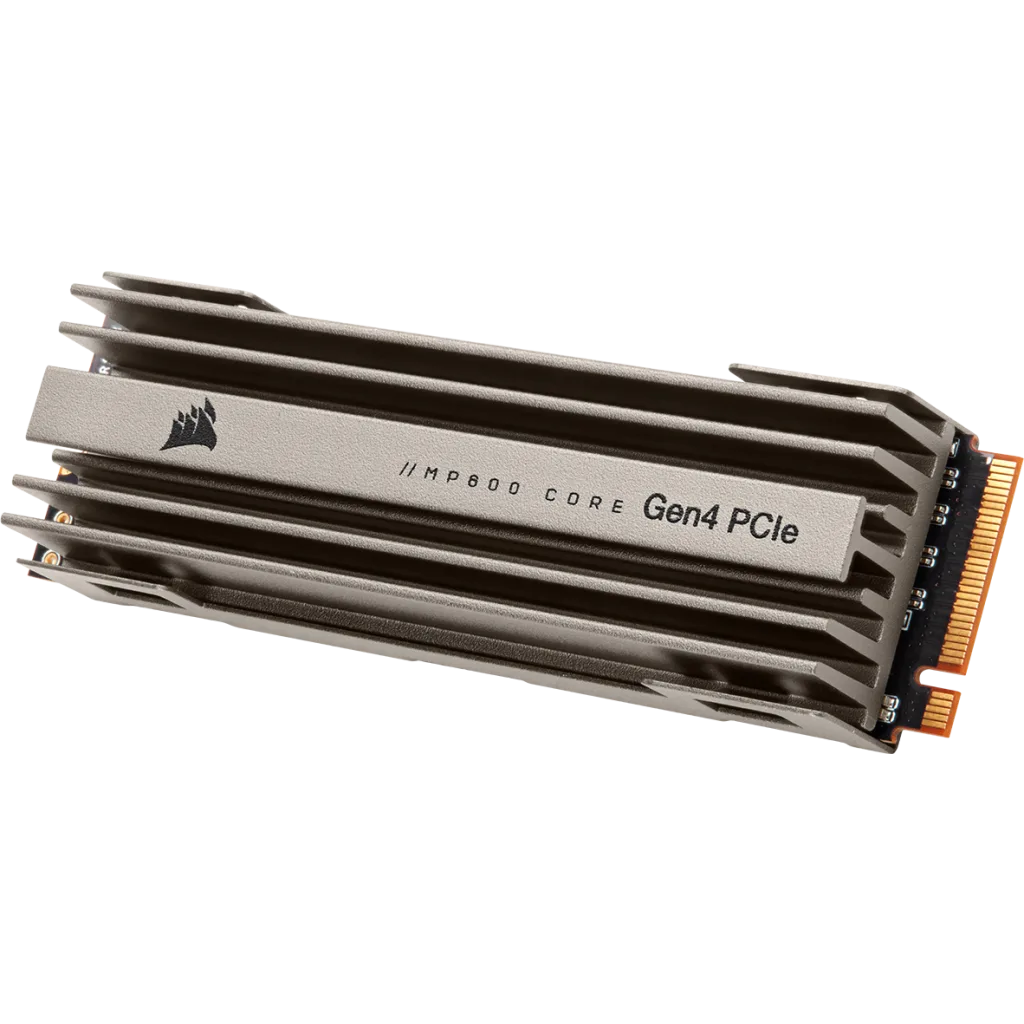
The drive comes with a built-in aluminum heatspreader, which Corsair says helps disperse heat and reduce throttling so the SSD maintains sustained high performance. The image on this page shows the finned grey heatspreader over the M.2 card with the MP600 CORE Gen4 PCIe label. The package contents are the MP600 CORE Series M.2 SSD with heatsink and a quick start guide. A heatspreader adds height to the module, so if your motherboard already has an M.2 heatsink, check that the two are compatible and that the extra height fits under any graphics card or cover. Many boards include their own heatsink; whether to remove it in favour of the drive's own is a board-specific question that the drive's page cannot answer. Our guide to NVMe thermal throttling and heatsinks explains when cooling matters.
Warranty and support
The drive carries a comprehensive five-year warranty, described by Corsair as long-term reliability and industry-leading customer support for peace of mind. The downloads section lists a quick start guide for M.2 SSDs and declarations of conformity. As with any warranty, the terms that apply depend on your region and on Corsair's own conditions, so read the details on Corsair's website before you rely on them.
What the page does not state
To keep expectations realistic, note what is missing. The page does not name the controller or the NAND manufacturer, gives no random read or write figures, no sustained write speed, no power consumption, no weight, no DRAM or cache information and no NVMe protocol version for this model. It does not say whether the drive is compatible with the PlayStation 5, and it does not list a launch date. This site does not fill those gaps with guesses. If one of them matters to you, for example random performance for a database or heavy sustained writes for video work, look for the figures in Corsair's documentation or choose a drive whose manufacturer publishes them.
Where it sits and how to compare it
Two other drives on this site give context from different price and speed tiers. The Corsair MP700 PRO SE is the company's PCIe 5.0 drive, and the WD_BLACK SN850X is a PCIe Gen4 drive from another brand; each entry reports its own manufacturer's specification. To lay the MP600 CORE next to the WD_BLACK, open the side-by-side comparison, or browse the whole storage category. All numbers on this page come from Corsair's product page. How a drive performs in your own PC depends on your motherboard, your operating system and your workload.