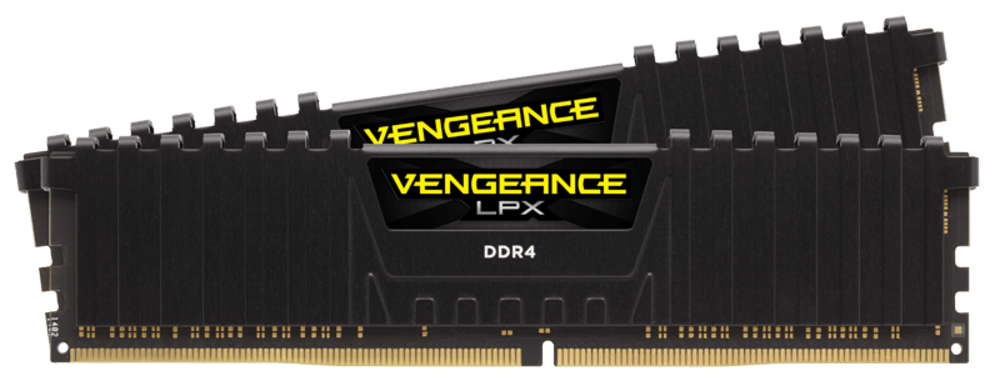
Corsair VENGEANCE LPX 32GB (2x16GB) DDR4-3200 CL16
A 32 GB (2 x 16 GB) DDR4-3200 CL16 kit with XMP 2.0, a low-profile anodized aluminum heat spreader and a limited lifetime warranty.
Full Specification Sheet
| Part Number | CMK32GX4M2E3200C16 |
|---|---|
| Type | DDR4 UDIMM, 288-pin |
| Capacity | 32 GB (2 x 16 GB) |
| Tested Speed / Latency | 3200 MT/s, CL16 |
| Rating | PC4-25600 |
| Tested Voltage | 1.35 V |
| SPD (Default) | 2133 MHz, CL15, 1.2 V |
| Profile | Intel XMP 2.0 |
| Heat Spreader | Anodized aluminum, low profile |
| Warranty | Limited lifetime |
The Corsair VENGEANCE LPX 32GB (2 x 16GB) DDR4 3200 MT/s C16 kit, part number CMK32GX4M2E3200C16, is a pair of 16 GB DDR4 memory modules sold together for dual-channel use. The LPX name refers to the low-profile design that has made the series a common choice for systems where space around the processor socket is limited. The kit is the black version, and the same series is available in several other colours. DDR4 is the previous generation of desktop memory, but it remains the correct choice for a very large number of existing AM4 and LGA1200 or LGA1151 platforms. This page collects the published specification, explains what the numbers mean and leaves out anything the manufacturer does not state.
Capacity and configuration
The kit contains two modules of 16 GB each, for a total of 32 GB. Two modules are the recommended way to populate a typical desktop board with four slots, because most consumer platforms have two memory channels and a matched pair of modules fills both channels, which keeps the memory bandwidth at its maximum. Whether 32 GB is the right amount for your use is a separate question, and our guide to how much RAM you need helps to answer it for gaming, creative work and multitasking. The modules are unbuffered DIMMs (UDIMM) with 288 pins, which is the standard desktop format for DDR4, and they will not fit into a laptop or into a server slot that requires registered memory.
Speed, latency and voltage
Corsair lists the tested speed as 3200 MT/s, which is transfers per second, and the tested latency as 16, meaning CAS latency 16 (CL16). The speed rating is PC4-25600, a designation that describes the theoretical peak bandwidth of one module in megabytes per second. The tested voltage is 1.35 V, higher than the 1.2 V listed as the SPD voltage. SPD is the small chip on each module that stores the default settings the motherboard reads at start-up, and Corsair lists them as 2133 MHz with a latency of 15 at 1.2 V. The kit therefore starts at a conservative default and reaches its advertised 3200 MT/s CL16 profile only when that profile is enabled in the motherboard firmware. A useful rule of thumb is that the true first-word latency in nanoseconds equals the CAS latency multiplied by 2000 and divided by the transfer rate, so CL16 at 3200 MT/s works out to 10 nanoseconds. Our explanation of RAM speed versus latency covers this in more detail.
XMP 2.0 support
The kit uses an Intel XMP 2.0 performance profile. XMP stands for Extreme Memory Profile, and it stores tested settings for speed, timings and voltage in the module so that a single option in the BIOS applies them all. Corsair's text puts it simply: one setting is all it takes to adjust automatically to the fastest safe speed for the kit, without lockups or other strange behaviour. Note that XMP is Intel's name for the feature. Many AMD boards read the same profile through their own memory-overclocking option, which is why the compatibility list on the product page includes AMD platforms, but the exact option name differs between boards, and you should check your board manual. Without the profile enabled, the memory runs at the default SPD speed, which is much slower than the rated speed.
Cooling and low-profile design
The heat spreader is made from anodized aluminum, and Corsair describes the aluminum as pure and the design as one that optimally pulls heat away from the memory chips and into the system's cooling path, since overclocking headroom is limited by operating temperature. Each memory IC is described as individually screened for peak performance, and the modules are built on a custom performance PCB. The low-profile design is the reason for the name: the compact form suits smaller cases and systems where the space above the memory slots is at a premium, for example when a large air cooler hangs over the first slot. No fan is included. Because the heat spreader has no RGB lighting, this kit suits builds where appearance and clearance matter more than illumination.
Platform compatibility
The compatibility list on the product page names Intel 300 Series, 400 Series, 500 Series and 600 Series chipsets, Intel X299, and AMD 300 Series, 400 Series, 500 Series and X570 platforms. In practice, that means the kit works with typical DDR4 motherboards across several generations, but not with DDR5 boards, because the two memory types have different notches and are not interchangeable. If you are unsure which platform you have, see our guide to DDR5 versus DDR4 before you buy. It is also worth checking your motherboard manufacturer's qualified vendor list for the kit and updating the BIOS, because some boards need a recent firmware to reach the rated speed with all four slots populated. A board such as the MSI X470 Gaming Plus Max is a typical example of the AM4 generation this kind of kit was designed for.
Installing and enabling the kit
Installation follows the usual pattern for desktop memory. With the system switched off and unplugged, open the retention clips on the memory slots, align the notch in the module with the key in the slot and press down evenly until both clips snap shut. On a four-slot board with two modules, the motherboard manual normally names the pair of slots that gives dual-channel operation, and it is worth following that recommendation, since placing both modules in the same channel would halve the available memory bandwidth. After the first start, enter the BIOS or UEFI setup and enable the XMP profile so that the kit runs at 3200 MT/s with CL16 instead of the 2133 MHz default listed in the SPD. Then run your usual workload to confirm that the system is stable; if a very old board or an unusual processor cannot sustain the profile, the manufacturer's compatibility resources and a BIOS update are the first things to try.
A last practical point concerns mixing. Kits are tested as a matched pair, so combining this kit with a different one, even from the same series, is not covered by the tested profile and can force lower speeds or looser timings. If you later want 64 GB, the safest route is a single kit of the total capacity you need rather than adding a second 32 GB kit.
Testing, warranty and positioning
Corsair says the exhaustive testing process includes performance and compatibility testing on nearly every motherboard on the market. That is a statement about the company's process, not a certification. The kit is covered by a limited lifetime warranty, which Corsair describes as protecting the performance investment; the exact terms should be read on the manufacturer's site. For a different DDR4 design from another brand, compare it in the VENGEANCE LPX versus XPG Spectrix D41 comparison, and browse the whole memory category. The product page states no price, so confirm price and stock with a retailer. None of the statements above is a test result; all values are the manufacturer's.
Product image: Corsair product image.