16GB vs. 32GB RAM in 2026: How Much Do You Actually Need?
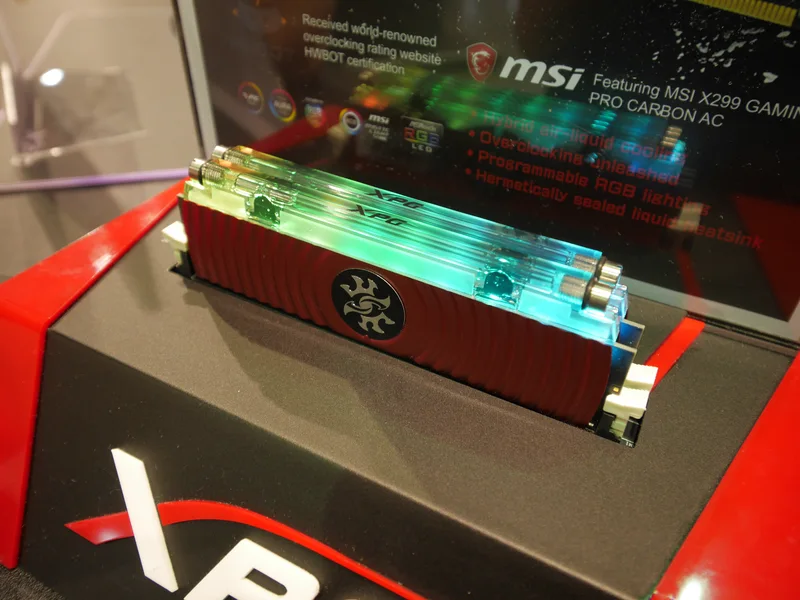
"How much RAM do I need?" is one of the most common questions in PC building, and the honest answer has shifted meaningfully over the past few years. Where 8GB was once a reasonable minimum and 16GB was plenty for almost everyone, modern operating systems, browser tabs, and background services have pushed the comfortable baseline higher. Using two very different real products — the ADATA XPG Spectrix D41 16GB DDR4-3200 kit and the Corsair Vengeance RGB DDR5 32GB 6000MHz kit — as reference points, here's how to actually decide between 16GB and 32GB rather than just defaulting to whatever a build guide recommends.
What 16GB actually handles well in 2026
A 16GB kit like the XPG Spectrix D41, running as a 2x8GB DDR4-3200 kit at CL16, is still a completely viable amount of memory for a large share of PC users. Web browsing with a reasonable number of tabs, office work, most competitive esports titles, and single-player AAA gaming at default settings all fit comfortably inside 16GB without the system reaching for slower page-file swapping. Where 16GB starts to strain is when you multitask aggressively — game running in the background while you have a browser with dozens of tabs open, a Discord call, and a streaming or recording tool all active simultaneously.
Where 32GB earns its place
The Corsair Vengeance RGB DDR5 32GB kit, running 2x16GB at DDR5-6000 CL36, targets a different kind of user. Video editing, especially with 4K footage or multiple timeline tracks; 3D modeling and rendering; running virtual machines or containerized development environments; and heavily modded games that balloon their own memory footprint all benefit meaningfully from 32GB of system memory. Content creators in particular tend to run several memory-hungry applications simultaneously — an editing suite, a browser full of reference tabs, chat apps, and asset management software — and 32GB gives enough breathing room that the operating system rarely needs to compress or swap memory under that load.
DDR4 vs DDR5: a second variable stacked on top of capacity
Capacity and generation are two separate decisions that often get bundled together by accident. The Spectrix D41 kit is DDR4, meaning it only fits older platforms like AM4 or LGA1700 boards with DDR4 slots; the Vengeance kit is DDR5, required for current AM5 and newer Intel platforms. If you're buying a new motherboard today, you'll almost certainly be choosing DDR5 regardless of capacity, since new boards have largely moved away from DDR4 support. We cover the generational trade-offs — speed, latency, pricing — in detail in our DDR5 vs DDR4 buying guide, which is worth reading alongside this capacity comparison if you're speccing a full new build.
Dual-channel matters as much as total capacity
Both of these kits ship as two-module sets rather than a single stick, and that's deliberate: running memory in dual-channel mode roughly doubles the effective memory bandwidth compared to a single stick of the same total capacity, which matters for integrated graphics performance and for any workload that's memory-bandwidth sensitive. When shopping, always check whether a "16GB" or "32GB" listing means one large stick or a matched two-stick kit — a single 32GB stick running in single-channel mode can measurably underperform a 2x16GB kit in games and memory-bound applications, even though the total capacity is identical on paper.
Gaming specifically: does 32GB actually help frame rates?
For most current games, the jump from 16GB to 32GB produces little to no measurable frame rate improvement when nothing else is running — the game simply doesn't need the extra headroom. The benefit shows up in consistency rather than peak performance: fewer stutters during texture streaming, fewer background-task-induced frame drops, and better behavior when a game is left running while you alt-tab to a browser or chat app. If you're building a dedicated gaming rig with minimal background multitasking, 16GB paired with a fast CPU like those covered in our core count vs clock speed guide is still a completely reasonable, cost-effective choice.
Future-proofing and the cost of upgrading later
Memory prices and availability fluctuate, and buying a kit that uses all of a motherboard's DIMM slots today can make a future capacity upgrade more expensive or impossible without discarding your existing sticks. If your board has four DIMM slots, buying a 2x16GB kit now and leaving room to add a matched pair later is a more flexible path than filling every slot immediately. If your board only has two slots, decide your target capacity upfront, since there's no room to add more without replacing what you already bought.
Don't forget to enable the rated speed
Both of these kits ship with an advertised speed — DDR4-3200 for the Spectrix D41, DDR5-6000 for the Vengeance RGB — that your motherboard will not apply automatically out of the box. Every DIMM defaults to a conservative JEDEC baseline speed until you enable XMP or EXPO memory profiles in the BIOS, Intel's and AMD's respective one-click overclocking presets for RAM. Skipping this step is one of the most common, easily avoidable mistakes in PC building: shoppers pay for a 6000MHz kit and then run it at its JEDEC fallback speed, sometimes barely half the rated frequency, because they never opened the BIOS after first boot. Checking that the enabled speed matches the sticker on the box takes thirty seconds and can be the difference between a kit performing as advertised and quietly underperforming for the life of the build.
Timings and latency alongside raw capacity
Capacity gets most of the attention, but timings matter too. The Spectrix D41's CL16 at DDR4-3200 and the Vengeance RGB's CL36 at DDR5-6000 look very different on paper, but DDR5's much higher clock speed means the actual real-world latency of the two kits ends up closer than the raw CAS latency numbers suggest — this is a common source of confusion for buyers comparing generations directly. When comparing two kits within the same generation and capacity tier, lower CAS latency at the same speed is a genuine, if modest, performance advantage; when comparing across DDR4 and DDR5, bandwidth differences tend to matter more than the latency numbers alone.
Bottom line
16GB remains a sensible, budget-friendly baseline for gaming and everyday use, and the DDR4-based Spectrix D41 kit represents that tier well on older or budget-focused platforms. 32GB is worth the extra cost for content creators, heavy multitaskers, and anyone running memory-intensive creative or development workloads, where a kit like the Vengeance RGB DDR5 32GB genuinely changes day-to-day responsiveness. Compare current pricing and specs across the full memory lineup before deciding which capacity tier actually matches how you use your PC.