ASUS ROG Strix Z890-E Gaming WiFi
An ATX LGA1851 board for Core Ultra processors with seven M.2 slots, CUDIMM memory support, Thunderbolt 4 and Wi-Fi 7.
Full Specification Sheet
| Chipset | Intel Z890 |
|---|---|
| Socket | LGA1851 (Intel Core Ultra Series 2) |
| Memory | 4x DIMM DDR5, up to 256 GB, 9200+ MT/s (OC), CUDIMM support |
| Form Factor | ATX (30.5 x 24.4 cm) |
| Expansion | PCIe 5.0 x16 (CPU) + PCIe 4.0 x16 (x4 mode, chipset) |
| Storage | 7x M.2 (3x PCIe 5.0 x4, 4x PCIe 4.0 x4) + 4x SATA 6Gb/s |
| Networking | Realtek 5Gb Ethernet, Wi-Fi 7 (2x2, 320 MHz), Bluetooth 5.4 |
| Rear USB | 14 ports incl. 2x Thunderbolt 4 |
| Audio | ROG SupremeFX ALC4080, 7.1 |
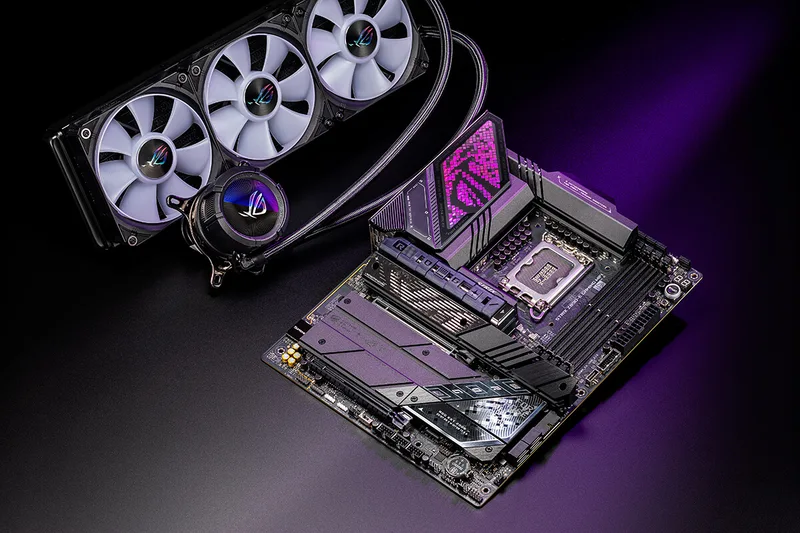
The ASUS ROG Strix Z890-E Gaming WiFi is an ATX motherboard for Intel's LGA1851 socket and the Z890 chipset, designed for the Intel Core Ultra (Series 2) desktop processors. In ASUS's Republic of Gamers range it sits in the Strix family, the tier aimed at enthusiast builders who want extensive connectivity without moving to the most extreme models. This page goes through the published specification, explains the memory, storage and networking arrangements and points out the caveats that matter when planning a build.
Socket, chipset and operating system
The board carries an LGA1851 socket for Intel Core Ultra (Series 2) processors and supports Intel Turbo Boost Technology 2.0 and, depending on the processor, Turbo Boost Max Technology 3.0. ASUS notes that operating system requirements differ by processor family: the Core Ultra 200S series supports Windows 10 version 21H2 and later and Windows 11 version 22H2 and later, while the Core Ultra 200S Plus series needs Windows 11 version 25H2 or later for full compatibility. ASUS directs buyers to its CPU support list for exact processor models, so check that page and the board's BIOS version before pairing an unusual processor with it. Our guide to Wi-Fi 6E versus Wi-Fi 7 on motherboards is relevant to the networking, which is discussed below.
Memory and CUDIMM support
There are four DIMM slots supporting dual-channel DDR5 up to 256 GB in total, with ASUS stating support for rated overclocked speeds of 9200+ MT/s. The specification explicitly lists non-ECC, clocked unbuffered DIMM (CUDIMM) support. CUDIMMs place a clock driver on the module itself to re-time the signal, which is what allows very high data rates to remain stable, and ASUS adjusts its claimed speeds to the mass-production modules available on the market. The board supports Intel XMP profiles, ASUS's AEMP III profiles, NitroPath DRAM technology and the DIMM Flex and DIMM Fit features; ASUS lists these among its memory features, and we do not describe them further because the specification sheet does not. For a look at the kind of kit this board is designed for, see the G.Skill Trident Z5 CK CUDIMM kit staged alongside it, which was announced specifically for Intel Core Ultra 200 K-series processors and Z890 boards. As with any motherboard, supported speeds depend on the processor and the number of modules installed.
Storage: seven M.2 slots and shared lanes
The Z890-E supports seven M.2 slots and four SATA 6 Gb/s ports. The slots connected to the processor are M.2_1 at PCIe 5.0 x4 (which accepts 22110-length drives), M.2_2 at PCIe 4.0 x4, and M.2_3 and M.2_4 at PCIe 5.0 x4. Chipset-connected slots are M.2_5 and M.2_6 at PCIe 4.0 x4, and M.2_7 at PCIe 4.0 x4 with SATA mode support. Intel Rapid Storage Technology supports PCIe and SATA RAID 0, 1, 5 and 10, though the M.2 slots connected to the processor only support RAID 0, 1 and 5. The catch to remember is that M.2_3 and M.2_4 share bandwidth with the main PCIe 5.0 x16 slot: if both are occupied, the graphics slot runs at x8. That is usually acceptable for a graphics card, but you should plan drive placement deliberately. Our explainer on PCIe lane sharing between a GPU and several NVMe drives shows how to think about it.
For expansion, the primary slot is PCIe 5.0 x16, which can run as x16 or be bifurcated into x8/x4/x4, and a second slot is PCIe 4.0 x16 running at x4 from the chipset.
Networking, USB and display outputs
Wired networking is a Realtek 5 Gb Ethernet port. Wireless is 2x2 Wi-Fi 7 (802.11be) on 2.4, 5 and 6 GHz with 320 MHz channel support and a stated transfer rate of up to 5.8 Gbps, plus Bluetooth 5.4. ASUS states that full Wi-Fi 7 requires Windows 11 24H2 or later, that older Windows 11 releases support only Wi-Fi 6E, and that on Windows 10 only Wi-Fi 6 is supported. The 6 GHz band is regulated differently by country.
The rear panel provides 14 USB ports: two Thunderbolt 4 Type-C ports, nine 10 Gbps ports (seven Type-A, one Type-C and one Type-C with up to 30 W power delivery) and three 5 Gbps Type-A ports. For displays, the board offers one DisplayPort output, one HDMI output, and the two Thunderbolt 4 ports that carry DisplayPort and Thunderbolt video. ASUS notes that the DisplayPort and HDMI outputs each support up to 8K at 60 Hz as specified, and that, when installing an operating system, the monitor should be connected to the rear HDMI port or a discrete graphics card. Thunderbolt 4 also matters for external NVMe enclosures; our guide to USB4 versus Thunderbolt for external NVMe enclosures explains what it adds. Internally there is a front-panel 20 Gbps USB Type-C connector, two 5 Gbps headers and three USB 2.0 headers, plus a Thunderbolt (USB4) header for add-in cards.
Audio, cooling and design features
Audio is the ROG SupremeFX ALC4080 codec with a Savitech amplifier, a stated 120 dB signal-to-noise ratio for stereo playback and 110 dB for recording, and 32-bit, 384 kHz playback on the front panel. Cooling connections include a CPU fan header, a CPU optional header, an AIO pump header and five chassis fan headers, and there are three addressable Gen 2 RGB headers, a thermal sensor header, a chassis intrusion header and a PCIe mode switch. Power comes from a 24-pin main connector and two 8-pin CPU connectors, and the board uses 5K black metallic capacitors. VRM and M.2 heatsinks with a backplate handle cooling.
ASUS Q-Design features include the tool-free M.2 Q-Latch, Q-Release and Q-Slide mechanisms, a slimmer release for the PCIe slot with SafeSlot reinforcement, Q-LED diagnostic lights for CPU, memory, graphics and boot device, a Q-Code display, a Q-Dashboard and a pre-mounted I/O shield. BIOS FlashBack and Clear CMOS buttons sit on the rear panel, and there is a FlexKey button. Software includes Armoury Crate, Fan Xpert 4 with AI Cooling II and a driver hub.
Build planning notes
The board is a full ATX size, 30.5 by 24.4 cm, and takes processor power through two 8-pin connectors, so check the case and power supply accordingly. Seven M.2 slots is a lot of storage, but only some of them are processor-connected: use the PCIe 5.0 slots for the fastest drives, and remember that filling the two shared processor slots reduces the graphics slot to x8. If you intend to use CUDIMM memory at its rated speed, install the latest BIOS first, since memory support usually improves with firmware updates, and read the operating-system note above so that the Wi-Fi and processor features are fully available.
Where it fits
The Z890-E is a high-end Intel board suited to builds with several fast SSDs, CUDIMM memory, Thunderbolt peripherals and Wi-Fi 7. For an AMD alternative from the same product family, see the X870E-E versus Z890-E comparison, and browse all motherboards for other options. All figures are from ASUS's official product page; availability, bundled accessories and prices vary by region.
Product image: ASUS product image.