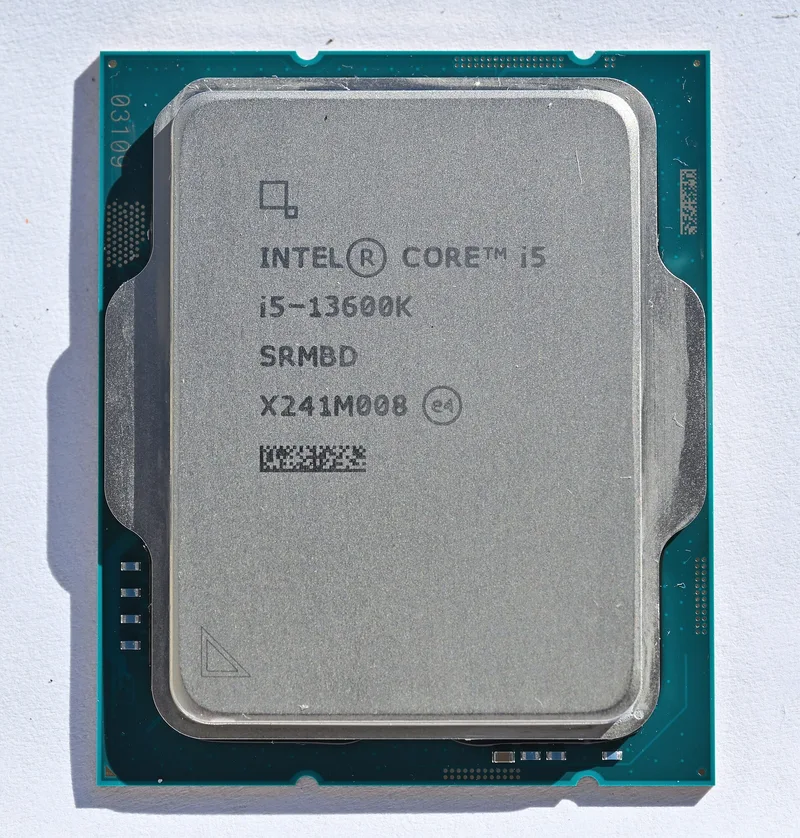
Intel Core i5-13600K
A fourteen-core hybrid LGA1700 chip with a 181 W turbo ceiling and the flexibility to use DDR4 or DDR5.
Full Specification Sheet
| Cores / Threads | 14 (6P+8E) / 20 |
|---|---|
| Base / Boost Clock | P-cores 3.5 GHz / up to 5.1 GHz; E-cores 2.6 GHz / up to 3.9 GHz |
| Cache | 24 MB Intel Smart Cache (L3) |
| TDP (Base / Max Turbo) | 125 W / 181 W |
| Socket | LGA1700 |
| Process | Intel 7 |
| Memory | DDR5-5600 or DDR4-3200 (2 DIMMs, dual-channel) |
| PCIe | 16x PCIe 5.0 + 4x PCIe 4.0 lanes |
The Intel Core i5-13600K belongs to the 13th-generation Raptor Lake desktop family and was released on 20 October 2022 at a recommended customer price of $319. It uses a hybrid layout of six performance cores and eight efficiency cores, giving fourteen cores and 20 threads in total, because each performance core can run two threads while each efficiency core runs one. It is an unlocked K-series part for the LGA1700 socket, and its role in the lineup is straightforward: bring most of the family's strengths to a lower price and a lower power ceiling than the Core i7 above it.
Reading the core layout
The six performance cores are Raptor Cove cores with a base clock of 3.5 GHz and a maximum turbo of up to 5.1 GHz. The eight efficiency cores are Gracemont cores with a 2.6 GHz base and a turbo of up to 3.9 GHz. It is worth noticing what those numbers imply. The performance cores are where games and lightly threaded software spend most of their time, and their turbo ceiling is slightly below that of the Core i7-13700K, which reaches up to 5.4 GHz. The efficiency cores matter when many threads are active at once, such as during a render, a compile or a large export, and they also give the operating system somewhere to put background tasks so that the performance cores are left free for the foreground application.
Cache totals 24 MB of shared L3, with the performance cores each getting a private L2 slice and the efficiency cores sharing L2 in clusters. Compared with the 30 MB of the Core i7-13700K, the smaller cache is one of the ways the design keeps its price and power lower. In day-to-day use the difference is subtle, and for most gaming and productivity tasks the clock speed and core layout matter more than the extra 6 MB.
Memory and connectivity
One of the most practical features of the platform is that the processor can be paired with either DDR5 or DDR4, depending on which motherboard you buy. Intel rates all models in this family for up to DDR4-3200 or DDR5-4800, and for processors from this tier upward it lists DDR5 support up to 5600 MT/s with two modules installed, falling to 4400 MT/s when four modules are present. Capacity can reach 128 GB. The choice is made by the board, not the processor: DDR4 boards keep the cost of a build down, especially if you already own compatible memory, while DDR5 boards give you access to higher bandwidth and a platform with more room to grow. Our DDR5 versus DDR4 buying guide lays out the trade-offs.
From the processor itself you get 16 PCIe 5.0 lanes, 4 PCIe 4.0 lanes and 8 DMI lanes. The sixteen PCIe 5.0 lanes serve the graphics slot, and the four PCIe 4.0 lanes are typically wired to an NVMe drive slot. The motherboard's chipset provides additional lanes for further storage, networking and USB, which means the chipset you select influences how many devices you can attach without compromise.
Power draw and cooling
The base power is 125 W and the maximum turbo power is 181 W. That is a noticeably lower ceiling than the 253 W of the Core i7-13700K and makes the i5 easier to cool and easier to power. Real behaviour depends on motherboard settings: many boards ignore the conservative defaults and allow sustained turbo power, so a system may run hotter and draw more than the minimum specification suggests. If you want quieter operation, set explicit power limits in the BIOS. Intel does not include a cooler with K-series processors, so buy a competent tower cooler or a liquid cooler. For the power supply, use our guide to PSU wattage to add up the graphics card, processor and other components with headroom, because the graphics card usually dominates the total.
Where it fits in a build
The 13600K is a natural core for a mainstream-to-upper-midrange gaming PC. Fourteen cores and twenty threads are more than most games can use, which leaves capacity for a streaming application, chat programs and browser tabs to run at the same time. It also handles creative work such as photo editing and moderate video projects comfortably. If you spend many hours per day rendering or compiling, moving up to the Core i7-13700K adds eight more threads and a larger cache, and you can weigh the differences on a comparison page. The Core i5-13600K against the Core i7-13700K page lays out the spec differences side by side.
For buyers coming from an older platform, note that LGA1700 is its own socket: the processor does not fit older Intel boards, and coolers designed for previous sockets may need a different mounting kit. Our platform guide covering AM4, AM5 and LGA1700 explains how the sockets differ and which coolers and boards go together. If AMD is also on your shortlist, the Core i5-13600K against the Ryzen 5 5600X comparison highlights the difference between a hybrid design and a six-core processor with a lower power rating.
Buying advice
Confirm that the motherboard is a compatible LGA1700 model with a BIOS that recognises the processor, decide early whether you want DDR4 or DDR5 because the board fixes that choice, choose a chipset that allows overclocking only if you intend to use the unlocked multiplier, and budget for a cooler. Browse the processors catalogue to see how this model relates to the other chips in the range. The specification list on this page comes directly from the manufacturer's published figures, and the launch price reflects the recommended customer price rather than what the processor costs at retail today, so check current prices before making a decision.
Verdict
The Core i5-13600K is a sensible choice when you want a modern hybrid processor without paying for a top-tier model. Its six performance cores and eight efficiency cores cover gaming, streaming and everyday creative work, its 181 W turbo ceiling is easier to manage than its bigger siblings, and its DDR4-or-DDR5 flexibility keeps the build cost under control. Pair it with a good cooler, a well-sized power supply and a motherboard that fits your memory plans, and it should deliver strong all-round performance for several years of use.
Photo: 4300streetcar / Wikimedia Commons, CC BY 4.0.