ASUS ROG Maximus Z890 Hero
A flagship ATX LGA1851 board for Core Ultra processors with six M.2 slots, a SlimSAS connector, dual Thunderbolt 4, two Ethernet ports and Wi-Fi 7.
Full Specification Sheet
| Chipset | Intel Z890 |
|---|---|
| Socket | LGA1851 (Intel Core Ultra Series 2) |
| Memory | 4x DIMM DDR5, up to 256 GB, 9200+ MT/s (OC), CUDIMM support |
| Form Factor | ATX |
| Expansion | PCIe 5.0 x16 (CPU, x16 or x8/x4/x4) + PCIe 4.0 x16 (x4 mode) + PCIe 4.0 x1 |
| Storage | 6x M.2 (3x PCIe 5.0 x4, 3x PCIe 4.0 x4) + 1x SlimSAS + 4x SATA 6Gb/s |
| Networking | Intel 2.5Gb + Realtek 5Gb Ethernet, Wi-Fi 7 (2x2, 320 MHz), Bluetooth 5.4 |
| Rear USB | 11 ports incl. 2x Thunderbolt 4 |
| Audio | ROG SupremeFX ALC4082, ESS ES9219 Quad DAC |
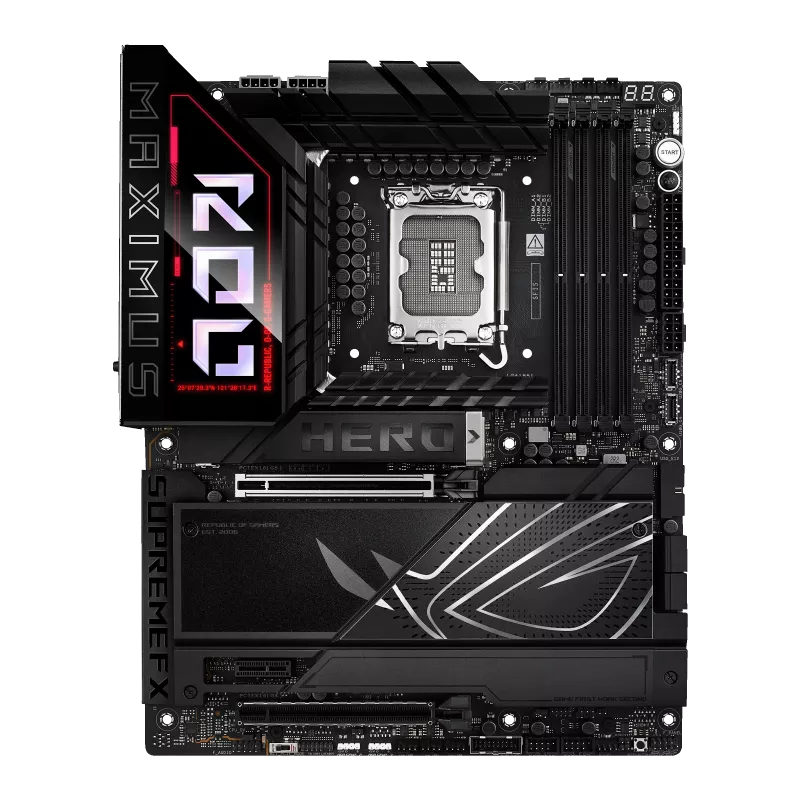
The ASUS ROG Maximus Z890 Hero is a top-tier ATX motherboard for Intel's LGA1851 socket and the Z890 chipset, designed for the Intel Core Ultra (Series 2) desktop processors. In ASUS's Republic of Gamers line the Maximus name marks the Intel flagship family, above the Strix boards, and the Hero model is the enthusiast board that sits below the most extreme special editions. It is aimed at builders who want a large amount of storage, high-speed memory support, Thunderbolt 4 and overclocking tools, and who are prepared to pay for a strong power-delivery design and premium features. This page reviews the specification that ASUS publishes, explains how the slots and lanes are arranged and points out the details that are easy to miss.
Processor and memory
The board supports Intel Core Ultra processors (Series 2) on socket LGA1851, with support for Intel Turbo Boost Technology 2.0 and Turbo Boost Max Technology 3.0. The chipset is the Intel Z890, the enthusiast tier that allows processor and memory overclocking. Memory support covers four DIMM slots with a maximum of 256 GB of DDR5 in a dual-channel architecture. ASUS specifies speeds of up to 9200+ MT/s with overclocking, for non-ECC unbuffered modules including Clocked Unbuffered DIMM (CUDIMM), a newer module type that places a clock driver on the module to help maintain signal integrity at very high speeds. Intel XMP profiles are supported, along with ASUS's AEMP III profile and several memory-tuning features named by ASUS: DIMM Flex, NitroPath DRAM technology and DIMM FIT. A kit such as the G.SKILL Trident Z5 CK DDR5 CUDIMM is exactly the sort of memory this board is designed to run.
PCIe slots and M.2 storage
Expansion starts with a PCIe 5.0 x16 slot connected to the processor, which can run as x16 or be divided into x8/x4/x4 modes, and uses ASUS's Q-Release Slim mechanism. The chipset adds a PCIe 4.0 x16 slot that works in x4 mode and a PCIe 4.0 x1 slot. The graphics slot is the one to use for a high-end card, while the chipset slots suit capture cards, network cards or, as ASUS notes, a Thunderbolt add-in card, which must go in the PCIe 4.0 x16 slot.
Storage is the board's headline feature. ASUS lists up to six M.2 slots, four SATA 6 Gb/s ports and one SlimSAS connector. The processor feeds M.2_1 (which accepts 2242, 2260, 2280 and 22110 modules) and M.2_3 and M.2_4 at PCIe 5.0 x4, with M.2_2 at PCIe 4.0 x4. The chipset feeds M.2_5 and M.2_6 at PCIe 4.0 x4, together with the four SATA ports. The SlimSAS connector supports PCIe 4.0 x4 or, through an adapter cable sold separately, up to four SATA devices. Some of these connections share bandwidth with each other, and the footnotes to ASUS's table govern which combinations can run at once, so plan your drive layout before you buy. The gap between Gen4 and Gen5 drives is discussed in our guide to upgrading from PCIe 4.0 to PCIe 5.0 NVMe, and it is worth checking whether your workload benefits before you pay a premium for the fastest drives. M.2 slots are covered by heatsinks and a backplate, and use the Q-Latch, Q-Release and Q-Slide tool-free mechanisms.
Networking and wireless
Two wired ports are provided: an Intel 2.5 Gb Ethernet controller and a Realtek 5 Gb Ethernet controller, with ASUS LANGuard protection. Wireless connectivity is 2x2 Wi-Fi 7 (802.11be) across the 2.4, 5 and 6 GHz bands, with support for 320 MHz channel width and a stated transfer rate of up to 5.8 Gbps, together with Bluetooth 5.4. As with other boards, ASUS notes that Windows 11 requires version 24H2 or later for full Wi-Fi 7 functionality and that Windows 10 supports only Wi-Fi 6.
USB, Thunderbolt and display
The rear panel has eleven USB ports: two Thunderbolt 4 Type-C ports, five USB 10 Gbps ports (four Type-A and one Type-C) and four USB 5 Gbps Type-A ports. The two Thunderbolt 4 ports also carry DisplayPort and Thunderbolt video output, and ASUS states that in Thunderbolt 4 mode they can drive an 8K 60 Hz display with display stream compression or two 4K 60 Hz displays. There is one HDMI port as well. Internally there are a USB 20 Gbps connector with up to 60 W power delivery for a front-panel Type-C, a 10 Gbps Type-C connector, two 5 Gbps headers and two USB 2.0 headers, plus a Thunderbolt (USB4) header for an add-in card. Our comparison of USB4 and Thunderbolt for external NVMe enclosures explains how these fast ports matter for external storage.
Audio, power and overclocking features
Audio is handled by the ROG SupremeFX 7.1 codec ALC4082 with an ESS ES9219 Quad DAC, gold-plated jacks, a stated 120 dB signal-to-noise ratio for stereo playback and 110 dB for recording, and an optical S/PDIF output. Power connections are a 24-pin main connector, two 8-pin 12 V CPU connectors and one 8-pin PCIe connector for extra slot power. ASUS lists the Extreme Engine Digi+ power design with 10K black metallic capacitors and MicroFine alloy chokes, and a VRM heatsink. The board carries the Extreme OC Kit: a FlexKey button, a ReTry button, a Start button, a thermal sensor header, an Alteration PCIe mode switch, Q-Code and a Q-LED diagnostic set for CPU, DRAM, graphics and boot device. What a strong power delivery design means for stability under load is the subject of our VRM quality explainer.
The board provides one CPU fan header, one CPU optional header, an AIO pump header, four chassis fan headers, a water-pump header and three addressable Gen 2 RGB headers. ASUS supplies Fan Xpert 4 with AI Cooling II, the Armoury Crate software and a BIOS with EZ Mode, CrashFree BIOS 3 and Q-Dashboard, and the rear panel has BIOS FlashBack and Clear CMOS buttons.
Who it suits
This is a board for a builder who plans to fill many M.2 slots, run very fast DDR5, use Thunderbolt peripherals and possibly overclock. For a similar Intel platform with a more moderate feature set, the Strix line is the alternative, and the ROG Maximus Z890 Hero versus ROG Strix Z890-E comparison shows the differences in slots and connectivity. Other options are listed in the motherboard category. All information on this page comes from ASUS's official specification. Pricing, availability, included accessories and BIOS support vary by region and revision, so confirm the details with your retailer and the manufacturer before ordering.
Product image: ASUS product image.