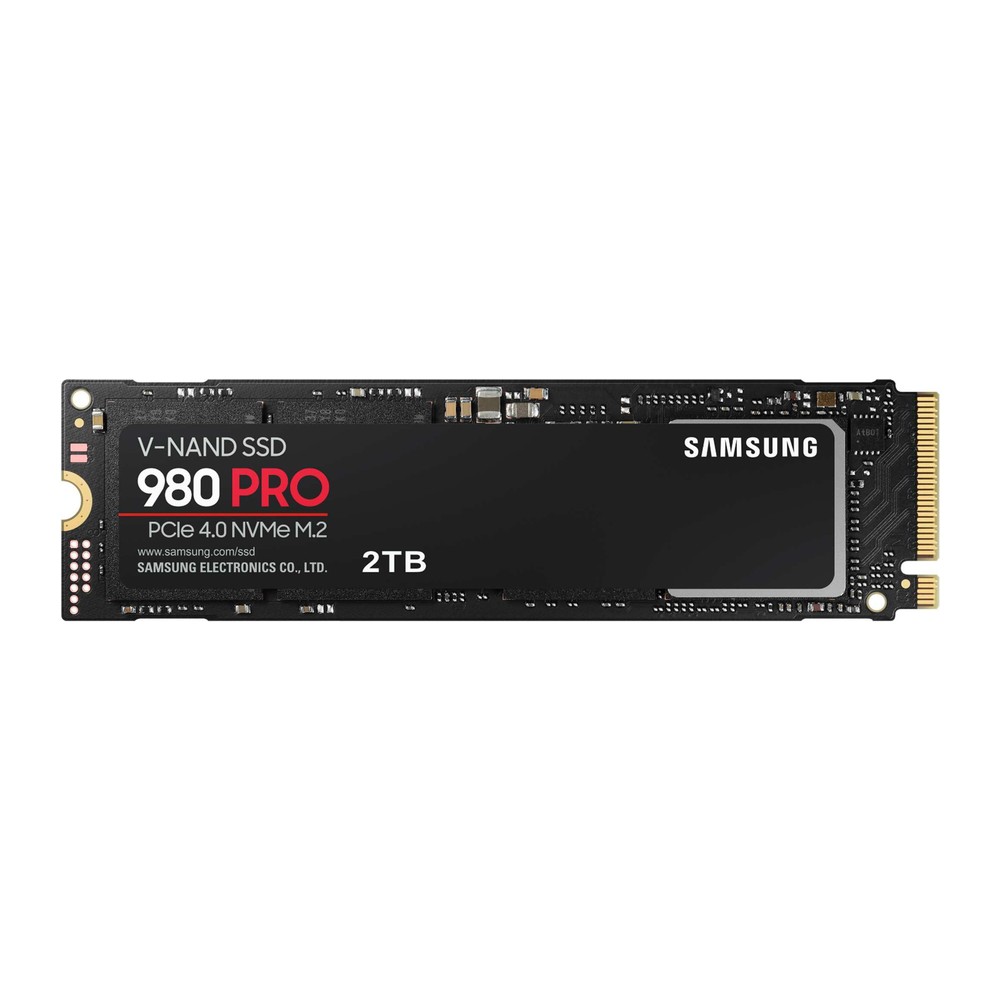
Samsung 980 PRO NVMe SSD (250GB-2TB)
A PCIe 4.0 x4 NVMe SSD in M.2 2280 with TLC V-NAND and DRAM cache, 250 GB to 2 TB, rated up to 7,000/5,100 MB/s and one million IOPS.
Full Specification Sheet
| Type | Internal SSD, NVMe (client) |
|---|---|
| Interface | PCIe 4.0 x4, NVMe 1.3c |
| Form Factor | M.2 2280 (max. 80.15 x 22.15 x 2.38 mm) |
| Capacities | 250 GB, 500 GB, 1 TB, 2 TB |
| Controller | Samsung in-house controller |
| NAND | Samsung V-NAND 3-bit MLC (TLC) |
| DRAM Cache | 512 MB (250/500 GB), 1 GB (1 TB), 2 GB (2 TB) LPDDR4 |
| Sequential Read | Up to 6,400 MB/s (250 GB), 6,900 MB/s (500 GB), 7,000 MB/s (1 TB and 2 TB) |
| Sequential Write | Up to 2,700 MB/s (250 GB), 5,000 MB/s (500 GB and 1 TB), 5,100 MB/s (2 TB) |
| Random Read 4K (QD32) | Up to 500K (250 GB), 800K (500 GB), 1,000K (1 TB and 2 TB) IOPS |
| Random Write 4K (QD32) | Up to 600K (250 GB), 1,000K (500 GB to 2 TB) IOPS |
| Endurance (TBW) | 150 TB (250 GB), 300 TB (500 GB), 600 TB (1 TB), 1,200 TB (2 TB) |
| Power (active, avg.) | Read 5.0 / 5.9 / 6.2 / 6.1 W, write 3.9 / 5.4 / 5.7 / 5.6 W (250 GB / 500 GB / 1 TB / 2 TB) |
| Encryption | AES 256-bit, TCG Opal 2.0, IEEE 1667 |
| Operating Temperature | 0 to 70 C |
| MTBF | 1,500,000 hours |
| Warranty | 5-year limited (or TBW, whichever comes first) |
The Samsung 980 PRO was Samsung's first consumer NVMe drive for PCIe 4.0 and remains a reference point for the high-performance class of that generation. It is an M.2 2280 card built from Samsung's own controller, 3-bit V-NAND and LPDDR4 DRAM, rated at up to 7,000 MB/s for sequential reads and up to one million IOPS for random reads and writes on the larger capacities. The data sheet covers four sizes from 250 GB to 2 TB. This page summarises that document. We have not tested the drive ourselves, and no prices or measurements of our own appear here.
Interface and compatibility
The drive connects through PCIe Gen 4.0 with four lanes and uses NVMe 1.3c. The card measures at most 80.15 by 22.15 by 2.38 millimetres. To reach its rated speeds it needs an M.2 slot wired for PCIe 4.0 or newer. It is backward compatible with PCIe 3.0, and the data sheet is specific about what to expect there: up to 3,500 MB/s for reads, and between 2,700 and 3,470 MB/s for writes depending on capacity. In an older system the 980 PRO therefore behaves like a very good Gen3 drive, with the option of using its full speed after a later platform upgrade. Our Gen4 vs Gen5 upgrade guide looks at how much each step in interface speed matters in practice.
Speed by capacity
Sequential read is rated at up to 6,400 MB/s for the 250 GB model, 6,900 MB/s for 500 GB and 7,000 MB/s for 1 TB and 2 TB. Sequential write shows a larger spread: up to 2,700 MB/s for 250 GB, 5,000 MB/s for 500 GB and 1 TB, and 5,100 MB/s for 2 TB. The smallest model is clearly the weakest, and the family reaches its intended performance from 500 GB upwards.
Random performance at queue depth 32 is given as up to 500,000 IOPS for reads on the 250 GB model, 800,000 on the 500 GB model and 1,000,000 on the 1 TB and 2 TB models, with random writes of up to 600,000 IOPS on 250 GB and 1,000,000 on the other three. At queue depth 1 with a single thread, all capacities are listed at 22,000 IOPS for reads and 60,000 IOPS for writes. Write figures were measured with Intelligent TurboWrite active; as on other Samsung drives, this fast buffer covers a limited amount of data, after which sustained write speed is lower.
Controller, NAND and cache
Controller, flash and DRAM all come from Samsung. The memory is V-NAND 3-bit MLC, the type generally called TLC. Earlier PRO generations used 2-bit MLC, so the 980 PRO marked a change in Samsung's line-up; the data sheet simply states the 3-bit type. The DRAM cache is 512 MB for the 250 GB and 500 GB models, 1 GB for 1 TB and 2 GB for 2 TB.
Endurance and warranty
Total bytes written are 150 TB for 250 GB, 300 TB for 500 GB, 600 TB for 1 TB and 1,200 TB for 2 TB, equal to 600 full drive writes. The limited warranty lasts five years or until the TBW value is reached, whichever comes first. Mean time between failures is 1.5 million hours. These are standard figures for a premium TLC drive and identical in ratio to those of Samsung's EVO models.
Power and heat
A fast Gen4 drive consumes more power than a Gen3 model. Average active power for reading is listed as 5.0, 5.9, 6.2 and 6.1 watts for the four capacities, and for writing as 3.9, 5.4, 5.7 and 5.6 watts. Idle power with active state power management is 35 milliwatts, and the L1.2 state draws 5 milliwatts. The operating range is 0 to 70 °C according to the drive's own sensor, and Samsung recommends proper airflow. In practice, a motherboard M.2 heat spreader or an equivalent cooler is advisable for long transfers, since a drive that becomes too hot will reduce its speed to protect itself. Our guide to thermal throttling and heatsinks explains when extra cooling is worthwhile. The data sheet we use describes the bare M.2 card without a heatsink.
Security and features
AES 256-bit full-disk encryption, TCG Opal 2.0 and IEEE 1667 Encrypted Drive are supported, along with TRIM, garbage collection and S.M.A.R.T. Non-operating shock tolerance is 1,500 G for 0.5 milliseconds, and vibration tolerance is 20 G between 20 and 2,000 Hz.
How it compares in our database
In our storage section, the 980 PRO sits just below the newer Samsung 990 PRO, whose 4 TB version we list with sequential figures of up to 7,450 and 6,900 MB/s. A direct rival from another manufacturer is the WD_BLACK SN850X, rated at up to 7,300 MB/s for reads and offered in capacities up to 8 TB. The page 980 PRO vs WD_BLACK SN850X compares the two specifications.
Who it suits
The 980 PRO is intended for enthusiasts, gamers and professionals with a PCIe 4.0 platform who want high sequential and random performance together with a DRAM cache, TLC flash and hardware encryption. It suits work with large media files, software builds, virtual machines and games with long loading sequences. For a simple office PC, its performance is more than required, and a mainstream drive will serve equally well. Buyers needing more than 2 TB must look at other families, since the data sheet ends at that capacity.
Installation tips
Install the drive in the M.2 slot connected directly to the processor where possible, since this is usually the slot with full PCIe 4.0 support; the motherboard manual shows which slots share lanes with other ports. Fit the board's heat spreader, remembering to remove any protective film from its thermal pad. After installation, check for firmware updates with the manufacturer's management software before putting important data on the drive.
What the data sheet does not say
The data sheet does not name the controller, does not give the size of the TurboWrite buffer and does not state sustained write speed after that buffer. It does not cover heatsink-equipped versions. No release date is printed in the document. Prices vary by country, retailer and capacity and are not listed on this page.