Thermal Paste vs. Liquid Metal vs. Thermal Pads: Which Actually Cools Better
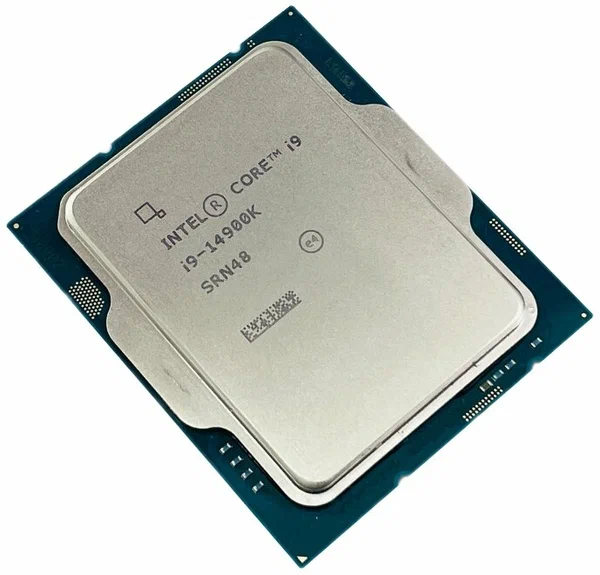
Thermal interface material sits between your CPU or GPU die and its cooler, filling in the microscopic gaps that would otherwise trap insulating air. Three main options exist: standard thermal paste, liquid metal, and thermal pads, and they are not interchangeable despite all being sold under the broad label of "thermal compound." Picking the wrong one for your hardware can cost you meaningful temperatures, or in liquid metal's case, actually damage components if applied carelessly.
Standard Thermal Paste: The Default for a Reason
Most thermal pastes are silicone- or carbon-based compounds loaded with thermally conductive particles. A well-regarded paste like Thermal Grizzly Kryonaut sits around 12.5 W/mK thermal conductivity, while cheaper stock pastes bundled with budget coolers can be under half that. That's not a subtle gap. On a hot-running chip like the Core i9-14900K, with its 24 cores and 253W maximum turbo power draw, the difference between a quality paste and a bargain-bin one can be five to ten degrees Celsius under sustained load. Paste is electrically non-conductive, forgiving to apply, and safe for a first-time builder, which is why it remains the default recommendation for the vast majority of builds regardless of how much thermal headroom the chip actually needs.
Liquid Metal: Real Performance Gains, Real Risk
Liquid metal compounds, typically gallium-indium alloys like Thermal Grizzly Conductonaut, conduct heat dramatically better; commonly cited figures put liquid metal around 73 W/mK, roughly six times a good paste. On a high-TDP chip that's thermally limited rather than power-limited, that can translate to a genuinely noticeable temperature drop, sometimes 10-15°C under sustained load. The catch is real: liquid metal is electrically conductive, and a stray drop that migrates onto a motherboard trace or RAM slot can cause a short. It also corrodes bare aluminum coolers over time, though copper and nickel-plated surfaces are safe, and is far messier to apply cleanly than paste. This isn't a beginner product; it's for experienced builders chasing the last few degrees on an unlocked, high-power chip who understand the failure modes and are comfortable masking off sensitive areas of the die and socket before application.
Thermal Pads: Convenience Over Peak Performance
Thermal pads are pre-cut solid sheets, commonly used for VRMs, M.2 SSDs, and RAM heatsinks rather than the CPU itself, though some pre-built systems use them on the CPU for assembly-line consistency. Pad conductivity varies widely by thickness and material, generally landing in the 3-8 W/mK range for standard silicone pads, with premium phase-change pads performing closer to paste-level numbers. Pads never pump out or dry up the way paste eventually does, and they're effectively foolproof to install with no spreading technique required and no risk of over- or under-applying. For a CPU under sustained heavy load they generally underperform a good paste, but for a secondary chip like an NVMe controller that just needs to shed moderate heat, a pad is often the more practical and durable choice.
Application Technique Matters As Much As Material Choice
Even the best paste underperforms if applied badly. A pea-sized dot in the center works well for most modern CPU integrated heat spreaders because cooler mounting pressure spreads it evenly on contact, while a large, cold, rectangular die benefits from a thin spread applied by hand or card to avoid air pockets at the corners. Too much paste isn't actually safer than too little; excess paste can pool at the edges and, in extreme cases, contribute to insulating dead zones rather than improving contact. Liquid metal application is far less forgiving of technique: even coverage in a very thin layer is essential, since liquid metal doesn't compress or spread under mounting pressure the way paste does, and any uncovered gap becomes a hot spot.
Longevity: What Actually Happens Over Years
Standard paste typically needs reapplication every 2-4 years as it dries out and loses conductivity, longer for high-quality non-drying formulas. Liquid metal doesn't dry out the way paste does, but it can slowly migrate or "pump out" from extreme thermal cycling over years, and its interaction with a cooler's surface needs periodic inspection, particularly on aluminum base plates. Thermal pads are essentially maintenance-free for the life of the component they're mounted to, which is part of why manufacturers favor them for parts that are rarely serviced, like M.2 heatsinks, where opening up the system to reapply paste every few years simply isn't practical.
Which One Should You Actually Use
- For a CPU on a mainstream or budget build, quality thermal paste is the right call. It's reliable, safe, and the performance gap to liquid metal won't matter without extreme overclocking.
- For a CPU on an unlocked, high-TDP chip pushed to its thermal limit, liquid metal is worth considering, only if you're comfortable with careful application and understand the short-circuit risk.
- For VRMs, M.2 SSDs, and RAM heatsinks, thermal pads matched to the exact gap height for your board are the practical, low-maintenance choice, and are worth pairing with a broader cooling strategy decision for the whole build.
There's no universally "best" thermal interface material; there's only the right one for the component, the power draw, and how much application risk you're willing to accept for the last few degrees of headroom. If you're weighing whether it's even time to repaste an aging cooler, material choice matters less than simply not skipping the maintenance in the first place.
A Note on Cost Per Application
Price differences between these three categories are easy to overestimate relative to how rarely most people actually replace thermal interface material. A quality paste tube lasts several applications and typically costs less than a single mid-range game, while a liquid metal kit, despite its higher per-gram price, is also used in tiny quantities and lasts many applications once purchased. Pre-cut thermal pads for a specific M.2 drive or VRM section are usually sold in small multi-packs sized for exactly one board, making cost comparison per application somewhat misleading since the three materials rarely compete for the same purchase decision in the first place; the choice is driven by the component being cooled, not by price.