CPU Overclocking and Voltage Safety: What Actually Kills a Chip
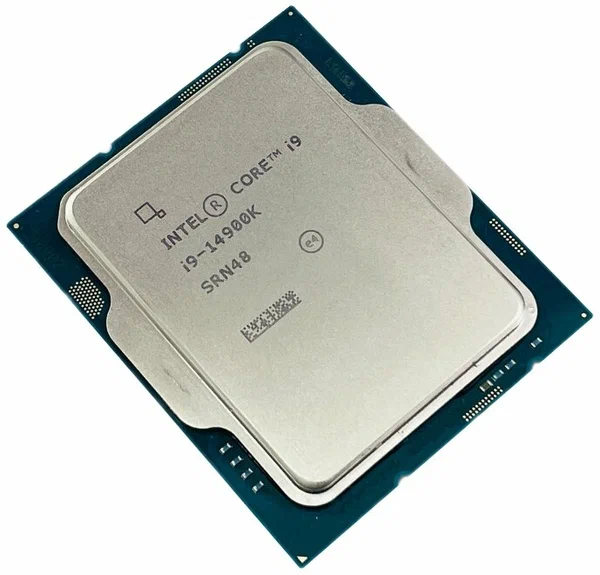
Overclocking has a reputation problem. To a lot of PC builders it still sounds like something that voids your warranty, cooks your CPU, and buys you a few extra frames for a lot of risk. That reputation is mostly outdated. Modern CPUs from both Intel and AMD already run close to their practical limits out of the box thanks to aggressive automatic boost algorithms, and the bigger, more useful conversation in 2026 isn't really about squeezing out extra clock speed — it's about understanding Vcore voltage and what actually damages silicon, so you can tune safely, or just leave sensible headroom and stop worrying.
Clock Speed Doesn't Kill Chips — Voltage and Heat Do
This is the single most misunderstood part of overclocking. Running a CPU at a higher multiplier by itself does very little damage over time. What actually degrades silicon is sustained high voltage combined with high temperature, through a slow process called electromigration — atoms in the chip's microscopic metal interconnects physically migrate over years of current flow, and that migration accelerates sharply as voltage and temperature climb. A CPU running at a modest overclock with tightly controlled, moderate voltage can comfortably outlast one running stock clocks but held at a high voltage under sustained heavy load. The takeaway: voltage is the dial you need to respect, not clock speed by itself.
What Counts as a Safe Voltage
There is no single universally "safe" number because it depends on the silicon generation, the manufacturing node, and how much sustained load (versus brief bursts) the voltage is applied under. That said, community and enthusiast consensus after years of degradation reports on modern Intel and AMD chips has converged on some practical daily-use guidelines: keeping sustained Vcore voltage under roughly 1.35-1.4V on modern desktop CPUs under full load is generally considered a conservative, long-term-safe ceiling on good cooling, while anything meaningfully above that under sustained all-core load is where degradation risk starts climbing noticeably, particularly if temperatures are also pushed close to the chip's thermal limit at the same time. Brief, transient voltage spikes during light single-core boost are a different and much lower-risk scenario than the same voltage held constant under a stress test for hours.
Temperature Is the Other Half of the Equation
Voltage and temperature amplify each other. The same voltage that's perfectly safe at 70°C becomes considerably riskier at 95°C+. Most modern Intel K-series chips throttle around a 100-105°C junction temperature ceiling, and AMD's Ryzen chips behave similarly in the high-90s. Running right up against that ceiling for extended periods, even if the chip is protecting itself with throttling, means you're operating in the zone where voltage-driven degradation compounds fastest. This is exactly why cooling capacity matters as much as voltage tuning — a high-end air cooler or a quality liquid loop buys you real thermal headroom, and if you're deciding between them for an overclocking-focused build, our air vs liquid cooling comparison walks through the tradeoffs in more depth.
Undervolting: The Safer, More Useful Tuning Direction
For most people, the more valuable tuning exercise isn't pushing clocks up with more voltage — it's the opposite: reducing voltage at the same or similar clock speeds. Both platforms have dedicated tools for this. On AMD, Precision Boost Overdrive's Curve Optimizer lets you apply a negative voltage offset per core, keeping boost clocks intact while cutting the voltage the chip actually requests at each frequency point. On Intel, adaptive voltage offsets and per-core voltage/frequency curve tuning achieve something similar. Undervolting typically lowers temperatures, reduces fan noise, and in laptops meaningfully extends battery life, all while matching or only slightly reducing performance — it is, in practical terms, a much better risk-to-reward tuning target than raw overclocking for the vast majority of builds.
The Motherboard's Role: VRM Quality
Whatever voltage you settle on, the motherboard's power delivery has to supply it cleanly and stably. A board with a weak VRM (voltage regulation module) can struggle to hold voltage flat under sustained heavy load, causing voltage droop or ripple that's arguably more damaging than a slightly higher but stable voltage target. This matters more the more aggressively you tune, and it's a big part of why two motherboards at the same price point can behave very differently under an all-core stress test. We go into this in detail in our motherboard VRM quality guide — it's worth reading before you invest time tuning voltage curves on a budget board with minimal power phases.
Safe Overclocking Practice, Step by Step
- Change one variable at a time: adjust multiplier or voltage offset individually, not both together, so you can isolate what caused instability or a temperature jump.
- Move in small increments: single multiplier steps or voltage changes of 0.01-0.02V per test round, not large jumps.
- Stress test with realistic duration: a 20-minute stability test can pass while a 2-hour session reveals thermal throttling or voltage-related crashes it missed.
- Monitor in real time: tools like HWInfo let you log Vcore, package temperature, and power draw continuously — watch for voltage spikes the BIOS default settings may be adding automatically (many boards apply more voltage than requested under "auto" settings as a safety margin, which is worth manually correcting).
- Respect thermal ceilings, not just stability: a configuration that's "stable" but constantly brushing 100°C is not actually a good long-term setting even if it never crashes.
Silicon Lottery and Chip-to-Chip Variance
Two CPUs of the exact same model, bought from the same retailer in the same week, can tolerate meaningfully different voltage-to-frequency curves. This is the "silicon lottery" — normal manufacturing variance means some chips reach a given clock speed at a lower voltage than others, purely due to tiny differences in how the transistors on that specific die turned out. This is why community-sourced overclocking numbers should be treated as a rough reference, not a guarantee: your specific chip might need noticeably more voltage to hit the same clock a forum post describes, or it might do it more efficiently. It also means two people running "identical" overclocks on paper are not actually running identical risk profiles, because the voltage their chip specifically requires to sustain that clock can differ. Warranty policies are another practical consideration — manufacturers generally do not cover degradation caused by manual voltage increases beyond factory specification, so anything beyond mild, well-monitored tuning is implicitly a self-insured risk, which is one more reason undervolting (which reduces stress rather than adding it) is the lower-risk default for most builds.
The Bottom Line
Modern CPUs like the flagship we tested in our Core i9-14900K review already ship close to their practical ceiling from the factory, so aggressive manual overclocking buys diminishing returns for meaningfully increased voltage-driven risk. The more useful, lower-risk project for most builders in 2026 is understanding your voltage curve, keeping sustained Vcore in sensible daily-use ranges, pairing it with adequate cooling, and considering undervolting rather than overclocking as the default tuning direction. Respect voltage and temperature together, change one thing at a time, and monitor honestly — that's what actually protects a chip over years of use, not the clock speed number itself.