SMT and Hyperthreading Explained: What Multithreading Actually Does for Gaming vs. Productivity
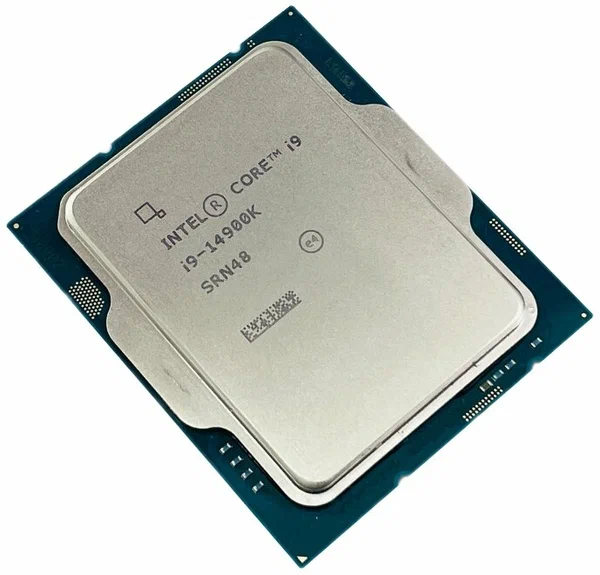
Simultaneous Multithreading (SMT) — branded Hyper-Threading on Intel chips and simply SMT on AMD — is one of the most misunderstood specs on a CPU box. It's often treated as a simple doubling of core count, which is not what it does, and that misunderstanding leads to real purchasing mistakes. This article explains what SMT/Hyper-Threading actually is at the hardware level, where it helps, where it does nothing, and where it can occasionally hurt.
What's actually happening inside the core
A physical CPU core has multiple internal execution units — for integer math, floating point math, memory loads and stores, branch prediction, and so on — and in normal single-threaded operation, a lot of those units sit idle at any given instant because a single instruction stream can't keep all of them busy simultaneously. SMT lets the core present itself to the operating system as two logical processors, each capable of scheduling instructions into whichever execution units are currently free. The core itself is not duplicated — you still have one set of execution units, one L1 cache, one set of physical registers (though register files are typically partitioned or duplicated for the two threads) — but two independent instruction streams can now compete for that shared hardware in the same clock cycles.
This is fundamentally different from having two real cores. Two real cores each get their own complete, dedicated set of execution resources. Two SMT threads on one core are sharing a single set of resources and only benefit when one thread's idle gaps line up with the other thread's demand. In practice this typically yields somewhere between a 15% and 30% throughput improvement for the pair of threads combined, compared to running just one thread on that core — nowhere close to the 100% you'd get from an actual second core.
Why gaming barely notices it
Most game engines are built around a handful of heavily-loaded threads — typically a main render/logic thread plus a few supporting threads for physics, audio, and asset streaming — rather than dozens of evenly-loaded threads. Those few critical threads tend to want the execution resources of a core almost entirely to themselves; when SMT puts a second thread on the same core, it's competing for cache space and execution ports with a thread the game actually cares about staying fast, which can introduce microstutter rather than a clean speed-up. This is exactly why flagship gaming CPUs at every price point are specified by their per-core clock speed and cache size at least as much as by their total thread count — our core count vs. clock speed breakdown covers this trade-off using the Intel Core i9-14900K and AMD Ryzen 9 7950X as reference points.
On the i9-14900K specifically, Hyper-Threading only applies to the eight Performance-cores; the sixteen Efficiency-cores are single-threaded by design, since their entire purpose is background/parallel throughput rather than latency-sensitive single-thread work. That gives the chip 32 logical threads total (8×2 + 16) from 24 physical cores — a detail that trips up a lot of buyers who assume "32 threads" means 32 equally capable cores.
Where SMT genuinely earns its keep
Workloads that spawn many independent, roughly equal-weight threads are where SMT shows its real value: video encoding/transcoding, 3D rendering (Blender, V-Ray, Corona), code compilation across large projects, scientific/numeric simulation, and virtualization running several guest OS instances at once. These workloads have far more parallel work available than there are physical cores, so filling the idle execution gaps with a second logical thread per core translates almost directly into faster completion times. The Ryzen 9 7950X, with SMT enabled across all sixteen physical cores for 32 threads total, is built explicitly around this kind of workload — it's a substantially better choice than a similarly priced gaming-focused chip for anyone doing regular video export or 3D render work.
The rare cases where disabling it helps
A small number of latency-sensitive, highly optimized workloads — some competitive esports titles, certain audio production chains, and specific benchmarking scenarios — occasionally run marginally faster with SMT disabled in BIOS, because the operating system scheduler can otherwise place a background thread onto the sibling logical core of your game's critical thread and introduce unwanted contention. This effect is usually under 5% and highly title-dependent, so it's not something to chase for its own sake; it's mainly relevant to enthusiasts already deep into fine-tuning a specific competitive setup, not a general recommendation.
The security footnote worth knowing about
SMT's shared execution resources were also the root cause behind several CPU side-channel vulnerabilities disclosed over the past several years, since two threads sharing cache and execution ports can, under specific crafted conditions, leak timing information about what the other thread is doing. Server and virtualization environments running untrusted workloads from multiple tenants on the same physical hardware sometimes disable SMT entirely as a mitigation, trading the throughput gain for a stronger isolation guarantee between workloads. This is essentially a non-issue for a typical single-user desktop or gaming PC where every thread running on the machine belongs to the same person, but it's part of why some server-oriented BIOS defaults ship with SMT disabled while every consumer desktop chip ships with it enabled.
Practical buying guidance
If your workload is overwhelmingly gaming, prioritize per-core clock speed, cache size (particularly 3D V-Cache variants), and a strong handful of physical cores over raw thread count — an 8-core/16-thread chip with high clocks will usually beat a 16-core/32-thread chip with lower clocks in most game titles. If your workload includes regular rendering, encoding, or compiling, thread count becomes directly relevant and a high physical-core-count chip with SMT enabled across the board is the better investment. Don't be swayed by thread-count marketing alone — always check what fraction of a chip's advertised threads come from real cores versus SMT doubling, and match that to what you actually do with the machine day to day. A chip advertised as having a high thread count that comes mostly from SMT rather than physical cores is a meaningfully different product than one with the same thread count spread across genuinely independent cores, even when the marketing number on the box looks identical.