Budget vs. Premium Motherboards: What Extra Money Actually Buys You
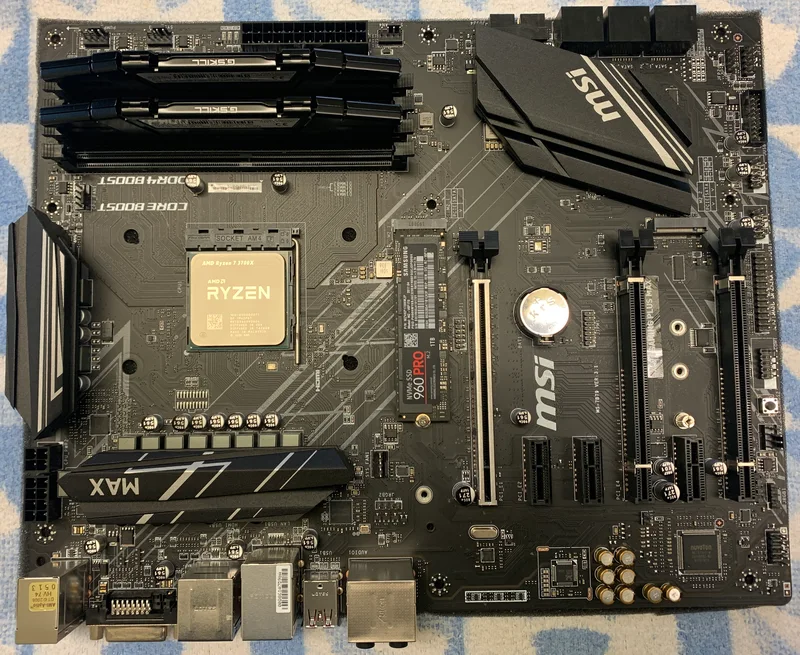
Motherboard pricing can look almost arbitrary from the outside — two boards with the same socket and chipset family can differ by $70 or more, and it's not always obvious what that extra money actually buys. Using the budget-tier MSI X470 Gaming Plus MAX ($110) and the more feature-rich ASUS ROG Strix Z390-H Gaming ($180) as concrete case studies, this guide breaks down where motherboard price actually goes, so you can judge any budget-versus-premium board decision on your own platform rather than guessing.
Before going further, one important caveat: these two specific boards use different sockets — AM4 on the X470, LGA1151 on the Z390 — so they aren't drop-in alternatives for the same CPU. Your socket and chipset choice should always be locked in by your CPU first; our AM4 vs AM5 vs LGA1700 platform guide covers that decision in depth. What's useful here is comparing what a budget-tier board and a more premium-tier board deliver for their respective price points, since that budget-versus-premium gap repeats itself across every socket and chipset generation.
Power delivery: the difference you can't see on a spec sheet
The single biggest difference between a budget and premium board rarely shows up in the bullet-point spec list: VRM power delivery quality. Voltage regulator modules feed clean, stable power to the CPU, and cheaper boards use fewer phases and lower-grade components to hit a price target. This matters most under sustained heavy load — long renders, extended gaming sessions, or any scenario where the CPU sits near its power limit for a long time. A budget board can run a demanding CPU adequately for lighter use but may throttle or run hotter VRM temperatures under sustained stress compared to a board with a more robust power stage design. If you're pairing a board with a high-TDP flagship CPU, VRM quality deserves real scrutiny, not just chipset name recognition.
Memory overclocking headroom
The ROG Strix Z390-H Gaming explicitly lists support for memory overclocking up to 4266MHz+, a feature Intel's Z-series chipsets are specifically built to unlock, since only the "Z" chipset tier permits CPU and memory overclocking on that platform. Budget boards, even on the same socket, often use simpler memory trace layouts and cheaper components that aren't validated for pushing RAM speeds beyond stock JEDEC or basic XMP profiles. If squeezing extra performance out of high-speed memory kits matters to you, this memory overclocking headroom is one of the more concrete, measurable things premium boards deliver that budget boards typically don't.
Expansion slots and I/O: quantity and quality both change
Both of these boards offer 2x M.2 slots and full ATX form factor, but premium boards typically add extra PCIe lanes, additional M.2 slots with heatsinks, more USB ports (including faster USB-C header options), better audio codecs, and often 2.5Gb or higher-speed networking versus the more basic gigabit Ethernet found on entry boards. None of these individually feel dramatic, but they add up: a board that runs out of USB headers or M.2ᅠslots two years into ownership forces either an add-in card purchase or a full motherboard swap, while a board with generous expansion headroom absorbs those future upgrades without extra cost.
Build quality details that matter over years, not days
Premium boards more often include reinforced PCIe slots (steel-reinforced "armor" around the primary GPU slot to resist sag damage from heavy graphics cards), better rear I/O shielding, and higher-quality capacitors rated for longer operational lifespans. A budget board isn't inherently unreliable, but the margin for component quality and long-term durability tends to correlate with price tier more consistently than almost any other spec on the page. If you plan to keep a build running for five-plus years, this is where premium pricing quietly pays for itself.
What budget boards genuinely do well
None of this means budget boards like the X470 Gaming Plus MAX are a bad choice — for a build with a mid-range, moderate-TDP CPU, standard-speed memory with no overclocking ambitions, and a single graphics card, a well-reviewed budget board delivers essentially the same day-to-day experience as a premium one. The extra money in premium boards buys headroom for edge cases: high-TDP CPUs, aggressive memory overclocking, extensive peripheral connectivity, and multi-year durability margins. If none of those apply to your specific build, that $70 is often better spent upgrading your GPU, storage, or cooling instead.
BIOS features, warranty, and software polish
Premium boards also tend to ship with more mature BIOS interfaces — clearer fan curve controls, more granular voltage and timing options, and better documentation of what each setting actually does. That polish rarely shows up on a spec sheet but makes a real difference the first time you're troubleshooting an unstable overclock or trying to tune case fan noise against cooling performance. Bundled software, RGB control suites, and driver update tools also tend to be more refined on higher-tier boards, though this varies more by brand than by price tier alone. Warranty length is another quiet differentiator: some premium lines carry longer coverage windows than entry-level boards from the same manufacturer, which is worth checking directly on the product page rather than assuming based on price.
None of these differences are dramatic in isolation, and a budget board with a clean BIOS and adequate documentation can still be a completely satisfying ownership experience. But taken together with power delivery and expansion headroom, they explain why two boards that look similar in a bullet-point spec comparison can feel meaningfully different three years into ownership.
How to decide for your own build
Start with your CPU's actual power draw and whether you plan to overclock memory or the processor itself — high-power chips and overclocking ambitions are the strongest arguments for spending up on VRM quality and chipset tier. Next, count your actual I/O needs: how many M.2 drives, USB devices, and network requirements you'll realistically have in three years, not just today. Finally, factor in how long you intend to keep the board before your next full rebuild — the longer the expected lifespan, the more a premium board's build-quality margin tends to justify its price. Browse the full motherboard lineup to compare chipsets and price tiers directly against each other.