Building a Budget Gaming PC in 2026: Where to Spend and Where to Save
Every budget PC build eventually runs into the same tension: there is never quite enough money to make every component great, so something has to give. The builders who end up happiest with the result are not the ones who found a magic combination of cheap parts with no downsides — that combination does not exist — but the ones who deliberately chose where to spend and where to cut, instead of spreading the budget thin and evenly across every category. A genuinely well-built budget PC is unbalanced on purpose, favoring the parts that affect daily experience the most.
Start with the part that determines what the machine is actually for: the GPU, for a gaming-focused budget build, deserves the largest single line item in the budget, frequently 35–40% of total spend. This is the opposite of how many first-time builders instinctively allocate money, since CPUs get more marketing attention and RAM capacity is an easy number to fixate on, but frame rate in the overwhelming majority of games tracks GPU capability far more closely than CPU capability once you are past a baseline competent processor. A card like the Radeon RX 6600 XT is a good real-world illustration of the segment: a genuinely capable 1080p gaming card that does not try to compete at the high end and is priced accordingly.
The CPU, by contrast, is the component where budget builders can most safely under-spend relative to what marketing suggests they need. A mid-range six-core or eight-core chip a generation or two behind the current flagship is frequently indistinguishable from a top-tier chip in actual gaming frame rates, because the GPU becomes the limiting factor first in the vast majority of titles at 1080p and 1440p. Save the premium-CPU budget for builds specifically aimed at heavy production work — video encoding, 3D rendering, compiling — where core count and single-thread performance both translate directly into shorter wait times rather than marginal frame-rate gains nobody will notice mid-game.
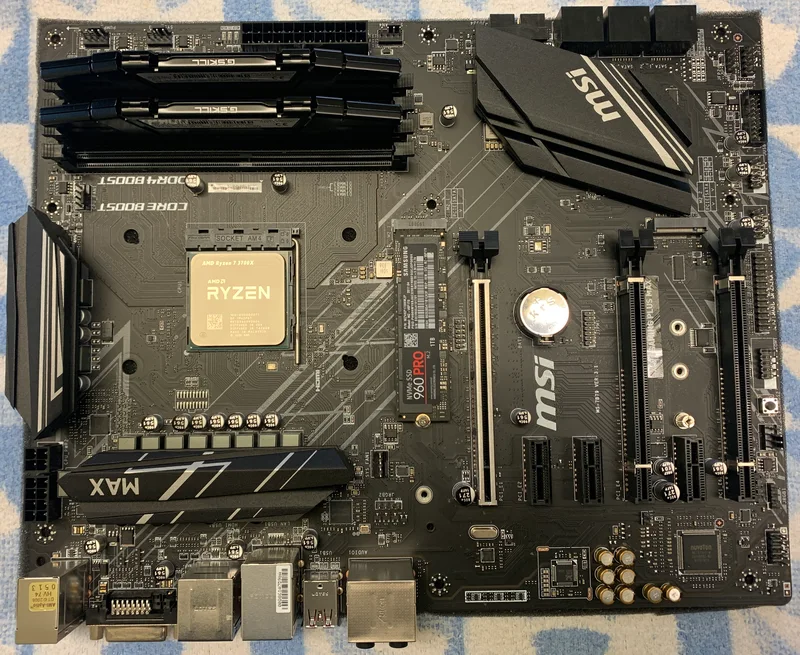
Motherboards are the second-easiest place to economize without meaningfully hurting the build, provided the cheap board still supports the CPU's rated power draw and the memory speed you actually intend to run. A budget-tier board built on a mature, well-supported platform — AM4 remains the standout example of this even years into AM5's lifecycle — routinely delivers everything a non-overclocking gaming build needs at a fraction of the price of a flagship board loaded with features a budget build will never use, like excessive M.2 slots, premium audio codecs, or 20+ phase VRMs meant for extreme overclocking headroom. Our budget vs. premium motherboard guide breaks down exactly which premium-board features are worth paying for and which ones are safe to skip.
Memory is where a lot of budget builds either overspend on capacity they will not use or underspend on speed that actually affects gaming performance. 16GB is still a perfectly reasonable baseline for a pure gaming build in 2026, and the incremental jump to 32GB matters far more for heavy multitasking, streaming while gaming, or content creation than for gaming frame rates alone. Where it is worth spending a little extra is on a kit that at least reaches its platform's comfortable mid-range speed rather than the cheapest, slowest kit available — a small premium here buys a real, measurable frame-rate benefit in GPU-light, CPU-bound scenarios, unlike an equivalent premium spent purely on unused capacity.
Storage and the power supply are the two categories where cutting corners causes the most disproportionate pain later, and they deserve a floor, not a ceiling, on quality. A single reasonably-sized NVMe SSD as the primary drive is worth prioritizing over splitting the budget across a small SSD plus a mechanical drive, since the day-to-day experience of an OS and games living on solid-state storage is difficult to overstate once you have used it. For the power supply, buying strictly to the wattage a build needs and no more is fine, but buying a genuinely reputable brand at that wattage rather than the cheapest unbranded unit available is not optional — a failing PSU can take other components down with it, which is the single most expensive mistake a budget build can make. Our PSU wattage guide walks through sizing a power supply correctly for a given GPU and CPU combination.
Case and cooling round out the build, and this is a category where budget builders can genuinely spend the least without meaningful compromise, provided airflow is adequate. A plain case with a couple of intake and exhaust fans and the stock cooler that ships with most non-overclocking CPUs handles a budget build's thermal needs completely; aftermarket cooling and elaborate case designs are upgrades worth revisiting later, not requirements on day one.
Put together, the pattern that separates a well-allocated budget build from a poorly-allocated one is consistent: spend where the component directly and continuously affects the experience — GPU, primary storage, and PSU reliability — and economize where the component's extra capability mostly goes unused by the workload the machine will actually run. A budget build assembled this way frequently outperforms a more expensive build that spread the same total budget evenly, because evenly-spread money buys mediocrity everywhere instead of real strength where it counts.
As a rough starting allocation for a pure gaming budget build, something like 35–40% GPU, 15–20% CPU, 10% motherboard, 10% memory, 10–15% storage, and 10% power supply is a reasonable template to adjust from, with case and cooling absorbing whatever remains. This is a starting point, not a rule — a build that will also handle streaming or light content creation should shift a few points from GPU toward CPU and memory, while a pure competitive-gaming build at 1080p can lean even harder into the GPU line item, since CPU and memory requirements for esports titles are comparatively modest.
One last piece of advice that applies regardless of the exact split chosen: buy the storage drive and PSU new from a reputable brand every time, even when everything else in the build is secondhand or discounted. Used GPUs and CPUs are generally safe purchases if tested before committing, since both are largely binary — they either work correctly or they do not, and problems tend to show up immediately. Storage drives and power supplies are different: a drive nearing the end of its write-endurance life or a PSU with degrading capacitors can both fail gradually and unpredictably, and a PSU failure in particular carries real risk to every other component connected to it. That asymmetry is exactly why those two categories deserve a firm quality floor no matter how tight the overall budget is.