Non-Modular vs Semi-Modular vs Fully Modular PSU: A Real Cable-Management Guide
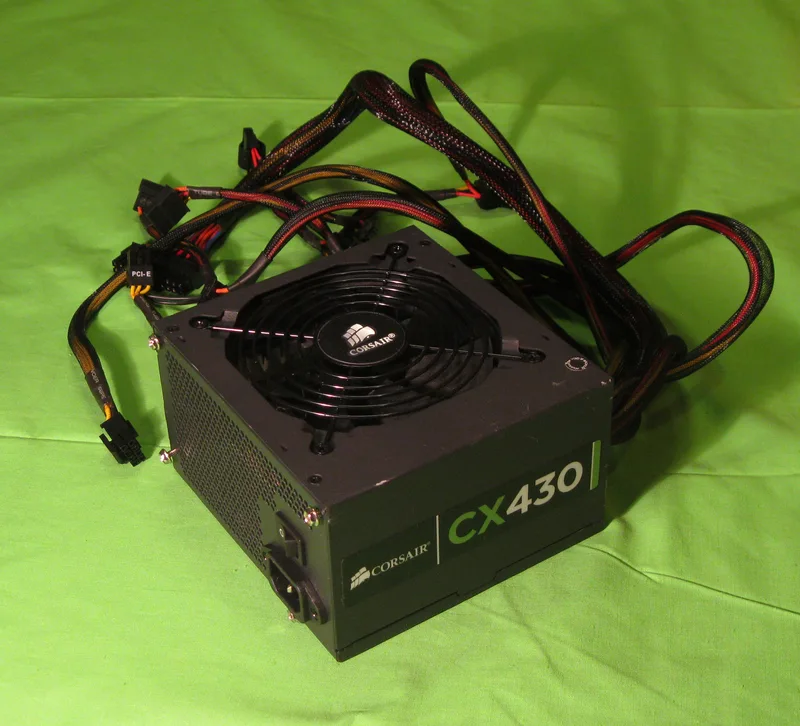
Modularity is one of the first specs buyers notice on a power supply listing, right after wattage and efficiency rating, but its practical impact is easy to misjudge. A fully modular PSU is not simply "better" in every situation — it is a genuine trade-off between cost, cable quality, and how much cable management actually matters for your specific build. Understanding what each modularity level actually changes helps you avoid overpaying for a feature you won't use, or underpaying and fighting a rat's nest of cables in a windowed case.
Non-Modular: Cheapest, and Not Always Worse
A non-modular power supply has every cable permanently attached at the factory, including cables your specific build may never use — extra SATA or PCIe power runs that simply get bundled and tucked away. This keeps manufacturing costs down, which is why budget units like a 430 W entry-level PSU are almost always non-modular. The real downside isn't performance — the cables carry power identically to modular ones — it's purely cable management. In a case with good routing channels behind the motherboard tray, a non-modular PSU is a non-issue for most budget and mid-range builds. In a compact case with limited space behind the tray, or in a windowed build where interior tidiness matters, unused fixed cables become a real annoyance you cannot solve by buying more cables — you're stuck routing and hiding what shipped in the box.
Semi-Modular: The Practical Middle Ground
Semi-modular units hard-wire the cables nearly every build needs — the 24-pin motherboard connector and the CPU EPS connector — while leaving PCIe, SATA, and Molex connections detachable. This is a sensible compromise for most mid-range and high-end builds: you plug in exactly the GPU power and drive cables you need and leave the rest in the box, without paying for full modularity on connectors you were always going to use anyway. For a single-GPU gaming build without an elaborate multi-drive storage array, semi-modular covers the vast majority of the cable-management benefit of fully modular at a lower price point.
Fully Modular: Best for Complex or Show-Case Builds
A fully modular PSU, like a premium 80 PLUS Platinum-rated unit with every cable detachable, lets you leave the 24-pin and EPS cables unplugged too until you've planned exact routing, and swap in aftermarket sleeved cable sets for a uniform look behind a tempered-glass panel. This matters most in show-case builds, small-form-factor cases where every unused centimeter of bundled cable competes for very limited space, or multi-GPU and multi-drive workstations where the specific mix of connectors needed varies a lot from a "standard" build. The price premium over semi-modular is usually modest, but it is a premium for a feature that mainly pays off when cable routing space or aesthetics are actually a constraint — buying full modularity for a budget build tucked inside a closed, non-windowed case is money that could go toward wattage headroom or efficiency rating instead.
Practical Cable-Management Tips Regardless of Modularity Level
- Route cables behind the motherboard tray whenever your case allows it, and use the provided routing grommets — this matters more for airflow and tidiness than modularity level alone.
- On semi-modular units, only plug in the PCIe and SATA cables you actually need; leaving unused modular cables in the box (rather than routed-but-unused) is strictly better for airflow.
- Velcro or reusable cable ties beat zip ties for anyone who expects to upgrade a GPU or add drives later — you will be back in that cable bundle sooner than you think.
- Match cable length to case size before buying aftermarket sleeved sets; oversized cables in a compact case create more mess than they solve.
- Bundle unavoidable slack with a single loose loop rather than several tight folds — sharp folds in a cable bundle stress the individual conductors over years of thermal expansion and contraction more than a gentle loop does.
- Label or photograph your cable routing before a major rebuild if you plan to reuse the same PSU, so you're not relearning the same routing puzzle from scratch next time.
What the Price Difference Actually Buys You
Across comparable wattage and efficiency tiers, the jump from non-modular to semi-modular is usually a small fraction of the unit's total price, while semi-modular to fully modular is a somewhat larger step, partly because fully modular units also tend to cluster in higher efficiency tiers to begin with. This means the "modularity premium" you're paying is rarely a clean, isolated number — you are often also paying for better efficiency, a better warranty, or higher-quality internal components that happen to be bundled with full modularity at that price point. When comparing two units, look at the full spec sheet rather than assuming modularity alone explains a price gap; two PSUs with identical modularity can differ substantially in efficiency rating, warranty length, and component quality.
When Fully Modular Is Worth Paying For Even on a Modest Build
There are a few scenarios where fully modular earns its premium even outside obvious show-case builds. Small-form-factor cases with genuinely tight routing space benefit disproportionately from removing every unused cable, since even a small bundle of unused wires can physically block airflow paths in a compact chassis. Builders who expect to reuse the same PSU across multiple future builds also benefit, since a fully modular unit adapts cleanly to very different case and component combinations without ever carrying dead-end cables from a previous build. For a one-time build in a mid-tower or full-tower case with reasonable routing space, the case for paying extra for full modularity is much weaker, and that budget is usually better spent on wattage headroom or a higher efficiency tier instead.
Modularity is one input into a PSU purchase, not the deciding one — wattage headroom and efficiency rating matter more for day-to-day reliability and running cost. If you're still sizing a PSU for a new build, our PSU wattage sizing guide and our 80 PLUS Bronze vs Platinum efficiency guide cover those decisions in more depth, and pair naturally with the modularity choice covered here.