Monitor Refresh Rate vs. GPU Pairing: Matching Your Graphics Card to Your Display
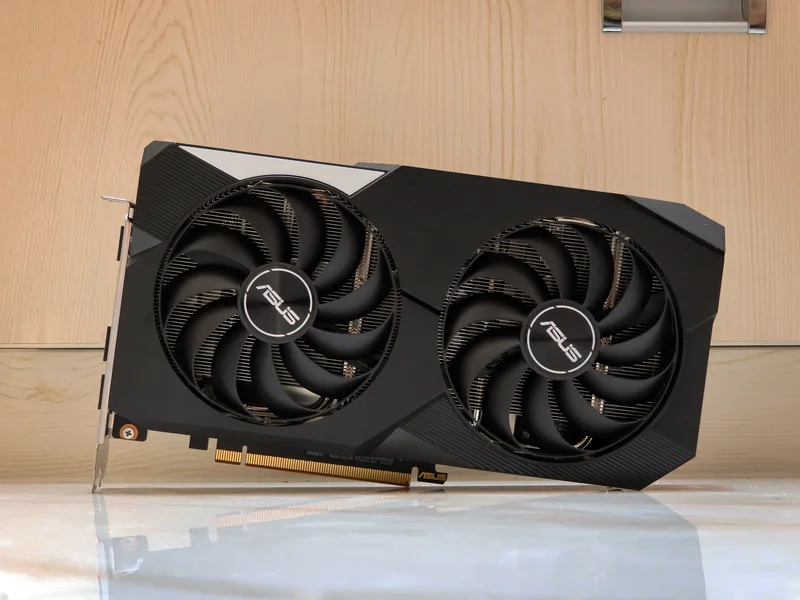
A 240Hz monitor sounds like an upgrade in its own right, and in a sense it is - but only if the GPU driving it can actually push enough frames to make that refresh rate meaningful. Pair a high-refresh panel with an underpowered card, or an overpowered card with a 60Hz screen, and you've spent money on a mismatch: capability sitting unused on one side of the connection. This guide walks through how refresh rate and GPU horsepower actually interact, what "feeding the panel" really requires at each resolution and refresh tier, and how to think about the pairing before you buy either component.
Why Refresh Rate Without Frame Rate Is Wasted Money
A monitor's refresh rate is simply how many times per second it can redraw the image - 60Hz, 144Hz, 165Hz, 240Hz, and so on. It is a ceiling, not a guarantee: a 240Hz panel only shows you 240 unique frames per second if your GPU is actually rendering 240 frames per second in that game, at that resolution, with those settings. If your card only manages 90 frames per second, your "240Hz" monitor is functionally behaving like a 90Hz one for that title - the extra refresh headroom is real, but unused. This is the single most common mismatch buyers make: chasing a high-refresh panel without checking whether their GPU tier can realistically feed it in the games they actually play, at the resolution they actually run.
What It Takes to Feed 1080p at High Refresh Rates
At 1080p, frame rate is largely gated by CPU and game engine overhead rather than raw GPU horsepower, which is exactly why 1080p high-refresh gaming (144Hz-240Hz) is achievable on relatively modest GPUs in most competitive titles. A card like the Radeon RX 6600 XT, with 2,048 stream processors and 8 GB of GDDR6 on a 128-bit bus, comfortably drives 1080p well past 144 fps in esports-focused titles with moderate settings, making it a sensible pairing for a 144Hz-165Hz 1080p panel without needing halo-tier GPU spending. The mismatch risk at 1080p usually runs the other direction: pairing a genuinely high-end card with a 1080p 60Hz monitor wastes the card's headroom entirely, since it will render far more frames than the panel can ever display.
What It Takes to Feed 1440p and 4K at High Refresh Rates
Move up to 1440p, and GPU horsepower starts mattering far more directly, especially in demanding AAA titles with ray tracing or dense geometry. Sustaining 144Hz at 1440p in modern graphically-intensive games generally requires a genuinely upper-mid-to-high-end GPU tier, and 4K at high refresh rates (120Hz-144Hz-class 4K panels) pushes that requirement further still - this is squarely the territory a halo card like the GeForce RTX 4090 was built for, with 16,384 CUDA cores, 24 GB of GDDR6X, and a 384-bit memory bus giving it the raw throughput and VRAM headroom that 4K's pixel count demands. Buying a 4K 144Hz monitor and pairing it with a mainstream 1080p-tier card guarantees you'll never see anywhere close to that refresh ceiling in anything but the lightest titles - the panel's capability and the GPU's capability need to be roughly matched to the same resolution/performance bracket, not bought independently.
Variable Refresh Rate Technology Changes the Calculation Slightly
Adaptive sync technologies (G-SYNC, FreeSync, and the VESA Adaptive-Sync standard most modern monitors support) let the display's refresh rate dynamically match whatever frame rate the GPU is actually producing, rather than requiring an exact match to the panel's maximum. This meaningfully reduces the penalty for a slight GPU/panel mismatch - a variable-refresh monitor rendering at 90 fps on a 144Hz panel still looks smooth, without the tearing or stutter you'd get on a fixed-refresh display running below its rated rate. It doesn't eliminate the pairing question entirely, though: you still want your GPU capable of hitting somewhere reasonably close to the panel's refresh ceiling in the games you play, or you're still leaving real capability unused, just with a smoother experience along the way.
Frame Pacing and Consistency Matter Almost as Much as the Average
An average frame rate number can hide a mismatch that a raw benchmark chart doesn't show: frame time consistency. A GPU averaging 144 fps but with frequent dips into the 80s during busy scenes will feel noticeably worse on a 144Hz panel than a card holding a steadier 120 fps throughout, even though the second card's average number looks lower on paper. This is why pairing decisions should factor in 1% and 0.1% low frame rate figures, not just the headline average, particularly for demanding open-world or particle-heavy titles where frame time spikes are common. A GPU tier with comfortable headroom above your panel's refresh ceiling - rather than one just barely reaching it on average - gives you a meaningfully smoother experience in exactly the scenes where it matters most.
Practical Pairing Guidelines by Use Case
For competitive, esports-focused gaming at 1080p, prioritize refresh rate and pair it with a mid-tier GPU capable of consistently high frame rates in lighter titles - a card in the RX 6600 XT's performance class is a realistic fit here. For a balanced 1440p build meant to handle both competitive and demanding AAA titles, target a 144Hz-165Hz panel paired with an upper-mid to high-end GPU with enough VRAM headroom for modern texture packs. For 4K or content-creation-adjacent work where visual fidelity matters as much as frame rate, a halo-tier GPU like the RTX 4090 genuinely earns its price pairing with a 4K high-refresh panel - anything less and you're not using what you paid for. If you're still deciding which GPU tier fits your resolution target in the first place, our GPU naming tiers guide explains how to read a card's model number as a rough performance-bracket signal before you dig into specific benchmarks.
Don't Forget the Rest of the Pipeline
GPU and monitor pairing is necessary but not sufficient - a mismatched CPU can bottleneck frame rate just as badly as a weak GPU, particularly at 1080p and in CPU-bound esports titles where the graphics card is rarely the limiting factor. If you're building a new system around a specific refresh-rate target rather than upgrading a single component, our CPU or GPU upgrade-first guide covers how to diagnose which component is actually holding your frame rate back before you spend on the wrong one. And once you've settled on a GPU tier, our full Radeon RX 6600 XT review and GeForce RTX 4090 review both include real frame-rate data across resolutions to sanity-check the pairing before you commit a budget to either the card or the monitor.